How to connect my business WhatsApp to collect responses in google sheet?
Status: Closed · Asked by glojasclinic on · 0 views
How to collect my business WhatsApp responses in google sheet using pabbly?
Hey @glojasclinic !
Sure, you can check on this video tutorial for your concern-
youtube.com/watch?v=_yD9--12UFg
Hope, this works for you.
Hey @glojasclinic !Sure, you can check on this video tutorial for your concern-
youtube.com/watch?v=_yD9--12UFg
Hope, this works for you.
Hi, i have tried this steps but after the configuration my number has never changed in the "from" console as shown in the attached file but it provides me a test whatsapp number
Attachments
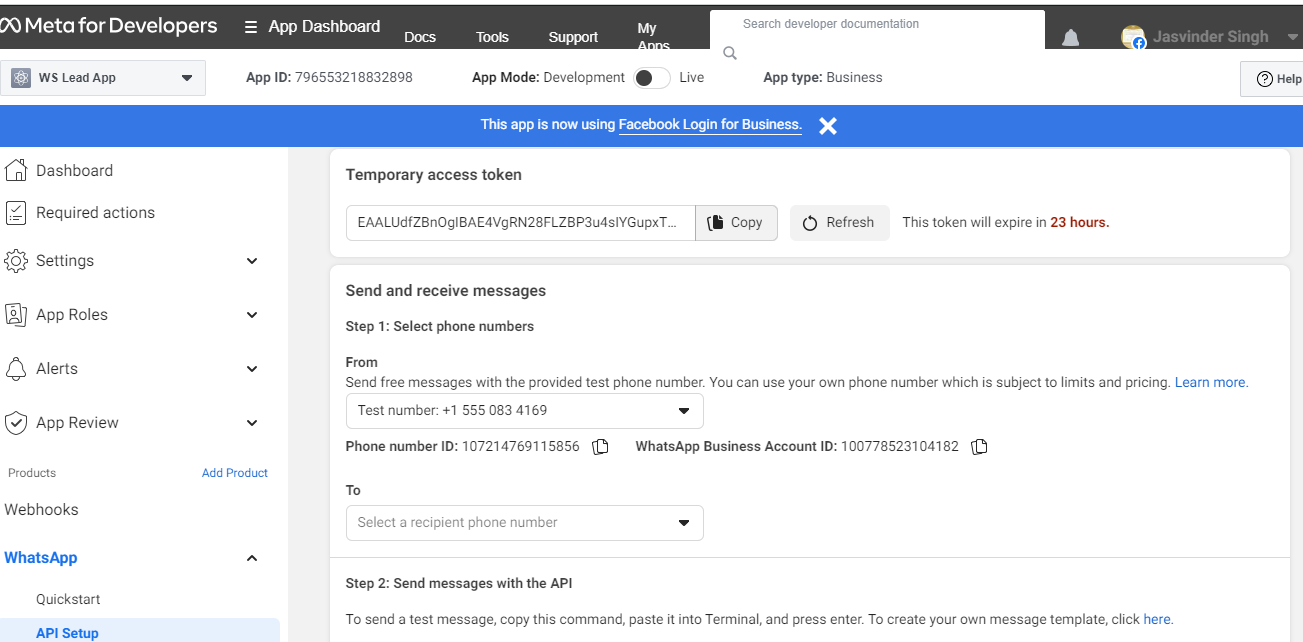
Hi, i have tried this steps but after the configuration my number has never changed in the "from" console as shown in the attached file but it provides me a test whatsapp number
n if i want to use the same test number then how do i install that test number in my phone to reply my customers? or is there any way to replace the test number to my own?
Hey @glojasclinic !
Kindly check on this forum thread for creating a WhatsApp Cloud API account to the fullest- https://forum.pabbly.com/threads/whatsapp-cloud-api.5745/
This should work for you.
Hi currently, im using the test whatsapp number which pabbly has provided me. So can we make changes with the whatsapp account such as changing the profile picture and the name ?
Hey @glojasclinic !
For that, you need to check it with the WhatsApp Cloud API support, as they can better assist you with this query.
We can only help you out with the creation of an account with WhatsApp Cloud API and further you can use it inside the workflow for further automation.