Hello
@binaya ,
For the use case you've described, you can use the "Plan Metadata" feature available in the plan settings to incorporate additional data into the plan as per your specific requirements. The values assigned to plan metadata remain static and only undergo changes when manually updated during the plan editing process. This allows you to effectively use this for your use case.
To add plan metadata to your plan, please follow the steps outlined below:
1. Navigate to Products > Plan.
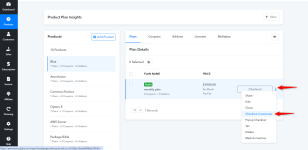
2. Hover over the desired plan for which you intend to add plan metadata.
3. Click on the three dots option.
4. Select "Edit" from the menu.
5. On the opened plan page, Scroll down to the bottom of the page, where you will find options such as Subscription Status, Description, Redirect URL, Metadata, Payment Failed Settings, and Payment Term Mark the checkbox for this option
7. Check the box for plan metadata and modify the values according to your requirements.
By following these steps, you can successfully integrate plan metadata into your plan to fulfill the specified use case.
Please refer to the below screenshot for more details