Importing tags in contacts

Grant Account Access for Support
  1. I authorize the Pabbly Support Team to access my account for troubleshooting purposes.
WhatsApp Number
+393348601902
Email Address
[email protected]
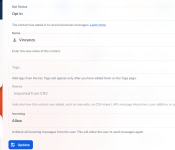
hi, i've completed import of my contacts but i can't see "tags"..

the sample csv file says "tag1|tag2|tag3|tag4|tag5" in C column

i'm attaching 3 different ways i've tried to import (i just need 1 tag)

 

Attachments

  • MN 2026-02-04 alle 09.07.38.png
    MN 2026-02-04 alle 09.07.38.png
    8.2 KB · Views: 3
  • MN 2026-02-04 alle 09.07.43.png
    MN 2026-02-04 alle 09.07.43.png
    6.1 KB · Views: 3
  • MN 2026-02-04 alle 09.07.54.png
    MN 2026-02-04 alle 09.07.54.png
    163.3 KB · Views: 3
  • MN 2026-02-04 alle 09.09.44.png
    MN 2026-02-04 alle 09.09.44.png
    7.2 KB · Views: 3

Preeti Paryani

Well-known member
Staff member
Hello @mnsolutions,

Thank you for reaching out.

To help us check this further, could you please confirm the email address associated with your Pabbly Chatflow account? Additionally, kindly share the CSV file you are using for the import so we can review the format.

Also, please make sure that the tag name(s) mentioned in the CSV already exist in your Pabbly Chatflow account under Settings → Tags. Tags need to be created there beforehand for them to be mapped correctly during import.

Once we have these details, we’ll be able to assist you further.
 
Top