Infinity - updating label fields
Status: Closed · Asked by Ben Mahy on · 0 views
Hi
Has anyone successfully used Pabbly with Infinity (startinfinity.com).
I am trying to update a record that has a label field. The problem is, whatever I try to update the field with I get an error I.e "Invalid data "label name" supplied to "label" attribute: Data "'label name'" is not an array supplied to App\Item\Types\Label class.".
Workflow Name - Infinity Update
If anyone has any suggestions it would be great. This works fine with Zapier, but really want to move to Pabbly.
Hey @axylus
Could you please confirm that the custom fields you have made from Infinity are of Plain text type or not? Though the fields should be plain text type from your account as the Infinity API accepts that only.
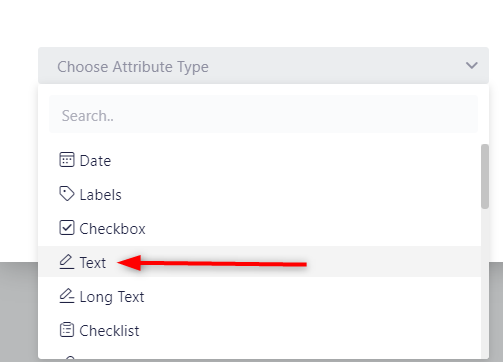
Kindly create the field type as Text instead of Label for the following field and then try.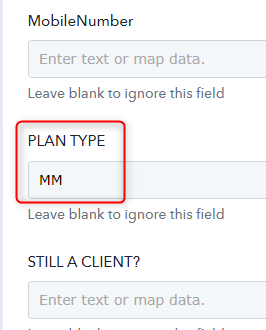
Thanks
Kunal
Hi Kunai
Text record works fine, and I need the label fields. You say that the Infinity API does not support label fields the API documentation says it works and ZAPIER works fine.
Thanks
Ben
Hey @axylus
As of now, we are not supporting the label field in the Infinity action.
Though we are currently working on it and if possible we will start supporting the label field as well on the action step.
Thanks for the update. I was really looking forward to moving over to Pabbly away fromZapier, but looks like I will have to wait a while.
Cheers @Supreme and @Kunal Valuskar for your help
You're welcome :)
@Supreme - just to clarify, are you saying that you are working on adding this functionality? If yes, do you know how long it might take and how would I find out that it is ready to test?
Many Thanks
Hey @axylus
We will keep you updated, once we are ready with supporting labels.
Hi
I was reviewing other Infinity related questions and I see that back in June you fixed the ability to "Create Items" with label fields. Did I miss something on "Update Item", am I doing something wrong or is it just not working right now?
https://forum.pabbly.com/threads/issue-with-infinity-app.6540/
Thanks
Ben
Hey @axylus
We have replied to your query on your another thread, kindly review that up.
https://forum.pabbly.com/threads/api-by-pabbly-and-infinity.8179/
Hey @Supreme
These were 2 separate questions - this is related to the Infinity integration where I need to update labels. The other was me learning the API module. So my question about updating labels in Infinity still stands.
Many Thanks
Ben
Hey @axylus
The other was me learning the API module. So my question about updating labels in Infinity still stands.
So, you can refer to the following video tutorial on how you can use the API by Pabbly action step or can contact StartInfinfity support team on how you can update the items as you want.
I'm not entirely sure if this fits your scenario @axylus - but I am using Infinity Labels with pabbly just fine, although it is a bit of a workaround. The thread I discuss it in is sadly private, but in essence I'm using Lookup Tables to translate the name of the Labels to the attribute ID in Infinity.
Hey @axylus
You can pass the value in the field by passing it in the square bracket.
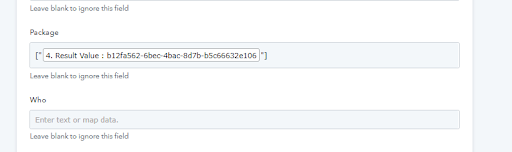
Hi @Supreme - I have tried this and that does not work as expected. This works fine if I know the ID of the Label value, but if I enter ["Yes"] for example, it doesn't work. My scenario is this:
1. Data imported in google sheet. (Labels are shown as the actual value)
2. Pull the data from the unique item ID in infinity using your search item
3. Update the record in infinity with changes, could be a label changing from ["no"] to ["yes] or a numeric/text/checkbox value change
If I use Pabbly to create a new record then this works as you show the label value in the drop down, but if I update a record I have to use the unique value id.
I use this solution today in Zapier, so I know it can work. So any thoughts, ideas you may have would be very helpful in enabling me to migrate to your platform.
Many Thanks
Ben
I'm not entirely sure if this fits your scenario @axylus - but I am using Infinity Labels with pabbly just fine, although it is a bit of a workaround. The thread I discuss it in is sadly private, but in essence I'm using Lookup Tables to translate the name of the Labels to the attribute ID in Infinity.
Hi @wibbler - thanks for letting me know, I think the amount of labels we use would require so many lookups, but would love to see an example of your workflow if you are happy to share with me?
Many thanks
Ben
Hi @Supreme - I have tried this and that does not work as expected. This works fine if I know the ID of the Label value, but if I enter ["Yes"] for example, it doesn't work. My scenario is this:
1. Data imported in google sheet. (Labels are shown as the actual value)
2. Pull the data from the unique item ID in infinity using your search item
3. Update the record in infinity with changes, could be a label changing from ["no"] to ["yes] or a numeric/text/checkbox value change
If I use Pabbly to create a new record then this works as you show the label value in the drop down, but if I update a record I have to use the unique value id.I use this solution today in Zapier, so I know it can work. So any thoughts, ideas you may have would be very helpful in enabling me to migrate to your platform.
For your concern, we can suggest you to create as many lookups as you are having the Label fields and can manually take the label id and pass it with the name along in the Lookup Table action step.
For your concern, we can suggest you to create as many lookups as you are having the Label fields and can manually take the label id and pass it with the name along in the Lookup Table action step.
Thanks for the update. From a time perspective this will hold me off moving to Pabbly. I would have loved to have migrated over, but in Zapier it’s so easy. I thought this would be functionality you would have liked to have added to get more people to migrate to Pabbly.
For your concern, we can suggest you to create as many lookups as you are having the Label fields and can manually take the label id and pass it with the name along in the Lookup Table action step.
Hi @Supreme - can you help me with how to use the lookup to get the values? I have just purchased the ultimate plan, I will try and get a solution working if you can help
Hey @axylus
As we can see from your workflow, you have already built the lookup table for the project name attribute whereas you only need to map the name of the project from the trigger response.
In a similar way, you can build the other option fields to map the data further with the help of the Lookup table.
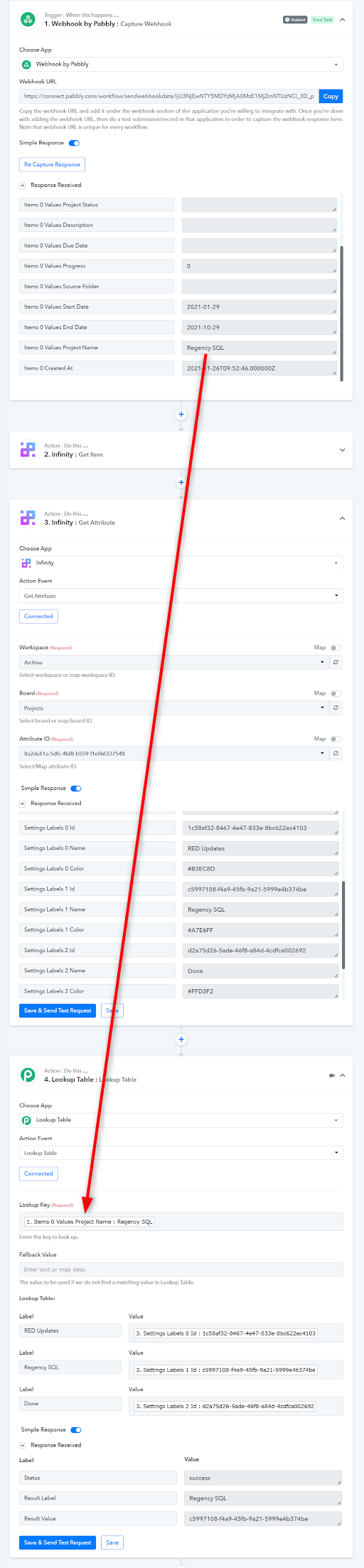
Hey @axylusAs we can see from your workflow, you have already built the lookup table for the project name attribute whereas you only need to map the name of the project from the trigger response.
In a similar way, you can build the other option fields to map the data further with the help of the Lookup table.
Thanks for this, but I don't really understand what you are saying.
The project name is a label field, If I want to update a record in infinity with a different label, what would I need to do? Do I need the lookup table that I have created (something with what I have done does not seem right)? If not how would I get the ID value needed for the new label?
Hey @axylus
You can get the Option and its Id from the "Get Attribute" action step and once you set the Lookup table action step for your desired fields you can map the value from the trigger response.
You can also refer to the following sample video how you can use the Lookup Table action step.
Thanks for this, but I don't really understand what you are saying.The project name is a label field, If I want to update a record in infinity with a different label, what would I need to do? Do I need the lookup table that I have created (something with what I have done does not seem right)? If not how would I get the ID value needed for the new label?
Hi Ben - the whole process here could definitely be simpler, but I was in a similar confusion to you when i started, and through Pabbly's support I've now got it working fine. I recommend Fagan Shah ( https://www.facebook.com/fagun.shah.7 ) for more personal support, he is excellent.
I don't see a way to PM you on here - if you can show me a way to send you messages somehow, I'm happy to share my workflow!