Inserting leads from PabblyChatflow to Zoho CRM Lead

Status
Not open for further replies.

taxajca

Member
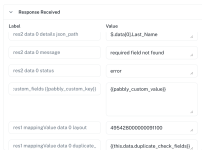
Facing error in subject workflow "mandatory field nit found"


Attachments

  • Screenshot 2025-07-25 at 11.37.33.png
    Screenshot 2025-07-25 at 11.37.33.png
    143.6 KB · Views: 56

Soumya Tripathi

Member
Staff member
Hello @taxajca
To assist you further, please note that we may need to access your Pabbly Connect account to investigate the issue effectively.

If you're comfortable with this, kindly grant us permission by replying with the following statement:
"You have my permission to log into my Pabbly Connect account and edit the workflow if required. Here is the registered email address associated with it: [your email]."
 

Soumya Tripathi

Member
Staff member
Hello @taxajca
We recommend using the action event "Insert/Update Record with Subform Data" for the Zoho CRM action step.

Additionally, could you please confirm if you have set any fields as mandatory in your Zoho CRM? Mandatory fields must be filled when inserting or updating a record. This information will help us assist you more effectively.
 

ArshilAhmad

Well-known member
Staff member
Please try executing the 'Insert/Update Record with Subform Data' action event in the classic Pabbly Connect interface and let us know if you encounter the same error there.
 
Status
Not open for further replies.
Top