• Instructions to Ask a Question

    For any assistance, please click the "Ask a Question" button and select the Pabbly product for which you require support.

    We offer seven comprehensive applications designed to help you efficiently manage and grow your business:

    Our support team endeavors to respond within 24 business hours (Monday to Friday, 10:00 AM to 6:00 PM IST). We appreciate your understanding and patience.

  • Due to Holi celebrations, our team will have limited availability. While we’ll continue to monitor threads, responses may be slightly delayed. Normal operations will resume on Thursday, 5th March 2026.

look up spreadsheet for a keyword

Andres

Member
I want to get all the new rows thath have a specific key word. I used the look up function, but it only responds the fir row not all the other that keeps adding up.
 

ArshilAhmad

Well-known member
Staff member
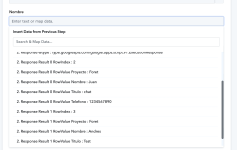
The "Lookup Spreadsheet Rows" action event captures all the rows that contain the Lookup Value. Please note that the value will only be looked up within the first 100 rows.
1689972756626.png


1689972782012.png
 

Andres

Member
When I run the test, it keeps returning just the first row, not all the new / other rows.
 

Attachments

  • Captura de pantalla 2023-07-21 a la(s) 16.14.44.png
    Captura de pantalla 2023-07-21 a la(s) 16.14.44.png
    842.9 KB · Views: 133

Andres

Member
How can I capture every new row that has the keyword FORET to either send an email, message, or add a new row.
 

ArshilAhmad

Well-known member
Staff member
You can disable the Simple Response, then click on 'Save & Send Test Request.' This will give you the entire data in array format.
1689976297904.png
 
Top