Meta Lead Ads Testing Tool Showing “Required Permissions Are Missing for the App” Error
Status: Open · Asked by Nimesh Koshti on · 0 views
I am facing an issue while testing Facebook Lead Ads integration using Meta's Lead Ads Testing Tool.
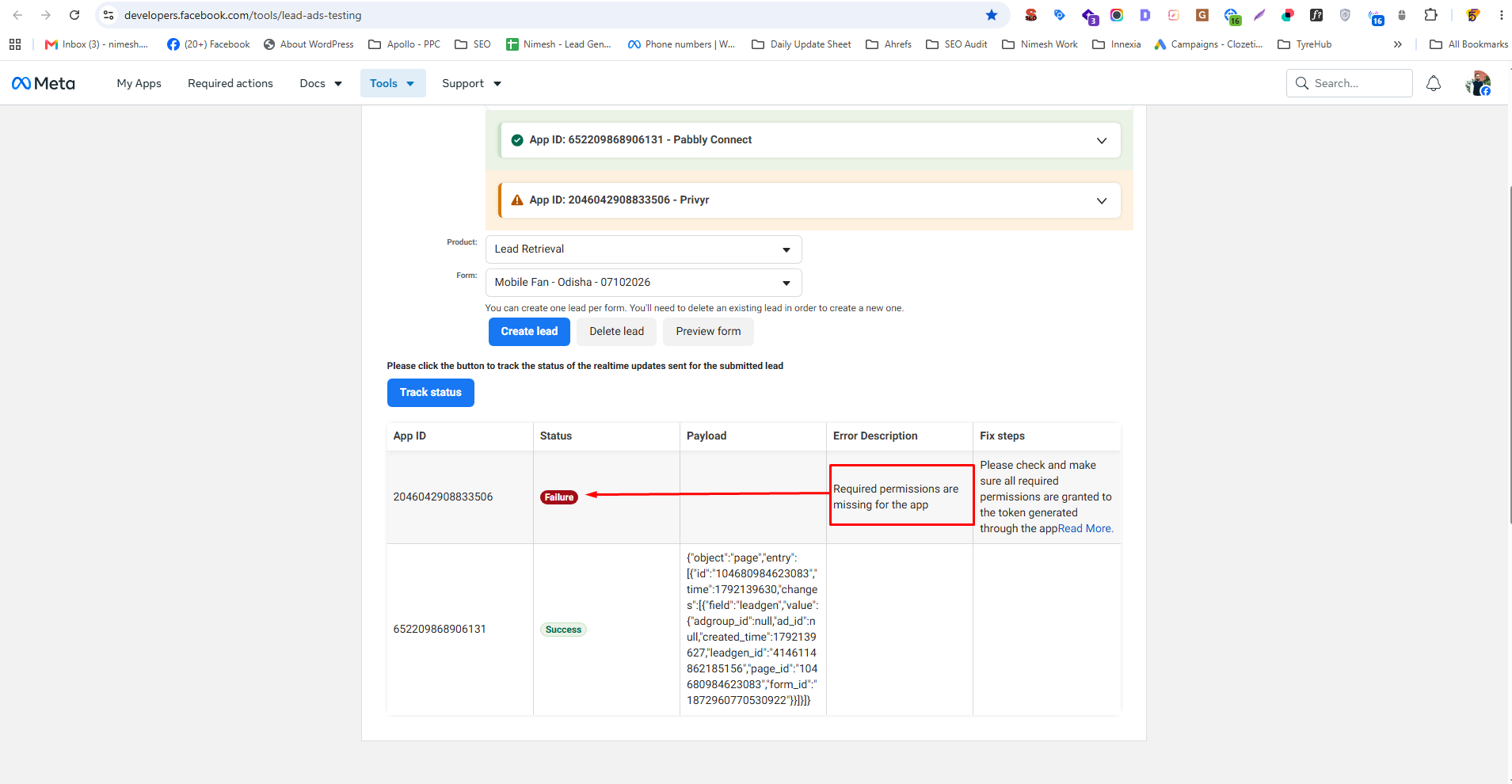
The lead form is active, and I am able to create a test lead. However, when I click on Track Status, Meta shows a Failure status with the following error:
Error Message: “Required permissions are missing for the app.
Details:
Meta App ID: 2046042908833506
Product: Lead Retrieval
Form Name: Mobile Fan - Odisha - 07102026
Testing Tool: https://developers.facebook.com/tools/lead-ads-testing/
Test Result: One app shows Failure, while another app ID shows Success in the same testing tool.
What I Need Help With:
1. Please confirm whether this error is related to missing permissions or access tokens in the Meta app.
2. Please guide me on which permissions need to be enabled or granted for successful lead retrieval.
3. Please confirm whether any changes are required in Pabbly Connect or the Meta app configuration.
The lead form is active, so please help me identify why this error is occurring and how to resolve it.
I have attached a screenshot showing the error for your reference.
Thank you for your support.
Hello Nimesh,
Thank you for reaching out and providing detailed information about the issue with Facebook Lead Ads integration.
To address your concerns:
1. The error message you are receiving, "Required permissions are missing for the app," typically indicates that the Meta app does not have the necessary permissions to access the lead data. This often occurs due to permission settings in the Meta app configuration.
2. You will need to ensure that your app has the following permissions enabled:
- pagesshowlist
- pagesreadengagement
- ads_management
- leads_retrieval
3. You may also need to re-authorize your app in Pabbly Connect to ensure that all required permissions are granted. This can include removing the existing connection and creating a new one, making sure to allow all requested permissions during the authorization process.
Please verify these settings and let us know if the issue persists. If you continue to encounter problems, kindly share the workflow name and registered email at support@pabbly.com so we can assist you further.