Monday.com Field Not Working
Status: Closed · Asked by miamifriendors on · 0 views
Hello, my automation seems to be working but one field is not picking up on Monday.com. Please see screenshots attached. Thank you.
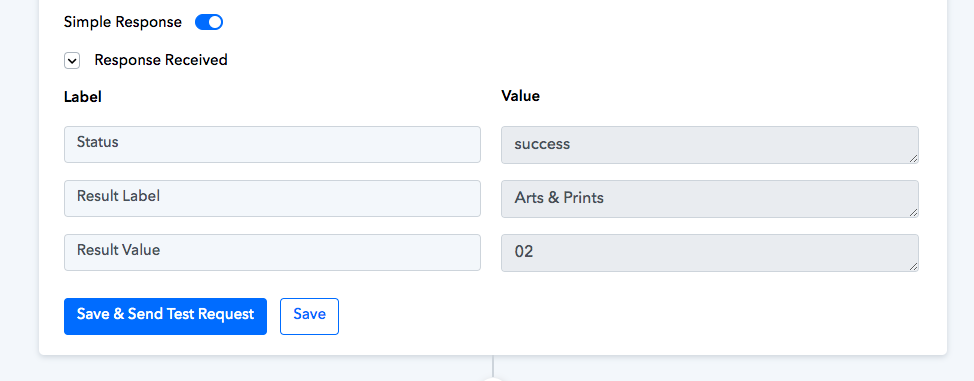
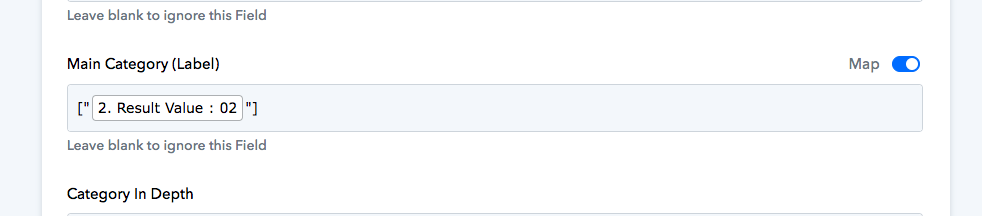

Hello @miamifriendors , What Field type is there in Monday.com and why are you passing value in [ ]. If the type is integer then pass value like this 1 else pass value in "1".
If you are still not able to solve this on your own feel free to DM me and we can do a free zoom call. FYI I'm not from Pabbly Connect team, just a freelancer who helps other Pabbly users.
Contact me - https://www.facebook.com/himeshsoni07
Email - [EMAIL][email hidden][/EMAIL]
Hey, thanks for your message. I added it in because that's what Pabbly had told me to do originally and it was working perfectly until recently.
Hey, thanks for your message. I added it in because that's what Pabbly had told me to do originally and it was working perfectly until recently.
If the issue still persists then kindly share the workflow URL once, so that we can look into it.
Hey @miamifriendors
In your "Main Category" field you need to pass the ID of the Main Category as mentioned in your Monday.com account.
e.g. -

Further, here is a sample video where you can get the Idea to set up the Lookup table to pass the Id to other dropdown options accordingly.
I'm not sure what you mean. I recently put up a question on the forum regarding help with this automation and the Pabbly team walked me step by step on how to complete it. It was working perfectly and then just stopped.
https://forum.pabbly.com/threads/http-status-code-500.18626/
Hey @miamifriendors
Kindly check the label ID correctly, you are passing 02 which doesn't exist instead try 176.
