

Via Inbuilt Action:
- Set up the inbuilt action according to this documentation.
- Go to the action where you want to set up the multi-select dropdown.
- We already added the in-built action by the name of “List Tags”. Which lists all the tags available in the users account.
- The same List Tags action returns an array of tags, this array of tags will be used to build the drop-down menu of the tags option on the integration.
- After clicking on setting of the tags fields.
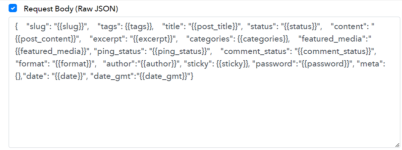
- Make sure to provide the multi-select field same to same as tags field in the raw JSON.
- Finally, the multi-select is set up and lets you select the two options tag1 and tag2 from the dropdown. So this will be sent in the JSON in the format "tags" : ["tag1", "tag2"] i.e. array of strings.
Attachments

Last edited: