FYM
Member
- Your Task History ID
- IjU3NmQwNTY4MDYzMjA0MzA1MjY1NTUzMDUxMzA1MTY0NTQzMCI_3D_pc
Good morning,
I created this workflow to automatically send an email with the required content. The form I use is Formcan, and after submission, I send an email and then add the contact to the newsletter and contacts.
The issue I'm facing is that I receive three emails instead of one with the same content, even though I set it up to send only one. I can't find any settings area where I can limit the amount, and I don't know why this is happening.
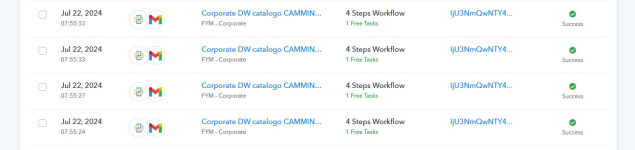
I looked into the Task History area, and even if I fill out the form only once, I see four different task executions.
How can I solve this issue?
Thank you in advance for your support.
I created this workflow to automatically send an email with the required content. The form I use is Formcan, and after submission, I send an email and then add the contact to the newsletter and contacts.
The issue I'm facing is that I receive three emails instead of one with the same content, even though I set it up to send only one. I can't find any settings area where I can limit the amount, and I don't know why this is happening.
I looked into the Task History area, and even if I fill out the form only once, I see four different task executions.
How can I solve this issue?
Thank you in advance for your support.