Pabbly google review data different than APIFY

Fousey

Member
Your Workflow URL
https://connect.pabbly.com/v2/app/workflow/mapping/IjU3NjcwNTZkMDYzMjA0MzI1MjZlNTUzNTUxMzci_pc
Consent to Access & Modify
I authorize Pabbly Support to log in to my account and make changes to the specified workflow for troubleshooting.
My pabbly URL LINK: https://connect.pabbly.com/v2/app/workflow/mapping/IjU3NjcwNTZkMDYzMjA0MzI1MjZlNTUzNTUxMzci_pc


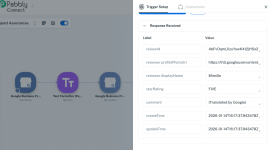
From my Google Business Profile, the latest review that is received, has a reviewID=AbFvOqmL0zuYowK4t2jHSo2Oc9FYwv343ayfje2dvG1XC9g-NwRdNCPQfoQTv2dH6Fl2rdI3Ppjv0Q

if i run APIFY and scrape the same review, the reviewID is different =
Ci9DQUlRQUNvZENodHljRjlvT2tock9EVmhZbTl1TWxvMVdWSm9UblJ0TkVzNVRWRRAB

Why for the same review PABBLY gives a different reviewID than APIFY scrapping?

Thank you
 

Fousey

Member
Hello Here is as requested.

Thank you
 

Attachments

  • Screen Shot 2026-01-18 at 4.58.55 PM.png
    Screen Shot 2026-01-18 at 4.58.55 PM.png
    23.7 KB · Views: 6
  • Screen Shot 2026-01-18 at 4.47.00 PM.png
    Screen Shot 2026-01-18 at 4.47.00 PM.png
    131.3 KB · Views: 6

ArshilAhmad

Well-known member
Staff member
The review ID you see in Pabbly Connect comes from Google’s official Business Profile API. This ID is stable within Google’s ecosystem and is intended to uniquely identify a review when working with Google APIs.

In contrast, the review ID returned by Apify is not the same as Google’s API review ID, as it does not use the Google Business Profile API. Instead, it scrapes data from the internet and typically returns an encoded value extracted from the Google Maps web UI.

Thanks & Regards,
Arshil Ahmad
Customer Support Associate
🌐 Pabbly.com
👉Rate your support
 

Fousey

Member
Thank you. What value can i use in order to match what i collect in pabbly and in Apify to identify the same review?
 

ArshilAhmad

Well-known member
Staff member
Thank you. What value can i use in order to match what i collect in pabbly and in Apify to identify the same review?
If Apify provides the review creation time and it matches the time fetched by the Google Business Profile action step in Pabbly Connect, you can use that to match the review between Pabbly Connect and Apify. Since Apify is not using the official Google Business Profile API, there is no unique ID available to match the review.

Thanks & Regards,
Arshil Ahmad
Customer Support Associate
🌐 Pabbly.com
👉Rate your support
 

Fousey

Member
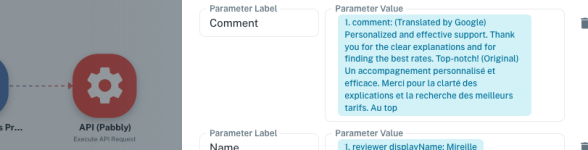
thank you, how can i pass in the last step API (Pabbly) the comment of the original posted language and not the Translated by google one?
 

Attachments

  • Screen Shot 2026-01-18 at 7.35.17 PM.png
    Screen Shot 2026-01-18 at 7.35.17 PM.png
    62.2 KB · Views: 4

Preeti Paryani

Well-known member
Staff member
Hi @Fousey,

Upon checking the action, it seems the comment is being passed in the original posted language itself, and it is not getting translated by Google.

You can confirm this under the last API step, as highlighted in the attached screenshot.

1768799217452.png
 

Preeti Paryani

Well-known member
Staff member
Hello @Fousey,

Yes, you’re doing it the right way. The OriginalComment value is correctly being passed in the last API step, so your setup looks fine.

Please feel free to proceed, and let us know if you face any issues.
 
Top