Pabbly returning Empty Responses for Facebook Leads
Status: Closed · Asked by raj ramesh on · 0 views
The last few different workflows which was working well over the last few weeks suddenly started suppplying empty data to google sheets and not fetch the actual leads from Facebook lead forms , only date and custom fields are pushed to the sheet where as name email phone number values are blank
any issue with facebook or is it an issue with pabbly? i have about 40-50 workflows setup which was fine working for over a month
I am facing the same problem. Please suggest.
Receiving Empty Response even when i am trying to Correct the Workflow , even creating the lead using the ad testing tool returns
Empty Data. @Pabbly please resolve
Hey @raj ramesh
Can you try reconnecting the trigger event once and then try agian?
hello its working now, thanks Seems like it was down for a couple of hours other workflows started working again
Appreciate the confirmation, I trust that everything is functioning normally now.
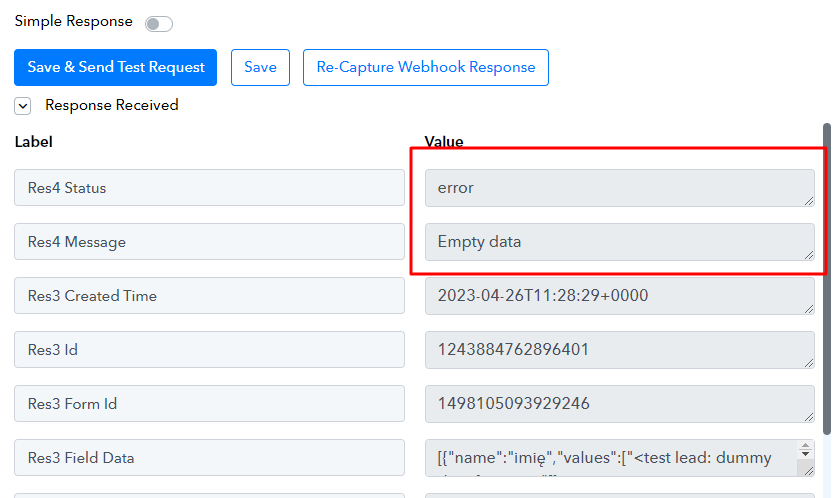
Hi I'm facing the same issue. When i test the webhook with the preview form it works fine, but then it only sends empty data and know i see the following error. Please advise. I have reconnected the trigger multiple times, nothing works

@Supreme
Hey @248media
It appears that you haven't linked the Facebook account that controls the relevant Lead ad form.
Please re-connect the Facebook account from the Facebook Lead ad admin account.
Further, follow the instruction written here to fix the "Empty Data" https://forum.pabbly.com/threads/facebook-lead-ads.2740/
But how come I can see the page and the leadgen form in the options if im not an ad admin?
The link you submitted is about issues with the trigger event "New Lead", i need help with the trigger event "New Lead (Instant)".
Also, when I fill out the preview form in the Lead Ads Testing Tool it works fine:


I am even receiving the leads correctly, but the info in the form simply doesn't appear:

It makes no sense. I am pretty sure I am admin of the page as well:

Can you please recapture the webhook response and then try again? Kindly ensure that your LeadGen form is live, or else you might not receive the lead data correctly.
It is live, and I've recaptured the webhook multiple times, I even created a new form and use it and the result is the same. Even more frustrating, this is happening with another workflow, exactly the same issue:
The form is live and working, I'm admin of the page and when I filled out the preview form in the Lead Ads Testing Tool it works fine, but then I do receive the email notifying about the lead but no info from the form :(
I've tried everything and really nothing works :cry:
Hey @248media
Can you please try passing a new lead from your Lead Ad form and check the automation?