TUBITO
Member
- Your Workflow URL
- https://connect.pabbly.com/workflow/sendwebhookdata/IjU3NjUwNTZmMDYzNzA0MzA1MjZiNTUzMDUxMzci_pc
- Your Task History ID
- IjU3NjEwNTY5MDYzNzA0MzA1MjZhNTUzNDUxMzY1MTYxNTQzNyI_3D_pc
Hello
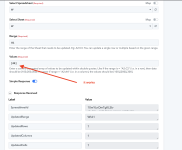
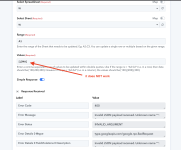
I've encountered a problem with the "Google Sheets: Update Range Values" action. The action seems to only accept numerical values (e.g., 44) but does not support alphanumeric strings (e.g., 44DLT). When using Gravity Forms to automatically populate the Google Sheet, data fields containing numbers work as expected. However, if the data includes letters or words, the action fails to update the sheet. The same issue arises when directly inputting alphanumeric strings into the value field. Additionally, the action also fails when there are spaces within numerical values (e.g., 4 4).
Could someone at Pabbly please address this issue? Alternatively, if anyone knows how to enable text entry for this action, I'd appreciate the guidance. Not being able to input text makes the Google Sheets action far less useful for me.
Thank you.
I've encountered a problem with the "Google Sheets: Update Range Values" action. The action seems to only accept numerical values (e.g., 44) but does not support alphanumeric strings (e.g., 44DLT). When using Gravity Forms to automatically populate the Google Sheet, data fields containing numbers work as expected. However, if the data includes letters or words, the action fails to update the sheet. The same issue arises when directly inputting alphanumeric strings into the value field. Additionally, the action also fails when there are spaces within numerical values (e.g., 4 4).
Could someone at Pabbly please address this issue? Alternatively, if anyone knows how to enable text entry for this action, I'd appreciate the guidance. Not being able to input text makes the Google Sheets action far less useful for me.
Thank you.