

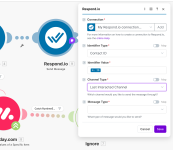
Respond.io "Last Interacted Channel"

optired

Member
Your Workflow URL
https://connect.pabbly.com/workflow/mapping/IjU3NjYwNTY1MDYzNTA0MzU1MjZlNTUzNzUxMzUi_pc
Consent to Access & Modify
I authorize Pabbly Support to log in to my account and make changes to the specified workflow for troubleshooting.
Hi there. I am migrating from MAKE to Pabbly.
For the respond.io integration, MAKE's module allow us to locate the "last interacted channel".
But I cannot find that in Pabbly's module.
Pls see screenshot.
 

Attachments

  • Screenshot 2026-02-09 at 16.42.17.png
    Screenshot 2026-02-09 at 16.42.17.png
    74.3 KB · Views: 6

Preeti Paryani

Well-known member
Staff member
Hi @optired,

Thank you for sharing the details and the workflow URL.

At the moment, there is no option available in Pabbly Connect to directly select or fetch the “last interacted channel” in the respond.io integration, as you may see in MAKE.

To assist you further, could you please let us know the exact use case you are trying to achieve using the last interacted channel in your workflow? Based on your requirement, we can check if the same outcome can be achieved in Pabbly Connect using an alternative approach or workaround.

Looking forward to your clarification so we can guide you accordingly.
 

optired

Member
The use case is to know the last interacted channel being used and then use the same channel to send a message to the customer.
 

Preeti Paryani

Well-known member
Staff member
Hi @optired,

Thank you for your clarification.

Currently, there is no feature available to list or select the “last interacted channel” in the channel dropdown of the Send Message action. However, we have escalated this requirement to our internal team to check the feasibility of adding such an option.

Once we receive any update from the team, we will get back to you with further information.

Thank you for your patience and understanding.
 

Preeti Paryani

Well-known member
Staff member
Hi @optired,

Thank you for reaching out to us.

Upon checking, if your requirement is to send a message to the user via the same channel they last interacted on, you can use the existing Send Message action that is currently available.

Instead of selecting a channel from the dropdown, please enable the Map option for the channel field and pass the channel value dynamically (from the previous step/output). This will allow the message to be sent on the relevant channel without selecting it statically from the list.

1770700745317.png


Please try this approach and let us know if it works for your use case or if you need any assistance while setting it up. We’ll be happy to help further.
 
Top