Hey
@karan bafna
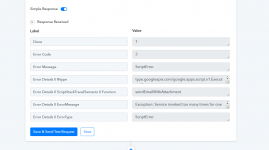
If you see the Data Out of Gmail.
You will see the error like this: Rate Limit Exceeded.
This error appears when you are sending messages beyond a certain limit.
You can check the same into the API documentation of Gmail for the same.
To keep systems healthy and accounts safe, Google limits the number of Gmail messages users can send per day, and the number of recipients

support.google.com
We highly recommend users to use a professional SMTP service like SendGrid, MailGun, or Amazon SES that allows you to send emails in bulk without limits.
If you purchase an SMTP and use that instead of Gmail step. Your issue with Gmail limits will be resolved.
Further, you can also purchase a professional GSuite account where the limits are comparatively higher for sending emails.