Jjuve Hernandez
Member
Hello:
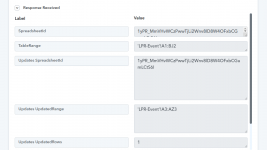
I am doing a webhook in Google sheet where the table handles several columns (A1:BJ2). When I make the connection it reads all the columns (TableRange) and after doing a test all the data appears in (webhook: Capture Webhook), where I have problems is that the columns from AZ4 are not listed, from what I noticed that the UpdatedRange goes from A3:AZ3 leaving the rest undisplayed (image attached).
What should I do to be able to complete the range of the columns of this table to complete its information?
Thanks
I am doing a webhook in Google sheet where the table handles several columns (A1:BJ2). When I make the connection it reads all the columns (TableRange) and after doing a test all the data appears in (webhook: Capture Webhook), where I have problems is that the columns from AZ4 are not listed, from what I noticed that the UpdatedRange goes from A3:AZ3 leaving the rest undisplayed (image attached).
What should I do to be able to complete the range of the columns of this table to complete its information?
Thanks