

thumbnails from google sheet to YouTube - API error ?

ilan316

Member
Your Workflow URL
https://connect.pabbly.com/workflow/mapping/IjU3NjcwNTZjMDYzNzA0MzQ1MjZkNTUzMDUxMzMi_pc
Your Task History ID
IjU3NjUwNTY1MDYzMDA0MzM1MjZiNTUzZDUxMzM1MTY0NTQzMTBmMzEi_pc
Consent to Access & Modify
I authorize Pabbly Support to log in to my account and make changes to the specified workflow for troubleshooting.
Uploading thumbnails from Google sheet to YouTube.

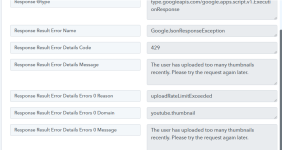
After a few successful uploads, I received the following error. (see attachment)

what should i do? how can i continue ?
 

Attachments

  • download.png
    download.png
    53 KB · Views: 4

Preeti Paryani

Well-known member
Staff member
Hi @ilan316,

Thanks for reaching out to us. Upon checking the task history details, it seems you have uploaded too many YouTube thumbnails in a short period of time, due to which you have hit the thumbnail upload rate limit.

That’s why you are getting the HTTP 429 error (uploadRateLimitExceeded).

In this case, we request you to wait for some time and try again later. Once the limit resets, you should be able to upload and set the thumbnail successfully.
 

ilan316

Member
“Wait for some time and try again later.”


What does this mean? Can you tell me the time? hours/days/weeks ?


I tried again after 12 hours and still received the error.


Can you increase my limit?
What is the current limit?
 

Preeti Paryani

Well-known member
Staff member
Hi @ilan316,

YouTube doesn’t provide an exact “reset time” for the uploadRateLimitExceeded (HTTP 429) thumbnail limit, so unfortunately we cannot know the precise time when it will reset for your channel.

What you can do is:

  • Retry after 30–60 minutes
  • If it still fails, try again after 12–24 hours (most cases resolve within this window)
 

Preeti Paryani

Well-known member
Staff member
Hi @ilan316,

The YouTube thumbnail upload rate limit is not managed from our end. This limit is completely controlled by YouTube, and Pabbly Connect is only using the YouTube API to perform the thumbnail upload.

So, unfortunately, we cannot increase the limit from our side. If you want to check whether the limit can be increased, you will need to reach out to YouTube Support directly.
 

Preeti Paryani

Well-known member
Staff member
Hi @ilan316,

Could you please clarify what exactly you want us to check from our end?

As mentioned in our previous reply, the thumbnail upload limit is controlled by YouTube, and it cannot be increased or verified from Pabbly’s side. To check the limit details or request an increase, you will need to contact YouTube Support.
 

ilan316

Member
Pabbly needs to check this, not me.
The workflow is connected to Pabbly, and the YouTube API is also connected through Pabbly.
Regardless, I also looked for this feature but couldn’t find it: is there an option to export a report showing which thumbnails were not updated due to the API error?
 
Top