TickTick configeration?

mrsme

Member
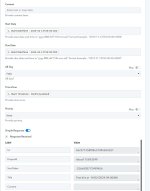
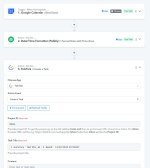
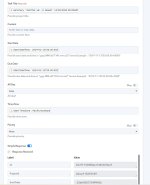
I can't get a date to connect into TickTick - Anyone tried and found a solution?

I've tried using date in the task title (as I would usually as have natural language processing for task titles), I've tried it in the due date, both in the format stated and formatted as the way it'd usually understood it - Neither is changing things.
Any ideas?
 

Attachments

  • 428068803_10161562321423523_4221404103033393558_n.jpg
    428068803_10161562321423523_4221404103033393558_n.jpg
    5.8 KB · Views: 101
  • 428072233_10161562321133523_1367523334971422565_n.jpg
    428072233_10161562321133523_1367523334971422565_n.jpg
    71.4 KB · Views: 111
  • 427983021_10161562320883523_521165479486594318_n.jpg
    427983021_10161562320883523_521165479486594318_n.jpg
    73.8 KB · Views: 112
  • 427967294_10161562320213523_8503829835223305666_n.jpg
    427967294_10161562320213523_8503829835223305666_n.jpg
    71.3 KB · Views: 106
P

Pabblymember11

Guest
Hey @mrsme

Have you tried converting the Start and Due date into the date timezone and then check again?


2024-02-13_13h42_56.png
 

mrsme

Member
Yup, I've done that as below.
1707814187908.png

I've just redone it and this is what is being sent through.
1707814389811.png

What I sent through is as below
1707814434058.png

1707814439083.png
 
P

Pabblymember11

Guest
Please change the Start and Due date time with the Date Formatter action step as mentioned in the previous reply.
 

mrsme

Member
I don't quite understand.

I have used the date formatter to NZ time.

Are you meaning to have it in the format like this picture.
Screenshot_20240214_022200_Chrome.jpg


If so, I've tried this without fixing it. Here's what I had put in.
1707858631779.png
 
P

Pabblymember11

Guest
Hey @mrsme

We have changed the Date Time format from your workflow now as mentioned in the help text and we request you to please give it a try now.

1707895549270.png
 

mrsme

Member
I have realised I never responded because I could not get it sorted.
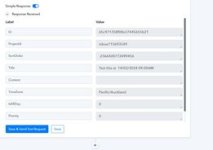
I can still not get this working. I'm not seeing a due date field in the response recieved when a test is sent. Below these are status, etag and kind.
Other sections like Content are still there, even if I put nothing in the section, but the dates are not. Any suggestions?

1770248194221.png
 

ArshilAhmad

Well-known member
Staff member
I have realised I never responded because I could not get it sorted.
I can still not get this working. I'm not seeing a due date field in the response recieved when a test is sent. Below these are status, etag and kind.
Other sections like Content are still there, even if I put nothing in the section, but the dates are not. Any suggestions?

View attachment 64775
Could you please share the Workflow URL where you have this concern?

Thanks & Regards,
Arshil Ahmad
Customer Support Associate
🌐 Pabbly.com
👉Rate your support
 

ArshilAhmad

Well-known member
Staff member
We have made a small change to the Start Date and Due Date fields, and it appears to have fixed the issue. The dates are now appearing in the TickTick: Create Task action application response.
1770326528858.png

1770326511405.png


Thanks & Regards,
Arshil Ahmad
Customer Support Associate
🌐 Pabbly.com
👉Rate your support
 
Top