Nimesh Koshti
Member
Hello Pabbly Support Team,
I have created a folder named Marut in Pabbly and inside it I created a worksheet called "Marut - HVLS Fan Leads_27012026" where all my leads are getting captured successfully.
However, I want to track whether the lead is coming from Facebook or Instagram.
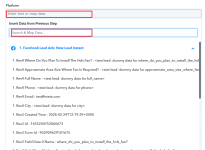
Could you please guide me on what I need to set in the "Platform" option in Pabbly so that I can differentiate between Facebook and Instagram leads in my Google Sheet?
It would be very helpful if you could explain which field I should map for the platform/source in the workflow.
Thank you.
Best Regards,
Nimesh
I have created a folder named Marut in Pabbly and inside it I created a worksheet called "Marut - HVLS Fan Leads_27012026" where all my leads are getting captured successfully.
However, I want to track whether the lead is coming from Facebook or Instagram.
Could you please guide me on what I need to set in the "Platform" option in Pabbly so that I can differentiate between Facebook and Instagram leads in my Google Sheet?
It would be very helpful if you could explain which field I should map for the platform/source in the workflow.
Thank you.
Best Regards,
Nimesh