• Instructions to Ask a Question

    For any assistance, please click the "Ask a Question" button and select the Pabbly product for which you require support.

    We offer seven comprehensive applications designed to help you efficiently manage and grow your business:

    Our support team endeavors to respond within 24 business hours (Monday to Friday, 10:00 AM to 6:00 PM IST). We appreciate your understanding and patience.

    🖤 BLACK FRIDAY DEALS ARE NOW LIVE! 🖤

    🔥 Enjoy an exclusive 10% discount on our LTD Plan — first-time ever offer!

    🚀 Unlock the Pabbly Plus Unlimited Yearly Plan and get unlimited access to every Pabbly application at a truly unbeatable Black Friday price.

    👉 Grab the Black Friday Offer

Voodoo SMS Integration

Preeti Paryani

Well-known member
Staff member
Dear @Coco1793,

You can refer to this tutorial to learn how to use the API by Pabbly module. If you encounter any challenges while configuring it, please share the API endpoint and your workflow URL so we can assist you accordingly.


Coco1793

Member
I have worked out how to use the formatter module, thank you.
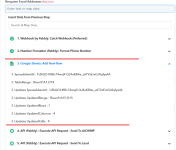
Can you tell me why i don't see the correct cell names from sheets, see image as I can't choose the data i need.
 

Attachments

  • Screenshot 2025-03-06 154643.png
    Screenshot 2025-03-06 154643.png
    70.2 KB · Views: 88

ArshilAhmad

Well-known member
Staff member
Google Sheets API does not provide cell names in the response for the 'Add New Row' action step.
1741283950068.png


You need to map the email address from another step.
 
Top