badym
Member
- Your Workflow URL
- https://connect.pabbly.com/workflow/mapping/IjU3NjcwNTZjMDYzNTA0Mzc1MjZkNTUzZDUxMzci_pc
- Your Task History ID
- IjU3NjUwNTY0MDYzMjA0MzY1MjZiNTUzMzUxMzc1MTY2NTQzMTBmMzYi_pc
- Consent to Access & Modify
- I authorize Pabbly Support to log in to my account and make changes to the specified workflow for troubleshooting.
Hi,
I am integrating Pabbly with Ontraport, and each time a contact finishes the Journey in Ontraport, I send a Webhook to Pabbly with the info of that contact and then Pabbly adds that contact to Aweber too.
But in the last days in Ontraport I have some Webhooks that ended with the 500 Error.
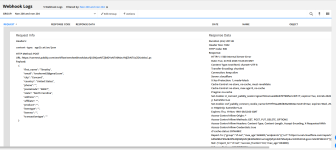
In Ontraport, I see what data is being sent to Pabbly and it looks like this :
content-type: application/json
HTTP Method: POST
URL: https://connect.pabbly.com/workflow/sendwebhookdata/IjU3NjcwNTZjMDYzNTA0Mzc1MjZkNTUzZDUxMzci_pc
Payload:
{
"first_name": "Timothy",
"email": "[email protected]",
"city": "Concord",
"country": "United States",
"phone": "",
"postalcode": "28027",
"state": "North Carolina",
"address": "",
"affiliate": "",
"product": "",
"itemtype": "",
"itemno": "",
"transactiontype": ""
}
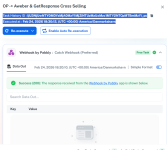
But in pabbly, the task has received an empty message from the Webhook.
Here are the details of a taks with this issue :
Task History ID : IjU3NjUwNTY0MDYzMjA0MzY1MjZiNTUzMzUxMzc1MTY2NTQzMTBmMzYi_pc
Executed at : Feb 24, 2026 18:30:12, (UTC +00:00) America/Danmarkshavn
Can you please advise ?
I have attached screenshots from both Pabbly and Ontraport.
I am integrating Pabbly with Ontraport, and each time a contact finishes the Journey in Ontraport, I send a Webhook to Pabbly with the info of that contact and then Pabbly adds that contact to Aweber too.
But in the last days in Ontraport I have some Webhooks that ended with the 500 Error.
In Ontraport, I see what data is being sent to Pabbly and it looks like this :
content-type: application/json
HTTP Method: POST
URL: https://connect.pabbly.com/workflow/sendwebhookdata/IjU3NjcwNTZjMDYzNTA0Mzc1MjZkNTUzZDUxMzci_pc
Payload:
{
"first_name": "Timothy",
"email": "[email protected]",
"city": "Concord",
"country": "United States",
"phone": "",
"postalcode": "28027",
"state": "North Carolina",
"address": "",
"affiliate": "",
"product": "",
"itemtype": "",
"itemno": "",
"transactiontype": ""
}
But in pabbly, the task has received an empty message from the Webhook.
Here are the details of a taks with this issue :
Task History ID : IjU3NjUwNTY0MDYzMjA0MzY1MjZiNTUzMzUxMzc1MTY2NTQzMTBmMzYi_pc
Executed at : Feb 24, 2026 18:30:12, (UTC +00:00) America/Danmarkshavn
Can you please advise ?
I have attached screenshots from both Pabbly and Ontraport.