• Instructions to Ask a Question

    For any assistance, please click the "Ask a Question" button and select the Pabbly product for which you require support.

    We offer seven comprehensive applications designed to help you efficiently manage and grow your business:

    Our support team endeavors to respond within 24 business hours (Monday to Friday, 10:00 AM to 6:00 PM IST). We appreciate your understanding and patience.

    🖤 BLACK FRIDAY DEALS ARE NOW LIVE! 🖤

    🔥 Enjoy an exclusive 10% discount on our LTD Plan — first-time ever offer!

    🚀 Unlock the Pabbly Plus Unlimited Yearly Plan and get unlimited access to every Pabbly application at a truly unbeatable Black Friday price.

    👉 Grab the Black Friday Offer

Webooks and Dropbox issue

Dot4Dot

Member
Hello, I have a workflow where when a customer uploads a file on my website, it automatically uploads that file to my dropbox. The issue I have is that sometimes if the customer selects more than 1 file, the ebook only uploads 1 file and not the other files. This only happens sometimes. Any idea what could be causing this?

 

Preeti Paryani

Well-known member
Staff member
Hello @Dot4Dot,

Could you please capture the webhook response in advanced format (by disabling the "simple response" toggle) with multiple files selected? This will allow us to analyze the response and identify a potential workaround for the issue.
 

Dot4Dot

Member
Here are the values. I uploaded 4 images through my website and only 2 uploaded to my dropbox.


Screenshot 2025-01-18 at 11.52.00 AM.jpg
Screenshot 2025-01-18 at 11.52.06 AM.jpg
 

Dot4Dot

Member
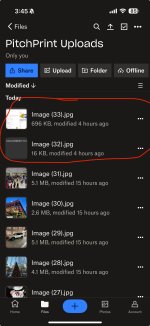
Thank you for checking this. I checked my dropbox and only 2 of those files appear on my folder. Could it be that the files uploaded have the same name and might get overwritten? Is there a way to have the files have a unique file name before they are uploaded to dropbox to do as a test?
 

Attachments

  • IMG_0751.jpeg
    IMG_0751.jpeg
    932.1 KB · Views: 115

ArshilAhmad

Well-known member
Staff member
We have added a Counter step to your workflow, which should help you assign a unique name to the uploaded file.

 
Top