Why are the Facebook Lead Form fields mapped incorrectly in Google Sheets?

Status: Closed · Asked by Gulabi Pragathi on · 0 views

Gulabi Pragathi — Question ·
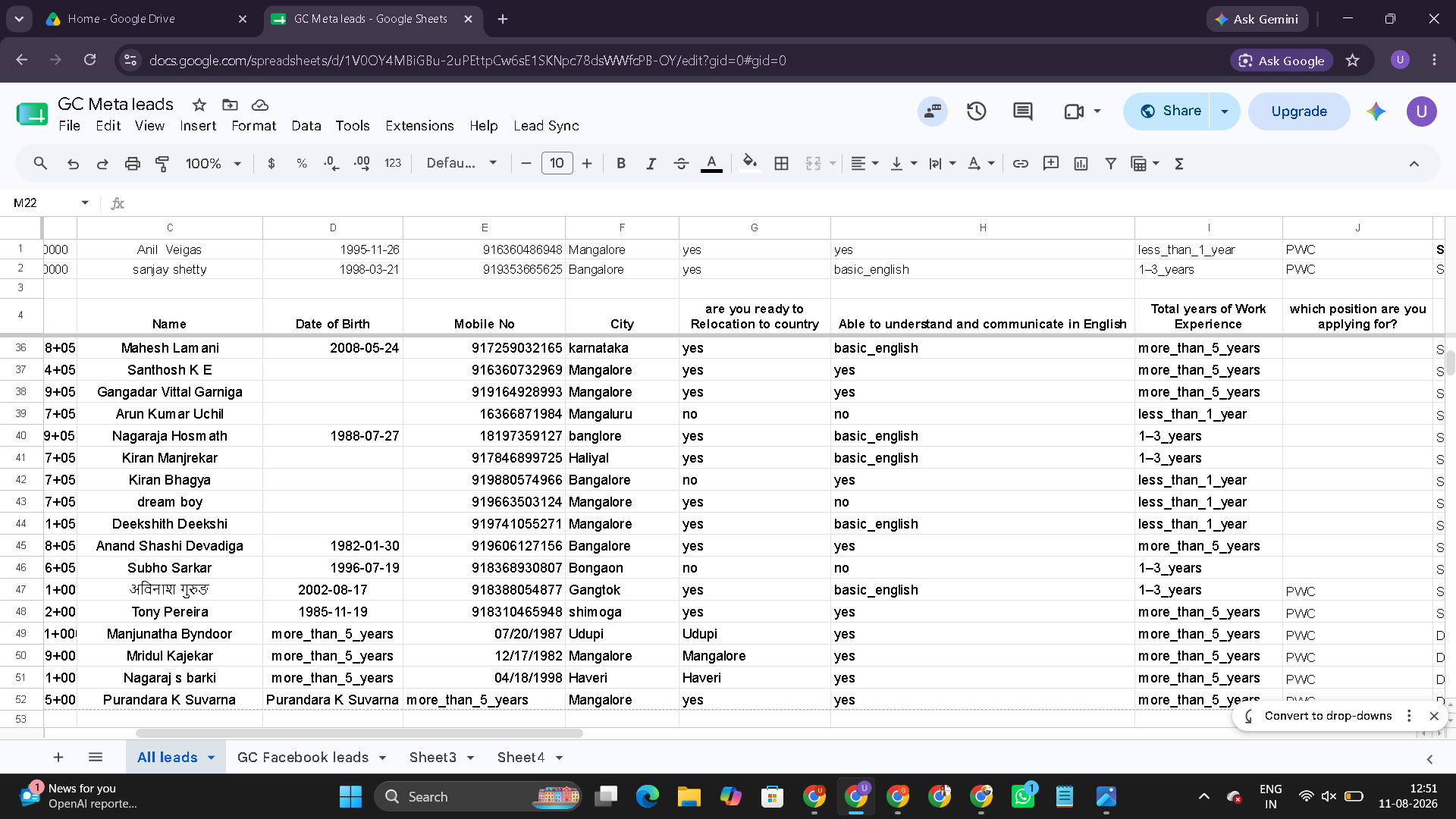
My Facebook Lead Form is connected to Google Sheets through Pabbly Connect, but the field mapping is incorrect. Some Facebook form responses are appearing under the wrong columns in my Google Sheet.
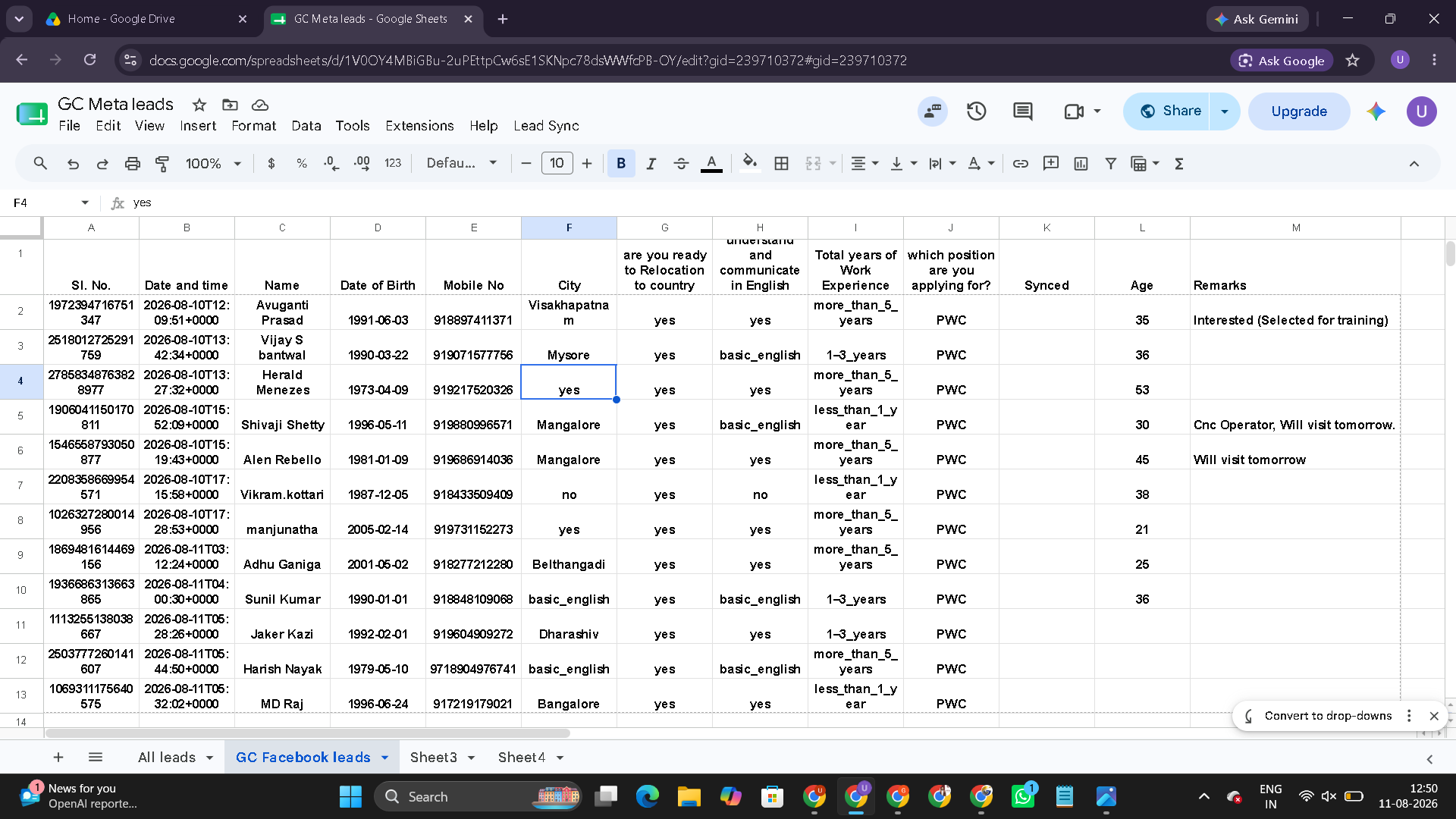
Screenshot 2026-08-11 125059.png
Screenshot 2026-08-11 125128.png
Pabbly Support — Reply ·

Hello!

Thank you for reaching out to us.

We have checked your workflows, and it seems that you have created two separate workflows for two different Facebook Lead Forms. However, both lead forms are sending their data to the same Google Sheet, and the field sets in both forms are different.

Due to this difference in field sets, some form responses are being mapped to the correct columns, while others are appearing under incorrect columns.

To resolve this issue, we recommend creating separate Google Sheets for each Facebook Lead Form and connecting the respective sheet to its corresponding workflow.

Please try this and let us know how it goes. We’ll be happy to assist you further if you face any issues.

Thanks & Regards,
Anushka Sahu
Customer Support Associate
🌐 Pabbly.com
Gulabi Pragathi — Reply ·

Hello Anushka,

Thank you for your response.

However, I believe the explanation provided does not match what is actually happening in my workflows.

You mentioned that the issue is because I have two separate workflows for two different Facebook Lead Forms, and that responses from both forms are being mapped into the same Google Sheet.

But I have checked the workflow task consumption, and there is clear evidence that only one workflow is actually receiving the leads.

As shown in the screenshot:

  • PCW-CNC-Programmer-Israel-06-08-2026-...20 Tasks Consumed

  • CNC-Programmer-Israel-06-08-2026-Copy0 Tasks Consumed

This means that all 20 leads were processed through one workflow. The second workflow has not processed any leads.

Therefore, if only one workflow/form is triggering these 20 leads, how can the mapping be getting mixed between the two different Facebook Lead Forms?

This is the main point I need you to clarify.

If all 20 leads are coming through the same workflow, then the explanation that the mapping is getting mixed because two different forms are sending data into the same Google Sheet does not explain the discrepancy.

Please investigate the following:

  1. Which exact Facebook Lead Form is being received by the workflow that consumed the 20 tasks?

  2. Can you verify the actual webhook/trigger response for those 20 leads?

  3. If only one Lead Form is triggering the workflow, why are the fields being placed under incorrect Google Sheet columns?

  4. Is Pabbly possibly using an old/sample response or cached field IDs from another Lead Form when the Google Sheet mapping was configured?

  5. Can you please check the field IDs/names being passed in the actual 20 lead responses, rather than assuming that the second workflow is responsible?

I am not disputing that both workflows use the same Google Sheet. The issue is that the evidence shows only one workflow is processing the leads, yet the data within those leads is still being mapped incorrectly.

So I would request that you please investigate the mapping inside the workflow that consumed the 20 tasks, rather than attributing the issue to both workflows triggering simultaneously.

I can provide the Google Sheet data and additional screenshots of the trigger response/mapping if required.

Please explain specifically how the mapping can be mixed when only one workflow has actually triggered and consumed all 20 tasks.

Thanks & Regards,
Ujwala

Pabbly Support — Reply ·

Hello Ujwala,

We have checked the workflows from our end and found that the workflow “PCW-CNC-Programmer-Israel-06-08-2026 – Copy” is configured with the Lead Gen Form “Workers in Pharmaceutical & Chemical Production Factories – Israel 🇮🇱” under the Gulabi Consultancy page, and this workflow has consumed 29 tasks.

The other workflow is configured with the Lead Gen Form “CNC Jobs in Israel-06/08/2026, 21:03-copy”.

Regarding the Google Sheets mapping issue, we recommend that you reconfigure the Google Sheets action once and remap the fields from the correct trigger response. After reconfiguring it, please test the workflow again.

If the data is still being mapped to the incorrect columns after this, please let us know, and we will investigate the issue further from our end.

Thanks & Regards,
Anushka Sahu
Customer Support Associate
🌐 Pabbly.com
Gulabi Pragathi — Reply ·

Hello Anushka,

Thank you for the update.

This is the third time we are reconfiguring and remapping the Google Sheets action for the same issue. I have been using Pabbly for nearly 5 years, so I am familiar with the setup and have already verified and reconfigured the workflow from our end.

At this point, I request you to please check the issue from your end, as it appears that the problem may not be with our configuration.

If required, we can also connect over Google Meet and troubleshoot the workflow live. This would help us identify the exact issue and reach a faster resolution instead of repeating the same configuration steps.

Please let me know the best approach or a suitable time for a Google Meet session.

You can also reach me directly at 985430390. I hope this will make communication easier and help us resolve the issue quickly.

Regards,
Ujwala

Pabbly Support — Reply ·

Hello Ujwala,

We completely understand your concern, especially since you have already reconfigured and remapped the Google Sheets action multiple times.

Please schedule a call with our team at any available slot during this week. During the meeting, we will review the complete workflow and troubleshoot the issue with you live.
Schedule a meeting

If we identify that the issue is occurring from our end, we will escalate it to our technical team for further investigation and resolution.

Please schedule the call at your convenience, and we’ll take it forward from there.

Thanks & Regards,
Anushka Sahu
Customer Support Associate
🌐 Pabbly.com

Back to all forum threads · Log in to reply