Koldo
Member
My workflow works perfectly when a new order is created in WooCommerce sending a template message via WhatsApp API with a payment link related to that order.
However there is an important issue I can't solve.
Often I need to clone several orders in WooCommerce. For that propose, I installed a little plugin which does the task easily but here is the problem. The triger "new order is created" doesn't work when cloning an order. It doesn't trigger the action.
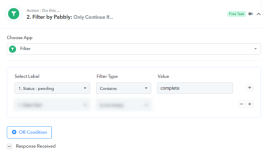
I have created a different workflow that triggers the action when an "order is updated" While it works when I clone the order by myself sending new order details, it also sends a WhatsApp message when client pays the order so the order gets updated. That new messages are unnecesary and repetitive. they don't need to receive a payment link, as they have already paid.
So, how could I make the system to understand a clone order is a new order?
Could there be other imaginative way to automatize the task of sending a payment link through WhatsApp just once when cloning many orders at a time.?
Thanks in advance for the help
However there is an important issue I can't solve.
Often I need to clone several orders in WooCommerce. For that propose, I installed a little plugin which does the task easily but here is the problem. The triger "new order is created" doesn't work when cloning an order. It doesn't trigger the action.
I have created a different workflow that triggers the action when an "order is updated" While it works when I clone the order by myself sending new order details, it also sends a WhatsApp message when client pays the order so the order gets updated. That new messages are unnecesary and repetitive. they don't need to receive a payment link, as they have already paid.
So, how could I make the system to understand a clone order is a new order?
Could there be other imaginative way to automatize the task of sending a payment link through WhatsApp just once when cloning many orders at a time.?
Thanks in advance for the help