Workflow not triggering – no steps are executing
Status: Answered · Asked by Food License on · 0 views
Hello,
Thank you for reaching out to us.
We reviewed your workflow "Mail confirmation gem" and observed that it was originally created on October 5, 2025, while the Zoho Desk action step was added later (recently) in the workflow.
Upon reviewing the Task History since this update, we found that the workflow is triggering successfully, with no recorded task failures. However, the recent executions did not proceed to completion because the incoming webhook responses did not satisfy the conditions configured in your Filter steps. As a result, the filter conditions evaluated as "False", preventing the workflow from proceeding to the subsequent steps.
Additionally, we noticed that two fields in your Zoho Desk action step: Ticket and To Email are mapped to values that are not available in the webhook response and are currently showing "No Data". These mappings need to be reviewed and corrected.
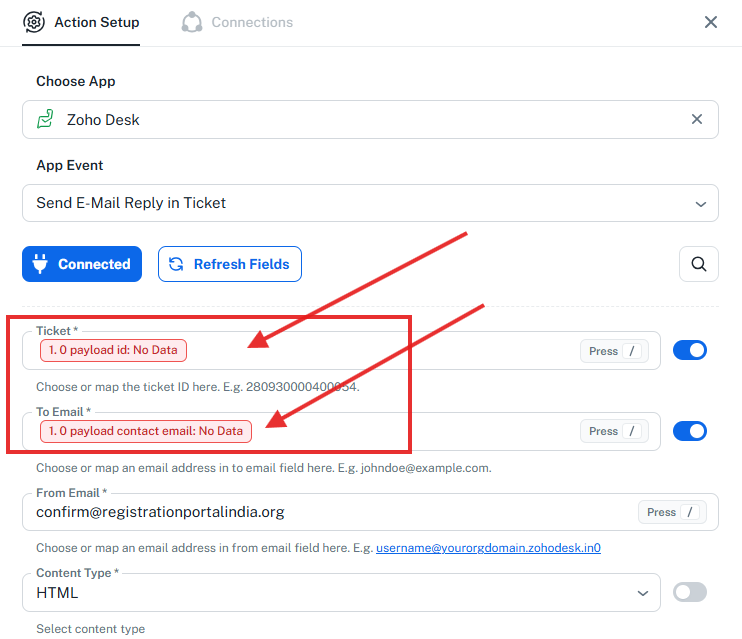
To proceed, we recommend the following:
Review and update the Ticket and To Email field mappings in the Zoho Desk action step, ensuring they are mapped to the appropriate data available in the webhook response.
Test the workflow using a sample webhook response that meets all the conditions configured in the Filter steps.
Verify that the filter conditions evaluate as "True" and that the workflow proceeds through the subsequent steps successfully.
Once these changes are made, please test the workflow again. If you continue to experience any issues, share the relevant Task History ID along with the details, and we will investigate further.
Thanks & Regards,
Shekh Dilshekh
Customer Support Specialist