Unable to Connect WhatsApp Number
Status: Answered · Asked by AMIT SHARMA on · 0 views
Dear Pabbly Support Team,
I am experiencing a persistent issue when registering and connecting WhatsApp phone numbers with Pabbly Connect, Meta Business Portfolio (Facebook), and the WhatsApp Business App on my physical phone.
Despite several attempts using different registration sequences, I have been unable to complete the setup successfully.
Case 1: Registering the Number on Meta First
When I add and register a phone number through Meta WhatsApp Business Portfolio and subsequently connect it to Pabbly Connect, the connection is established. However, I am then unable to activate or use the same number on the WhatsApp Business App on my physical phone.
Case 2: Registering the Number on My Physical Phone First
When I first register the number on the WhatsApp Business App on my physical phone and then connect it to Pabbly through Facebook, the initial connection is successful. However, I am unable to complete the phone number verification on Meta, as I receive an error stating that the number is already in use.
Existing WhatsApp Numbers
I currently have two business numbers that have previously worked successfully across WhatsApp, my physical phone, and Pabbly:
- Value Supermarket: 07867 108247
- Daily Eats: 07867 273746
I have not experienced these issues previously, and I am concerned that something may have changed in the registration or integration process.
Assistance Required
Could you please clarify the following:
- Why am I encountering these registration and verification errors?
- What is the correct sequence for registering a new WhatsApp number so that it works simultaneously on Meta Business Portfolio, Pabbly Connect, and the WhatsApp Business App on my physical phone?
- Does Pabbly Connect currently support WhatsApp Business App Coexistence, allowing the same number to be used on both the physical phone and through automation?
- Have there been any recent changes to Meta's or Pabbly's integration process that could explain these issues?
I would appreciate clear, step-by-step instructions on the correct setup procedure to avoid further failed attempts.
These WhatsApp integrations are essential to our daily business operations, and the repeated registration failures are causing considerable inconvenience and delays.
I would be grateful if your technical team could investigate this matter and provide a resolution as soon as possible.
Thank you for your assistance. I look forward to your prompt response.
Hello Amit,
Thank you for the detailed breakdown of both scenarios — that context is very helpful.
The core of what you're seeing relates to how Meta's WhatsApp Cloud API handles a number. Once a WhatsApp number is registered on the Cloud API (the method used by Pabbly), it generally cannot also be used on the WhatsApp Business App on your physical phone at the same time — the number moves to the API and no longer works on the mobile app. This is why, in Case 1, the number connects via Pabbly but won't activate on the phone app, and in Case 2 you hit a "number already in use" error because the number is still registered to the app/another setup.
A few points worth confirming on the Meta side:
1. If a number was previously connected to another Business Solution Provider or an old Meta Business account, it must be fully deregistered/released there before it can pair cleanly with a new connection.
2. Make sure the number is added to the same Business Portfolio you select during the integration flow, and that the Business Portfolio verification is complete (legal name, address, valid website, category, valid payment method).
3. New numbers may need to meet Meta's activity/eligibility requirements before they can be connected via the Cloud API.
Regarding Coexistence specifically (using the same number on both the physical phone app and via automation simultaneously): I don't have confirmed information in our knowledge base on whether this is supported for your setup, so I'd like a human agent to confirm this accurately rather than give you incorrect guidance.
To help us investigate your specific case, could you please share:
1. A screenshot of the exact error message you receive in each case.
2. Whether the two existing numbers (Value Supermarket / Daily Eats) were ever connected to another BSP previously.

Hi this looks that this query was answered by AI
Can any Human Support agent look into this matter
I can be contacted via e mail which you already have or call me
Looking forward to hear from you
Hi Can you setup a Teams call with me , please respond
Hello Amit,
To answer your specific questions regarding WhatsApp setup and Pabbly Connect:
1. Why Registration & Verification Errors Occur
Meta's standard WhatsApp Cloud API architecture treats a phone number as single-occupancy. When a number is registered on the standard Cloud API (which Pabbly Connect integrates with), Meta automatically deregisters it from the mobile WhatsApp / WhatsApp Business App on your physical phone.
Case 1 Failure: Registering on Meta/Cloud API first claims the number at the API level. Attempting to activate it on the physical phone fails because Meta blocks standard mobile app activation for active Cloud API numbers.
Case 2 Failure: Registering on your mobile phone first leaves the number registered on Meta’s consumer/SMB mobile infrastructure. Attempting to pair it to Meta Cloud API results in the "number is already in use" error until the account is deleted/deregistered from the physical phone app.
2. Standard Setup Procedure for Pabbly Connect
To use a number with Pabbly Connect via standard WhatsApp Cloud API:
Open WhatsApp Business App on your phone > Settings > Account > Delete Account (this releases the number from Meta’s mobile app network).
Go to your Meta Business Portfolio / Developer Console and add/verify the phone number under your WhatsApp Cloud API account via OTP.
Connect the Cloud API credentials (Phone Number ID, WhatsApp Business Account ID, Permanent Access Token) inside Pabbly Connect.
3. Regarding WhatsApp Business App Coexistence
Meta has recently introduced a Coexistence feature (allowing a number to run on both the mobile WhatsApp Business App and Cloud API simultaneously with mirrored chats).
However, standard direct Cloud API setups and Pabbly Connect integrations do not currently support Coexistence out-of-the-box. Standard Pabbly Connect setups require dedicated API-only numbers.
If keeping a physical phone app active on the exact same number is essential for your workflow, you would need to route through a WhatsApp Business Solution Provider (BSP) or gateway platform that specifically supports Meta's Coexistence onboarding framework.
Recommended Next Steps
If you need automation via Pabbly Connect: We recommend using dedicated business numbers strictly for API automation, separate from numbers used on physical handsets.
If you'd like us to inspect your two active numbers (Value Supermarket / Daily Eats): Please let us know how they were originally set up so we can verify if they are using a specific BSP gateway.
Additionally, we can schedule a meeting right away. Please use the link: https://www.draftmeet.com/book/lnk_c695209c7e079308b56f801019c9f778
Hi
Thanks for your reply I have scheduled a meeting .
However I am not convinced with the statement below because two of my numbers are working on Pabbly and also mirrored on the Physical Phones and we did not do as suggested below.
However, standard direct Cloud API setups and Pabbly Connect integrations do not currently support Coexistence out-of-the-box. Standard Pabbly Connect setups require dedicated API-only numbers. If keeping a physical phone app active on the exact same number is essential for your workflow, you would need to route through a WhatsApp Business Solution Provider (BSP) or gateway platform that specifically supports Meta's Coexistence onboarding framework.
If you'd like us to inspect your two active numbers (Value Supermarket / Daily Eats): Please let us know how they were originally set up so we can verify if they are using a specific BSP gateway.
Yes please investigate what we did in this two numbers and we can apply the same settings to the new number. Please do not change anything on the existing numbers as they are working fine.
Thanks for your support
Hi,
We’re currently waiting for you in the Google Meet lobby. Kindly join the meeting at your earliest convenience so we can discuss the issue and assist you further.
We look forward to connecting with you.
Thanks & Regards,
Shekh Dilshekh
Customer Support Specialist
🎉Black Friday Early Access
Hi Amit,
Thank you for joining the meeting with us today.
We completely understand your concern regarding the setup of your new WhatsApp number. To help us investigate this further and be as precise as possible, could you please share the specific new WhatsApp phone number that you tried to connect during our recent meeting session which showed the same error?
Once we receive this details, we will immediately escalate this to our technical team for further investigation.
Thanks & Regards,
Shekh Dilshekh
Customer Support Specialist
🎉Black Friday Early AccessHi
The number is 0044 7867107207
THx
Sorry TYPO
0044 786 7108 207
Hello Amit,
Thank you so much for providing the affected phone number.
Kindly note that we have escalated this concern to our technical team for further investigation right away. It might take some time to thoroughly investigate the issue from our end, and we may also need to escalate this to Meta Support to find the actual root cause, which can take additional time.
Once we receive an update, we will surely reach out to you directly and try to resolve the issue at the earliest. We truly appreciate your patience and cooperation in the meantime.
Thanks & Regards,
Shekh Dilshekh
Customer Support Specialist
🎉Black Friday Early AccessHello Amit,
Hope you are doing well.
Regarding our ongoing investigation, we need a quick confirmation from your side. Could you please let us know when you last attempted to connect the number (+44 7867 108 207) in the Meta dashboard following our meeting yesterday?
If you haven't tried again yet, please try connecting it again and confirm the timestamp of your attempt. If the exact same issue persists, we will attach these details to our escalation to Meta Support to demonstrate that the error continues even after a standard time gap.
Thank you for your cooperation!
Thanks & Regards,
Shekh Dilshekh
Customer Support Specialist
🎉Black Friday Early AccessHello,
We’re currently waiting for you in the meeting lobby. Kindly join the meeting when you’re available so we can proceed with the discussion.
We look forward to connecting with you.
Thanks & Regards,
Shekh Dilshekh
Customer Support Specialist
🎉Black Friday Early AccessHello,
As discussed during our meeting, we have escalated your concern to our technical team for further investigation.
Our team is reviewing the issue, and we will share an update with you as soon as we receive further information. We appreciate your patience and understanding while we work toward a resolution.
If you have any additional details or observations related to the issue, please feel free to share them with us, as they may help our team with the investigation.
Thanks & Regards,
Shekh Dilshekh
Customer Support Specialist
🎉Black Friday Early AccessHello,
Please check how to add a catalog to Chatflow after the number has already been added.
Steps:
Remove the number from Pabbly Chatflow (Settings → WhatsApp → Disconnect) and from Meta WhatsApp Manager. (Don't delete the Business Portfolio or the catalogs.)
Reconnect the number in Chatflow → Add WhatsApp Number → Connect with a catalog. Log in as the business admin in the Facebook window.
Select the catalog you want in the Facebook window.
Hi Naman
I have done exactly what you have asked . After Connecting the number I do not get the option to connect to the Correct Catalog . This is the same issue we had before
Can we have a call today
Hi Naman
I have created another Business Profile and Added the number and created the catalogue . I still cannot connect the catalogue in PABBLY

Hi Amit,
You can book a time that works best for you here: https://www.draftmeet.com/book/lnk_66ddfd80960cd41b6b1d0dcf038e2861
Looking forward to getting this resolved for you.
Hi
I have booked the time , its on 3rd Nov
Meanwhile can you check at your end why the catalogue cannot be added in PABBLY
Hello Amit,
Thank you for updating us.
Please be advised that frequently changing profiles and creating new ones can negatively impact your Meta trust score, which may further delay the review process.
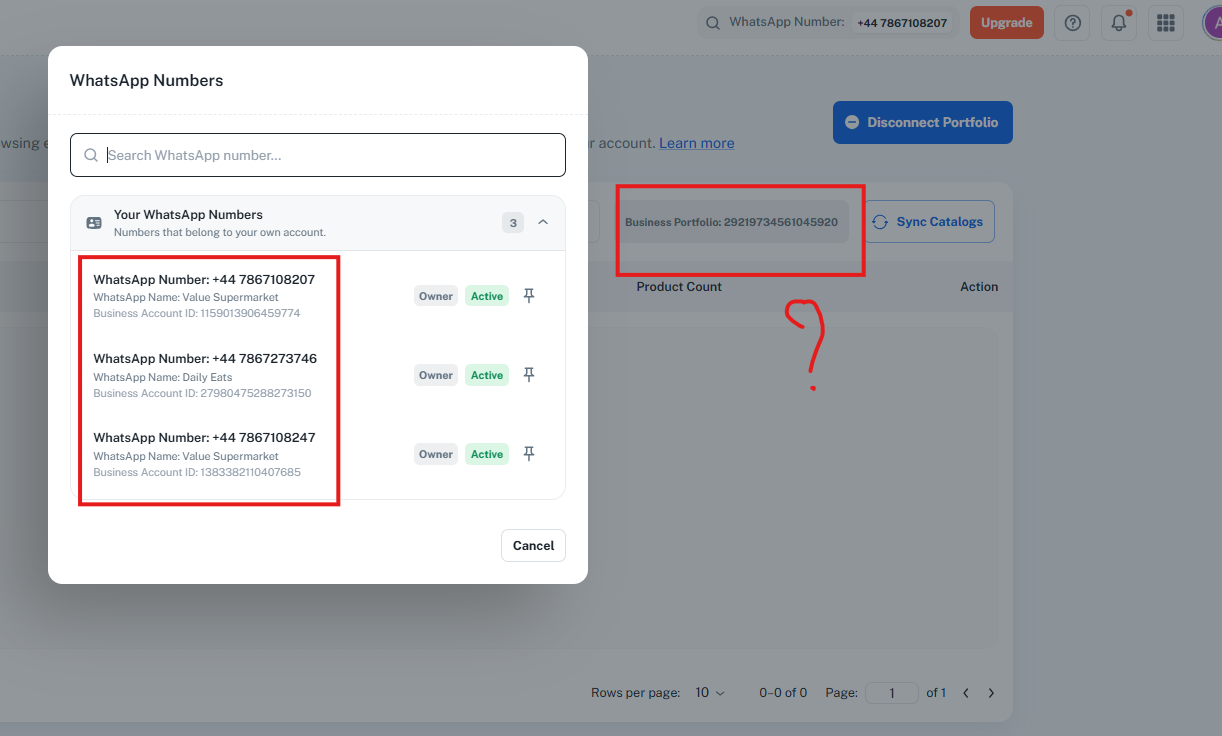
Additionally, regarding your attempt to resolve the issue by creating a new Business Portfolio: please note that syncing is tied to the specific WhatsApp Business Account (WABA) connected to that number. Creating a new portfolio will not resolve the catalog integration issue, as the connection remains dependent on the original WABA configuration. We recommend maintaining a consistent profile to ensure proper synchronization.
Hi Naman
Thanks for pointing it out but I wand all profiles to be on a different Business Portfolio
Please can you comment what is the status of the query , are we able to connect the Catelogue with the Number ?
Thanks
Hello Amit,
Thank you for your patience and for clarifying that you would like to maintain separate Business Portfolios for your profiles. We understand your requirement and are taking it into consideration during our investigation.
Our technical team has tested the connection process for your affected WhatsApp number +44 7867 108 207. During the Meta Embedded Signup process, the existing WhatsApp Business Account and its associated configuration continue to be retrieved instead of the newly created catalog being reflected as expected.
As the setup involves multiple Business Portfolios and associated Meta assets, we need to examine the relationship between the WhatsApp number, its WABA, the intended catalog, and the permissions configured in Meta Business Manager. We are working with our engineering team to identify where the discrepancy is occurring and determine the appropriate way forward.
Your ticket will remain open while we investigate this further. We will check this further during our scheduled call on November 3 so that we can discuss the findings and next steps with you.
We genuinely appreciate your understanding and assure you that we are continuing to look into this matter.
Thanks & Regards,
Shekh Dilshekh
Customer Support Specialist
🎉Black Friday Early AccessHello Amit,
We were in the meeting room at the scheduled time today, but it appears you were unavailable to join.
Please let us know if you have any questions or if you would like to reschedule our call.
Hello Amit,
I am following up on the email shared earlier.
We understand that resolving the catalog integration issue is a priority for your operations.
Could you please let us know if you would like to reschedule the call for a later time?
We look forward to hearing from you soon.
Hi Naman
The number is still not connected with catalogue , I was waiting for Pabbly to find a solution .
Yes lets have a call today
Do you require any information from my side
Thanks
Amit
Hi Amit,
Thank you for your reply.
I am available to jump on a call at 4:30 PM to discuss the catalog integration issue and explore a solution together.
You can join via this link: https://meet.google.com/gfy-ovvf-nri
I look forward to speaking with you then.
Hi Amit,
We're in the meeting, waiting for you.
Hi Amit,
We were in the meeting, but we were unable to connect with you.
Regarding the ongoing catalogue issue, we have escalated the details of your original Business Portfolios to Meta for investigation. Please be advised that creating new Business Portfolios while an investigation is active disrupts this process, as Meta is currently reviewing the existing configurations.
Continuing to create new portfolios requires us to restart the setup and validation process for each new asset, which complicates the investigation and significantly delays a resolution.
To ensure our team can effectively assist you and expedite a solution, we strongly recommend keeping your current configuration as it is and avoiding any further changes to your Business Portfolios while the matter is under review.
Rest, all the help from our side that can be done we've tried and shared with you, but this is with Meta, and what we were told to follow we shared those steps with you as well, and we're here waiting for further updates if any.
Hi Amit,
I am following up on our previous communication regarding the catalog integration issue. As mentioned, we have already escalated your Business Portfolio configurations to Meta for investigation.
To avoid further delays and ensure a smooth resolution, please refrain from making any additional changes to your Business Portfolios or creating new ones, as this disrupts the review process.
We are currently waiting for further updates from Meta’s side and will notify you as soon as we have more information.
Thank you for your continued patience and cooperation.
Hi Naman
Many thanks for your reply , please keep me posted about the next step.
I look forward hearing from you
Thanks Amit
Hi Amit,
Thank you for your response.
Certainly, we will keep you updated as soon as we receive any further information or updates from Meta.
Thank you for your patience and cooperation.
Hi Vinay
Any update on the status of query
This is really sad to see that its been a Month this issue is not resolved.
Is there any SLA from Meta ?
Thanks & Regards
Amit Sharma
Hi Amit,
Thank you for following up.
We understand your concern regarding the delay and apologize for the inconvenience.
Unfortunately, we have not received any further updates from Meta regarding your Business Portfolio configuration yet. The matter is still pending with their team.
We are awaiting their response and will certainly keep you informed as soon as we receive any updates.
Thank you for your continued patience and understanding.
Hi Vinay
What exactly is the problem are your other clients facing the same issue ?
Can it be an issue in Pabbly ?
Thanks
Amit
Hi Amit,
Thank you for your response.
We would like to clarify that if the issue were originating from Pabbly's end, there would be no need to escalate it to Meta for investigation. The issue is currently related to your Business Portfolio configuration, which is under review by Meta.
The delay is due to the time taken by Meta to investigate and share their response. We understand that this has been pending for some time and appreciate your patience.
Please be assured that we are following up on the matter and will update you as soon as we receive any information from Meta.
Thank you for your understanding and cooperation.
Hi Vinay
Any update on this matter
Is there any way I can contact Meta
Thanks
Amit
Hello Amit,
Unfortunately, there is no update as of now, the Team is coordinating with Meta Team to resolve the issue. We will get back to you once the issue is resolved.
Thanks & Regards,
Adeel Akhtar
🌐 Pabbly.com
Hi Adeel
Any update please , the time is ticking and this has to be resolved at the earliest
What is the other alternative ?
Please confirm
Thanks
Amit
Hi Amit,
Thank you for your patience.
Our team tested all three solutions Meta suggested for linking your catalog to +44 7867 108 207:
Linking via API: Meta rejects this for Coexistence numbers (numbers also active on the WhatsApp Business mobile app).
Direct system user access: Requires an internal ID that Meta does not expose in Business Settings or via API.
Reconnecting via Embedded Signup: Meta skips the catalog step for already connected numbers.
Since Meta closed the earlier ticket without resolving it, our team has re-escalated your case to Meta today with all test results and your WABA ID, requesting them either to provide a working method or grant catalog access directly from their side.
There is currently no workaround on our side to link the catalog on a Coexistence number until Meta replies.
We will update you as soon as Meta responds.
Hi Amit,
Quick update on the re-escalated Meta ticket—Meta Support has just responded at 5:15 PM today, confirming that:
Nothing on your account (ID:
1402741088614643) should be blocking a catalog from being linked.They have escalated the ticket to their Technical Support Team for a closer investigation and will follow up directly on that thread.
We will keep you updated as soon as Meta's technical team shares their response.