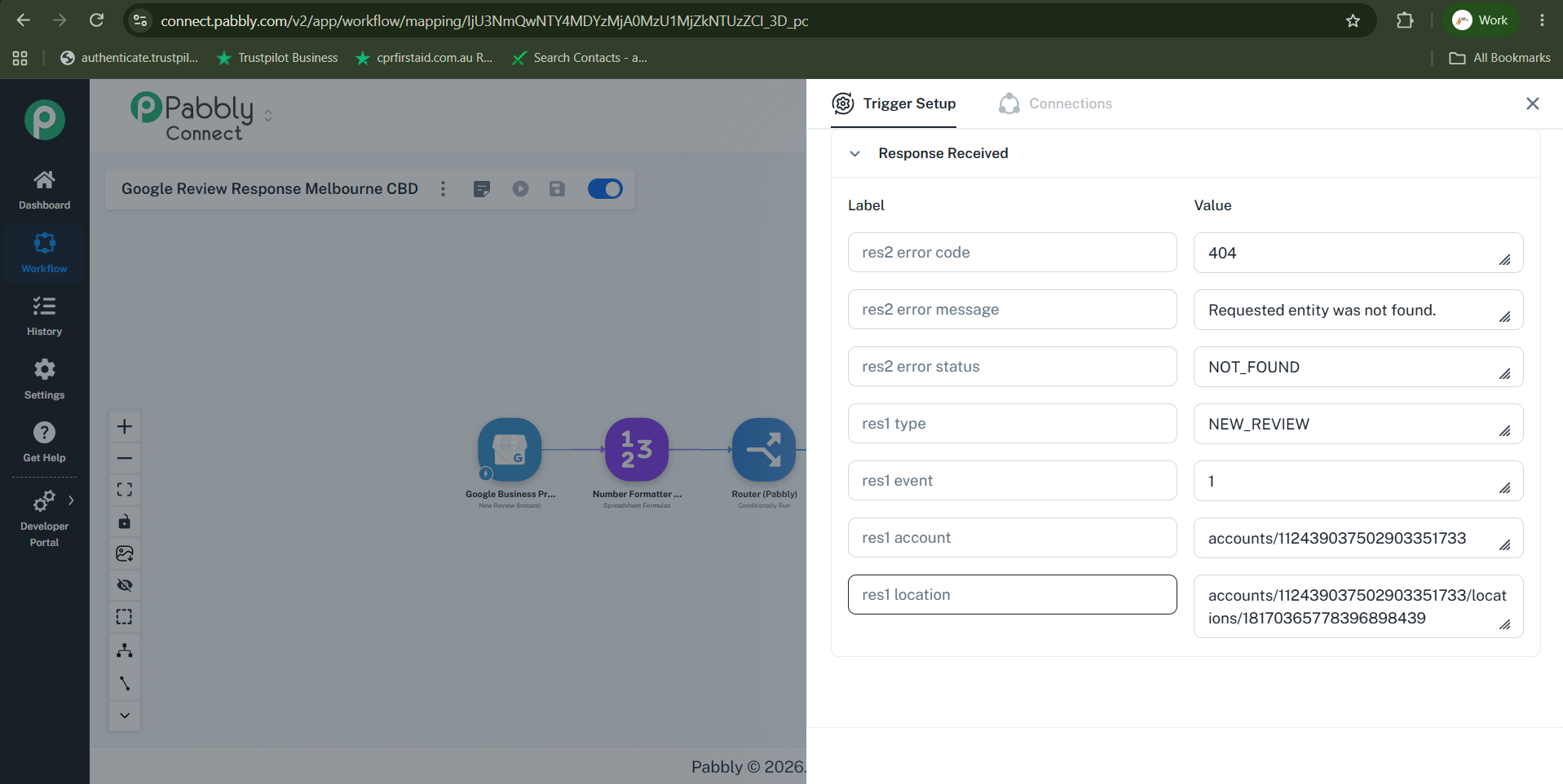
Subject: Google Business Profile "New Review (Instant)" trigger returns 404 NOT_FOUND when fetching review
Status: Closed · Asked by CPR First Aid on · 0 views
Hi Fred,
Thank you for your patience.
We have checked your workflow, “Google Review Response Melbourne CBD,” and can confirm that the data is now being received successfully in the latest response. The previous 404 – NOT_FOUND error is no longer appearing.
Please refer to the attached screenshot showing the latest successful response.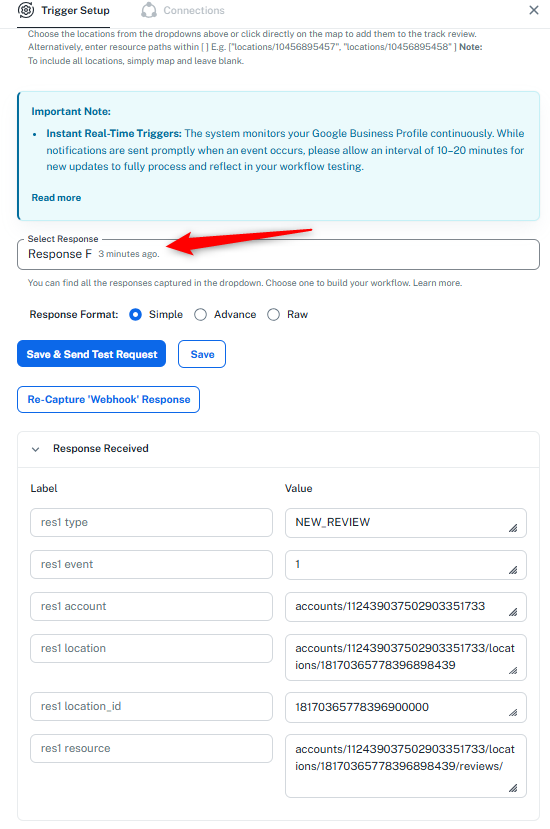
We also noticed that the required fields have not yet been mapped in the subsequent action step. Kindly complete the field mapping using the / mapping option.
Once the mapping is complete, please test the workflow from your end and confirm whether the automation is working as expected.
If you face any issues, please let us know. We will be happy to assist you further.
Aditya Chourey
Customer Support Associate
🌐 Pabbly.com
👉 Rate your support
Black Friday Early Access

Still 404 error on my end

Hi Fred,
Thank you for the update.
Could you please share your Google Business Profile URL with us? We will test the trigger response from our end to investigate why the 404 error is occurring.
Aditya Chourey
Customer Support Associate
🌐 Pabbly.com
👉 Rate your support
Black Friday Early Access
Hi,
Apologies for the late response. Thank you for your patience and for offering to help investigate the 404 error.
Here is our Google Business Profile URL: https://business.google.com/n/17566736421947930659/profile?fid=4289237799671351111.
Please let me know if you need any additional information. Thank you for your assistance!
Best regards,
Hi Fred,
Thank you for sharing the Google Business Profile link.
The URL provided is the internal management link, which is only accessible when logged into your account. To test whether the trigger is fetching new reviews correctly in your workflow, "Google Review Response Melbourne CBD," could you please share the direct review submission link (the link customers click to leave a review)?
You can easily generate and copy this link by following these steps:
Log in to your Google Business Profile.
Go to Read reviews → Get more reviews.
Copy and share the review link with us.
Once we receive the direct review link, we will submit a test review from our end to verify if the notification payload and review details fetch properly without throwing a 404 error.
Aditya Chourey
Customer Support Associate
🌐 Pabbly.com
👉 Rate your support
Black Friday Early Access
Hi,
I have the direct Google review submission link now. Please see the link below:
https://g.page/r/CUfHlq4Nb4Y7EAE/review
Thank you for your patience and assistance. I look forward to your update regarding the issue with the Google Business Profile trigger and the 404 error.
Hi Fred,
Thank you for providing the review link.
To help us troubleshoot this, please go to the trigger step in your workflow, click on the "Connected" button, select "Add New Connection," and save it. This will refresh the authentication for your account.
Please perform this step so we can investigate further, as we have not yet captured the new review data via the instant trigger. Once done, we will continue our investigation.
Aditya Chourey
Customer Support Associate
🌐 Pabbly.com
👉 Rate your support
Black Friday Early Access
Hi,
Thank you for the instructions. I have already completed the steps by selecting “Add New Connection” and saving the new connection. Please proceed with the investigation and let me know if you need any further information or assistance from my end.
Thank you for your support.
Best regards,
Hi Fred,
Thank you for confirming that you have created a new connection in your account.
We have now escalated this issue to our technical team for further investigation into the 404 error during the review fetch. We will keep you updated as soon as we have a resolution or further details from them.
Aditya Chourey
Customer Support Associate
🌐 Pabbly.com
👉 Rate your support
Black Friday Early Access
Hi,
Thank you for the update and for escalating the issue to your technical team. I appreciate your assistance in investigating the 404 error.
I will wait for your feedback and any updates regarding the resolution. I hope this issue can be resolved soon.
Thank you for your continued support.
Best regards,
Hi Fred,
Thank you for your patience.
I would like to confirm that your ticket is currently escalated to our technical team for further investigation. We are prioritizing this, and as soon as we have an update or a resolution regarding the 404 error, we will notify you immediately.
We appreciate your continued cooperation while we work to get this resolved for you.
Aditya Chourey
Customer Support Associate
🌐 Pabbly.com
👉 Rate your support
Black Friday Early Access
Thank you for the update and for prioritizing my ticket.
I appreciate your continued assistance in investigating the 404 error. I will wait for further updates from your technical team and hope the issue can be resolved soon.
Thank you for your time and support.
Hi Fred,
Thank you for your patience while our technical team investigated this.
Upon further review, it appears the issue is occurring because you were using a legacy version of the Google Business Profile trigger, which is causing it to fail when capturing incoming data.
Could you please try creating a new workflow from scratch using the current version of the Google Business Profile trigger? Please let us know if the 404 error persists after setting it up in the new workflow.
Aditya Chourey
Customer Support Associate
🌐 Pabbly.com
👉 Rate your support
Black Friday Early Access
Hi Pabbly Support Team,
Thank you for your update and for investigating this issue.
I would like to inform you that I have already created a new connection from scratch, but unfortunately, the 404 error still persists in Pabbly Connect.
The issue remains unresolved even after refreshing the connection. Could you please advise me on the next steps? I would also appreciate it if your technical team could investigate further to determine why the error continues to occur.
Thank you for your continued support and assistance. I look forward to your response and a possible resolution.
Best regards,
Hi Fred,
Thank you for your update.
I have re-escalated this issue to our technical team for a deeper investigation since the 404 error is still persisting even after creating a new connection.
Please rest assured that we are following up on this with priority. As soon as we receive an update or solution from our technical team, we will inform you immediately.
We truly appreciate your patience and cooperation in the meantime.
Aditya Chourey
Customer Support Associate
🌐 Pabbly.com
👉 Rate your support
Black Friday Early Access
Hi Fred,
We have investigated the issue with your Google Business Profile – New Review (Instant) trigger and successfully resolved it.
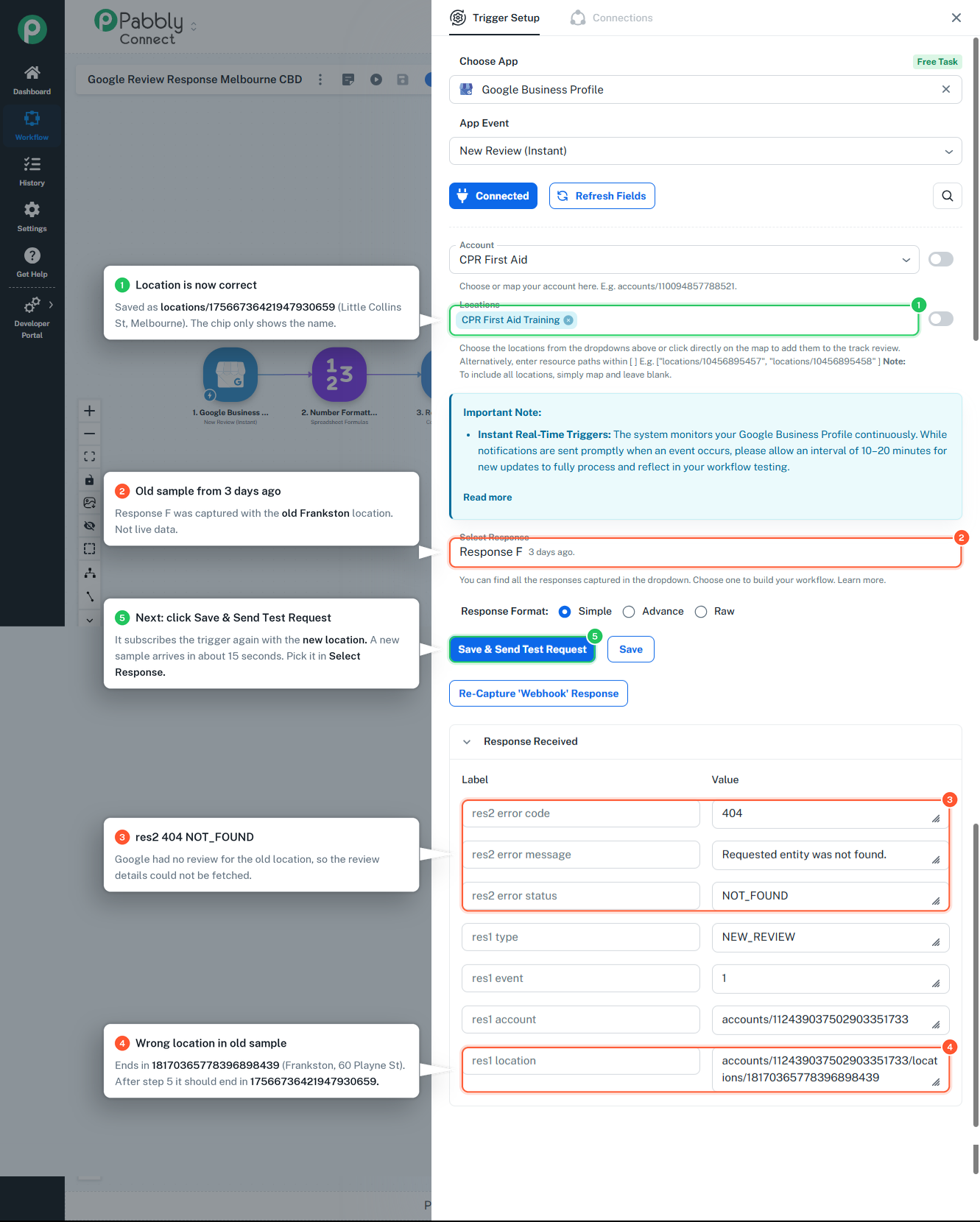
The issue occurred because your Google account had 124 locations, but the location dropdown was displaying only the first 100 locations. As a result, the workflow was configured with the wrong location (Frankston) instead of your actual Melbourne CBD location (CPR First Aid Training, 343 Little Collins St).
We have now:
Fixed the location dropdown to display all available locations.
Selected the correct Little Collins St location in your workflow, "Google Review Response Melbourne CBD".
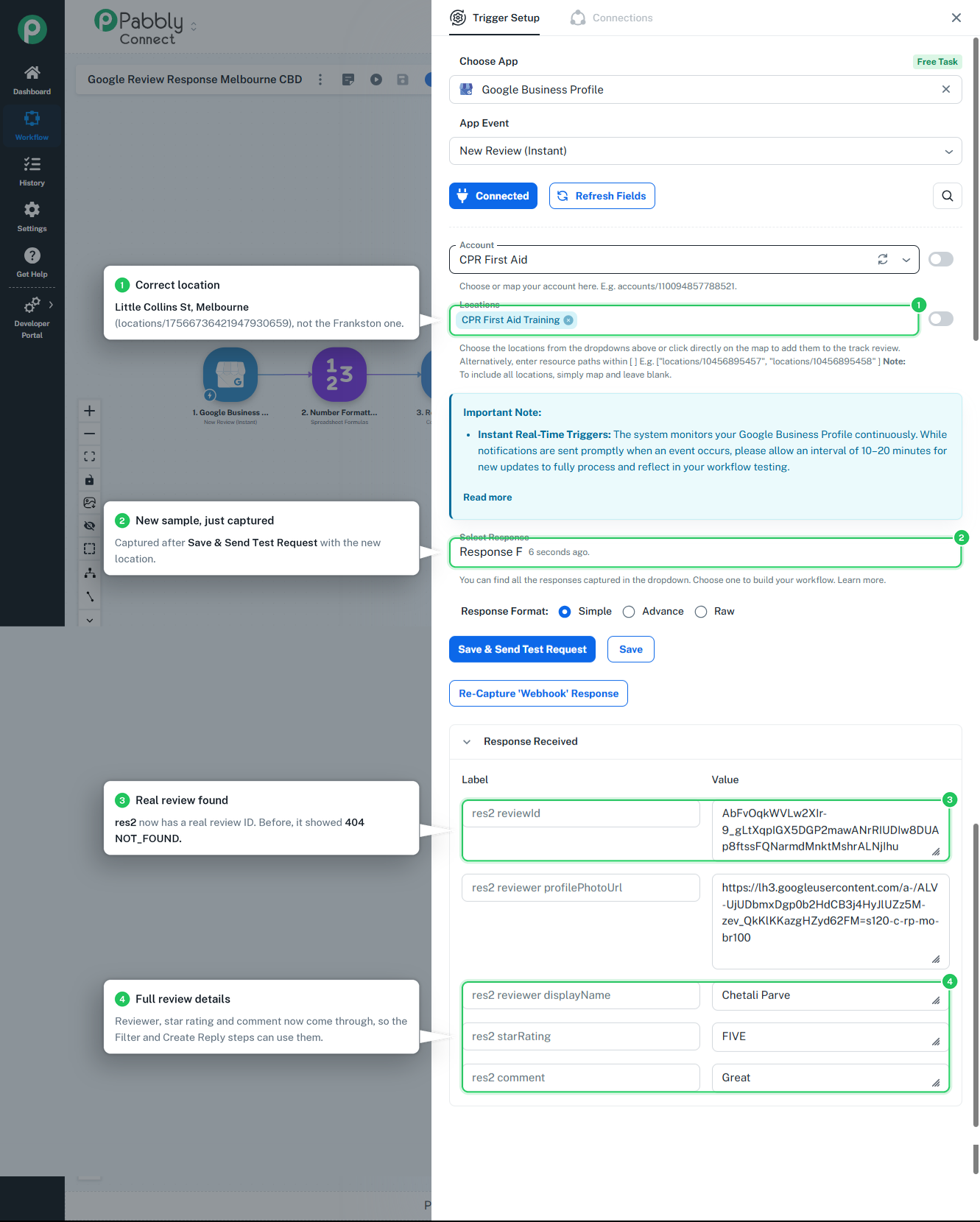
Verified that the trigger is now successfully capturing the review details, including the reviewer name, star rating, and comment.
Updated the Filter and Create Reply steps with the correct trigger response fields.
The issue is now resolved, and the trigger is successfully capturing new reviews.
For your reference, we have attached screenshots showing:
Screenshot 1: The correct Melbourne CBD location selected and a new review successfully captured.
Screenshot 2: The previous configuration with the incorrect Frankston location, which resulted in the 404 NOT_FOUND error.
 If you need any further assistance or have any questions, please feel free to reach out to us. We'll be happy to assist you.
Aditya Chourey
Customer Support Associate
🌐 Pabbly.com
👉 Rate your support
Black Friday Early Access
Hi Pabbly Support Team,
Thank you for investigating and resolving the issue with the Google Business Profile – New Review (Instant) trigger.
I appreciate your help in identifying the incorrect location and updating the workflow with the correct Melbourne CBD location. Thank you also for fixing the location dropdown and updating the Filter and Create Reply steps.
I will test the workflow on my end to confirm that it is now capturing new reviews correctly and that the automatic replies are working as expected.
Thank you for your support and assistance in resolving this issue.
Best regards,
Hi Pabbly Support Team,
I would like to provide an update regarding the ongoing issue with my Pabbly Connect workflow, “Melbourne CBD Google Review to Spreadsheet.”
The Google Business Profile auto-response is now working correctly. However, the connection to Google Sheets is still encountering an error, preventing the workflow from functioning completely as intended.
Based on my latest test, the following error is displayed.
Error Details
Error Code: 404
Error Status: NOT_FOUND
Error Message: Requested entity was not found.
I have already tried creating a new connection from scratch, but the error persists.
Could you please investigate why the Google Sheets connection is still returning this error and help me resolve the issue? I would like the workflow to automatically respond to new Google reviews and successfully record the review details in our spreadsheet.
I have attached a screenshot of the latest error response for your reference.
Thank you for your continued assistance. I appreciate your help in resolving this remaining issue so that the entire automation can work properly.
Best regards,

Hi Fred,
We reviewed your workflow configuration and noticed the Google Business Profile connection and location selection may need correction.
Please follow the steps below:
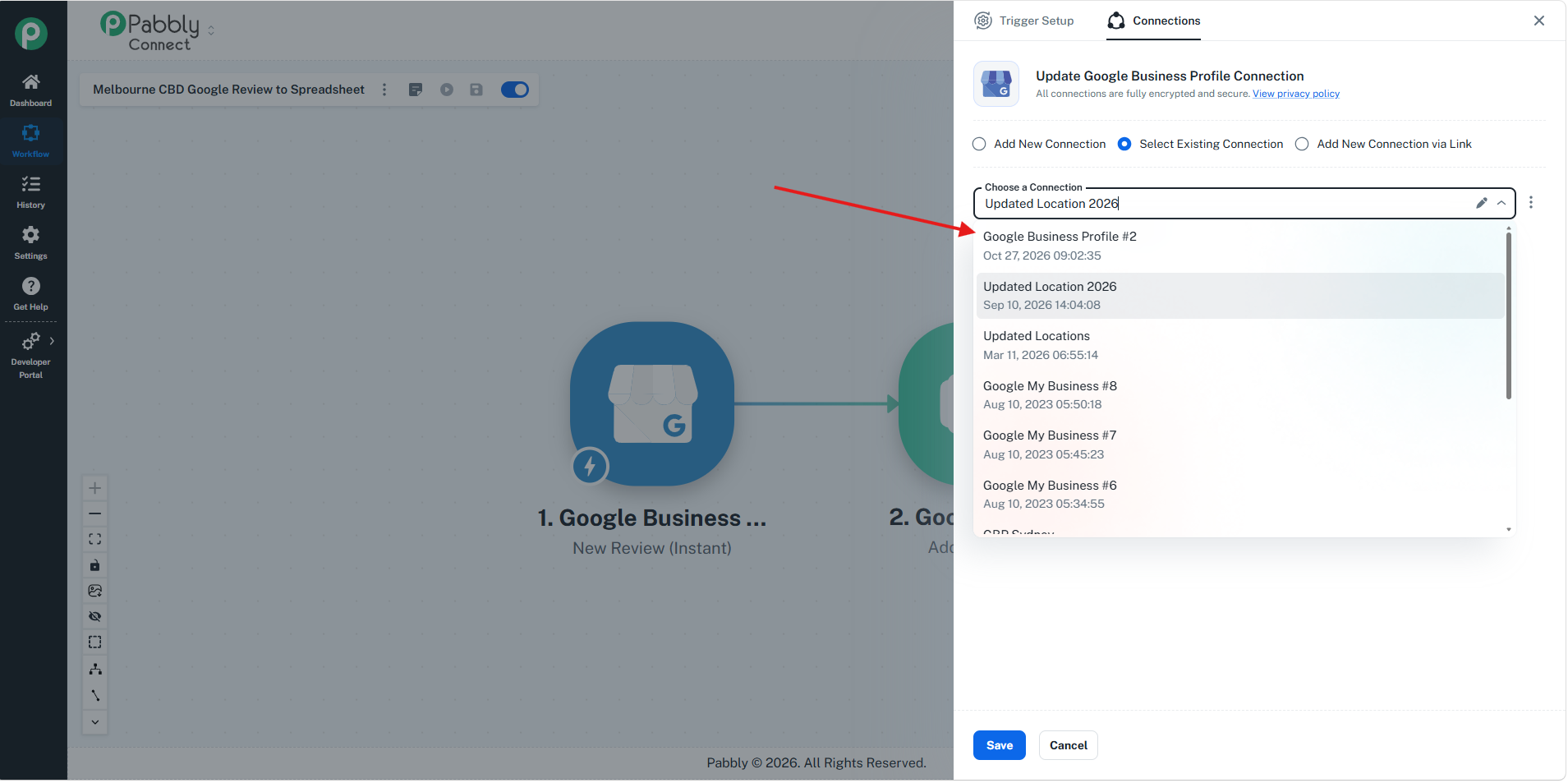
Select the correct connection: In the Google Business Profile trigger step, please select the updated connection named Updated Location 2026 instead of the other existing connections.
Select the correct business location: We noticed that the current configuration appears to be using the Frankston location. However, as per your previous workflow configuration, you should select the Little Collins, Melbourne location.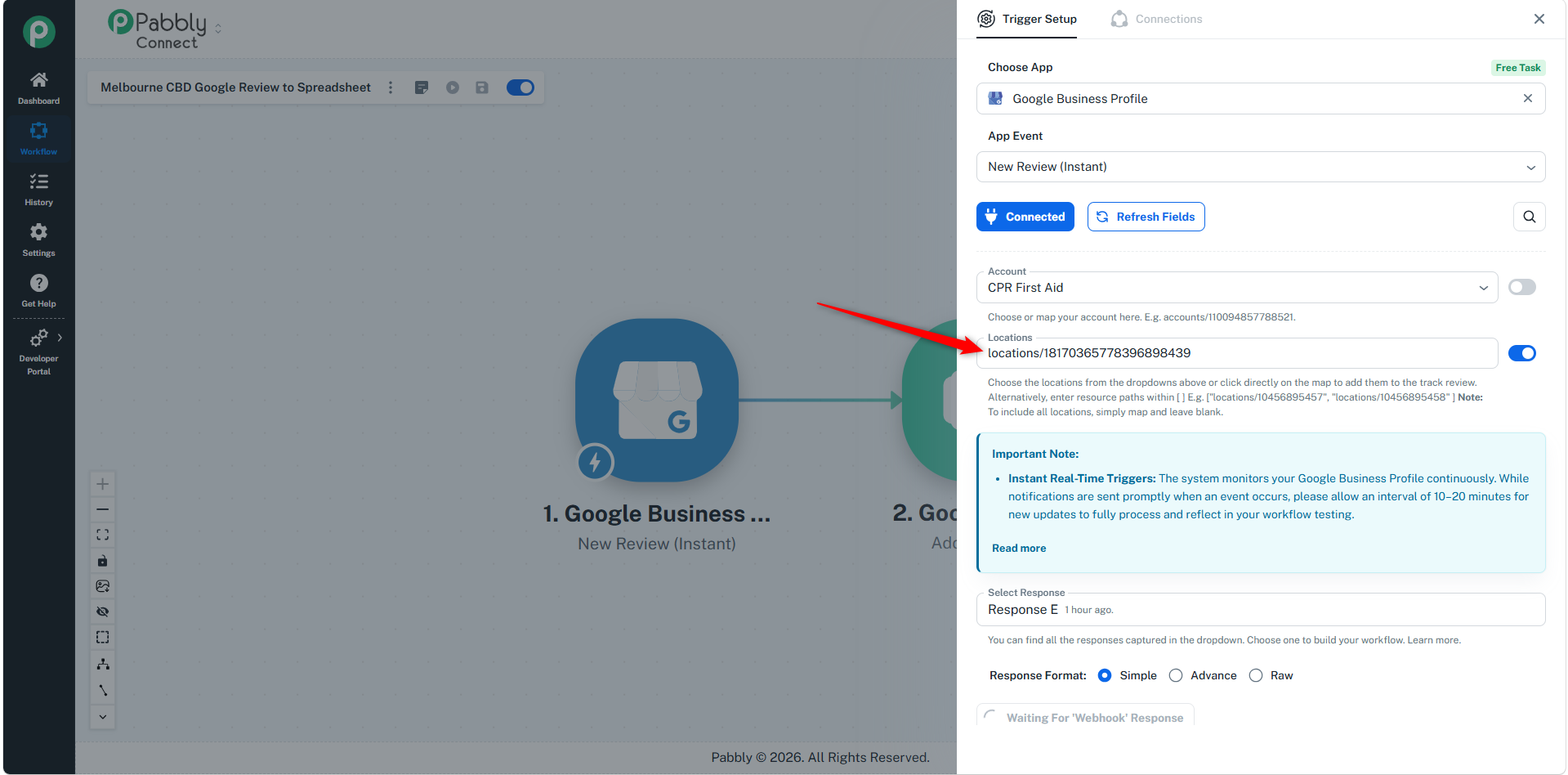 Correct location:- locations/17566736421947930659
Save the changes and test the workflow again.
Please make these changes and let us know whether the workflow executes successfully and the Google Sheets step records the review details.
Aditya Chourey
Customer Support Associate
🌐 Pabbly.com
👉 Rate your support
Black Friday Early Access
Hi Pabbly Support Team,
Thank you for reviewing my workflow configuration and providing the recommended steps.
I would like to confirm that the issue has already been resolved, and the workflow is now working properly.
Thank you for your assistance and continued support. I appreciate your help in resolving this issue.
Hi Fred,
You are most welcome! I am pleased to hear that everything is now functioning as expected.
I will go ahead and mark this ticket as resolved. If you need further assistance or run into issues with your other workflows, please don't hesitate to reach out. We are always happy to help.
Aditya Chourey
Customer Support Associate
🌐 Pabbly.com
👉 Rate your support
Black Friday Early Access