pabbly grabbing mismatch emails from iterator?
Status: Closed · Asked by John Smith on · 0 views
Hello, pabbly seems to be having a caching issue starting a few days ago when this workflow runs, we're grabbing a JSON array from our database. Tableau seems to be mixing up the emails that come through in this JSON array, goes through an iterator. This is causing clients to get the wrong client email, and it's causing issues for us. I have checked everything on my end, and this does not seem to be an issue on my end. After some research, this seems to be a caching issue on pabbly end. I added a chat step to this workflow and this issue happened afterward but I know for sure the mapping is correct. In the workflow history it shows the email going to the correct email but this is not the case. Please advise.
Sorry used talk to text Tableau = Pabbly
Hello John,
Thank you for bringing this issue to our attention.
We have reviewed the workflow URL and the Task History details you shared. To help us investigate the issue more accurately, could you please clarify the following?
Specific Iteration: We understand that the Iterator runs approximately 35 times. Please identify the specific iteration number(s) where the incorrect email is being sent. For example, are the initial iterations working correctly while the issue occurs in later iterations?
Expected vs. Actual Email: For the affected iteration(s), please share the expected email address and the email address that actually receives the message.
Screen Recording: Please share a screen recording demonstrating the issue, including the relevant Iterator output, the mapped email address, and the subsequent step where the email is sent. This will help us understand the behavior and investigate it more effectively.
Also, please note that this is a public forum, so we recommend avoiding the sharing of sensitive client information here.
You can share the requested details and screen recording by emailing support@pabbly.com or by replying to your recently created support ticket, #TCK-223519.
Once we receive these details, we can investigate the issue further.

Pabbly Support:
Hello John,Thank you for bringing this issue to our attention.We have reviewed the workflow URL and the Task History details you shared. To help us investigate the issue more accurately, could you please clarify the following?Specific Iteration: We understand that the Iterator runs approximately 35
Hello I have provided the link to the workflow, it only has two runs. Please check this. In the first run the emails go out correctly but when the rerun on failure runs (usually due to rate limit which is fine) the cache keeps the previous email in the gmail step it seems and it sends the remaining emails to the previous email in the chain. I hope that makes sense.
Pabbly Support:
Hello John,Thank you for bringing this issue to our attention.We have reviewed the workflow URL and the Task History details you shared. To help us investigate the issue more accurately, could you please clarify the following?Specific Iteration: We understand that the Iterator runs approximately 35
I have completely turned off this workflow due to this issue.
Pabbly Support:
Hello John,Thank you for bringing this issue to our attention.We have reviewed the workflow URL and the Task History details you shared. To help us investigate the issue more accurately, could you please clarify the following?Specific Iteration: We understand that the Iterator runs approximately 35
This was also a v1 version and it was having the error after I added OPENAI calls.
I made not changes to the data mapping
Hello John,
Thank you for the additional details. We understand that the issue occurs when an Iterator step fails and is rerun, potentially causing the Gmail step to use the previous iteration's email address instead of the current one.
As a troubleshooting step, we recommend adding a Delay by Queue step immediately after the Iterator. This may help control the execution flow and reduce issues caused by multiple requests running too quickly. However, you’ll need to test this to confirm whether it resolves the issue.
If the issue persists or anything remains unclear, we can connect over Google Meet to review the workflow together. You can request a meeting by replying to ticket #TCK-223519, or let me know, and I’ll share a meeting slot link so you can schedule the meeting at a convenient time from the available slots.
Hello John,
We’re following up to check whether adding the Delay by Queue step after the Iterator helped resolve the issue.
If the issue persists, please let us know, and we can arrange a Google Meet to review the workflow together.
Pabbly Support:
Hello John,We’re following up to check whether adding the Delay by Queue step after the Iterator helped resolve the issue.If the issue persists, please let us know, and we can arrange a Google Meet to review the workflow together.Thanks & Regards,Vinay JainCustomer Support Associate🌐 Pabbly.com
Hi there I am catching up on your responses. I would like to have that meeting and see if we can go over this. I will respond to the email
Pabbly Support:
Hello John,We’re following up to check whether adding the Delay by Queue step after the Iterator helped resolve the issue.If the issue persists, please let us know, and we can arrange a Google Meet to review the workflow together.Thanks & Regards,Vinay JainCustomer Support Associate🌐 Pabbly.com
Actually is says no response. how would I set up the meeting please
Pabbly Support:
Hello John,We’re following up to check whether adding the Delay by Queue step after the Iterator helped resolve the issue.If the issue persists, please let us know, and we can arrange a Google Meet to review the workflow together.Thanks & Regards,Vinay JainCustomer Support Associate🌐 Pabbly.com
Please email me and cc my associate [email hidden] for a meeting, thanks!
Pabbly Support:
Hello John,We’re following up to check whether adding the Delay by Queue step after the Iterator helped resolve the issue.If the issue persists, please let us know, and we can arrange a Google Meet to review the workflow together.Thanks & Regards,Vinay JainCustomer Support Associate🌐 Pabbly.com
Last comment is the workflow was delays already
Hello John,
Thank you for your response.
We’ve reviewed your workflow and found that the Delay After Queue step has not been added at the required location. We’re sharing a screenshot with an arrow indicating where you need to add this step.
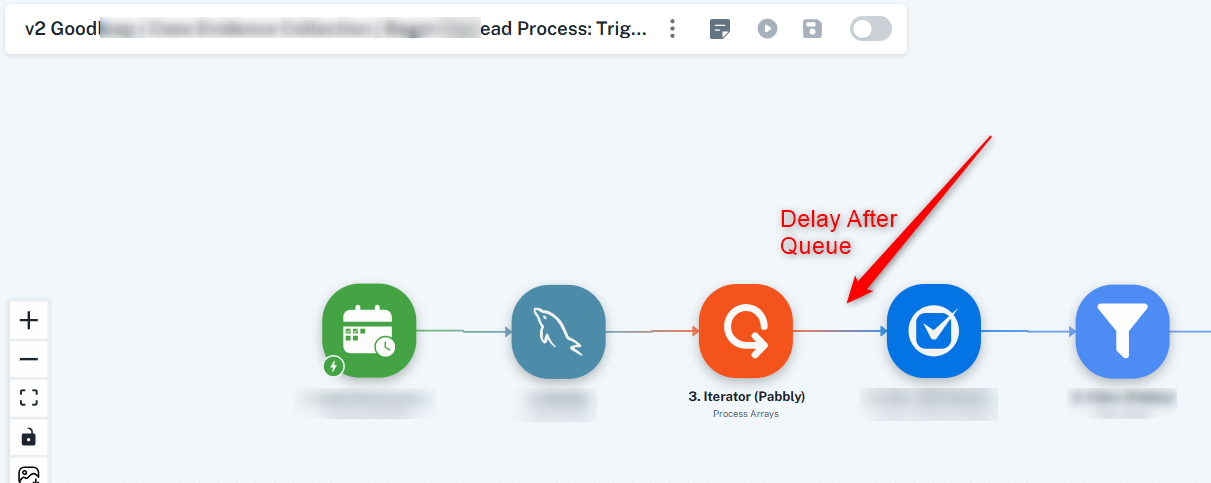
Please add the Delay by Queue step immediately after the Iterator, as this is a recommended workaround to help process each iteration correctly and prevent the Gmail step from using previous iteration data.
If the issue persists after adding and testing this step, you can book a Google Meet with our team at your convenience using the link below:
https://www.draftmeet.com/book/lnk_06620e67ea29136b2a689d2605283e5b
Please select a suitable available time slot to schedule the meeting.
Hello John,
Just following up to check whether you’ve added the Delay by Queue step and tested the workflow.
If the issue persists, you can book a Google Meet with our team using the link shared in our previous email.
Hi John,
We’re following up on our previous message regarding your query. As we haven’t received a response, this will be our last follow-up, and the thread will be closed automatically.
If you still need assistance, you can email us again at support@pabbly.com to raise your concern.
We would also greatly appreciate it if you could share your feedback on your support experience using the following link: https://www.trustpilot.com/review/www.pabbly.com