harsh40413
Member
- Your Task History ID
- IjU3NjUwNTY0MDYzNjA0MzE1MjZhNTUzZDUxM2E1MTZiNTQzMzBmMzki_pc
- Consent to Access & Modify
- I authorize Pabbly Support to log in to my account and make changes to the specified workflow for troubleshooting.
Hi Pabbly Team,
I’m completely blocked while reconnecting Zoom in Pabbly Connect and need clarity from your side.
One of my workflows failed with the following error:
Error received via email:
{
"code": 124,
"message": "Access token is expired.",
"OAuthException > reason": "Invalid Token!",
"OAuthException > error": "invalid_grant"
}
Your system suggested creating a new connection.
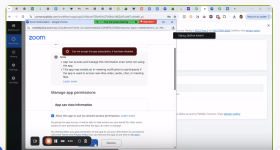
When I try to re-authorize Zoom from Pabbly, the Zoom OAuth screen shows this error:
Because of this, I cannot log in or grant access at all.
So creating a new connection is not possible.
 Same error every time.
Waiting for a clear resolution.
Thanks.
I’m completely blocked while reconnecting Zoom in Pabbly Connect and need clarity from your side.
 What’s Breaking
One of my workflows failed with the following error:
- Workflow: BBE – 1 day new workflow
- Step: Zoom → Add a Webinar Registrant
- Connection Name: bbe_99_2days
Error received via email:
{
"code": 124,
"message": "Access token is expired.",
"OAuthException > reason": "Invalid Token!",
"OAuthException > error": "invalid_grant"
}
Your system suggested creating a new connection.
Actual Problem
When I try to re-authorize Zoom from Pabbly, the Zoom OAuth screen shows this error:
“Can not accept this app subscription, it has been disabled.”
Because of this, I cannot log in or grant access at all.
So creating a new connection is not possible.
 What I’ve Already Tried
- Removing the existing Zoom connection
- Creating a fresh connection
- Logging in again via Zoom OAuth from Pabbly
Same error every time. Questions That Need Clear Answers
- What is the exact fix from Pabbly’s end to restore Zoom authorization?
Waiting for a clear resolution.
Thanks.