Instructions to Ask a Question
For any assistance, please click the "Ask a Question" button and select the Pabbly product for which you require support.
We offer seven comprehensive applications designed to help you efficiently manage and grow your business:
Our support team endeavors to respond within 24 business hours (Monday to Friday, 10:00 AM to 6:00 PM IST). We appreciate your understanding and patience.
Are you looking to this?Hi there,
I have successfully created a workflow from Ora to Focuster.
And now I'm hoping I can do a Focuster to Ora - so when the task is completed in Focuster, on Ora it will move the task to the Done list.
This is even possible?
Please send me the screenshot of the error you're getting.Yes, correct, but I couldn't get it to work.
Please send me the screenshot of the error you're getting.
Can you please map the corresponding task Id instead of title there,
I have gone through their API and couldn't get any Search Task by Task Title endpoint in order to get the Task ID.Hi Naveen,
There's no task id field I could find, and I tried finding a common unique id to map from Ora to Focuster but there isn't.
Can you advise?
I have gone through their API and couldn't get any Search Task by Task Title endpoint in order to get the Task ID.
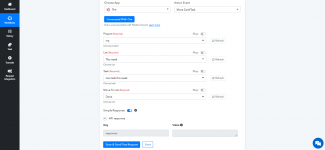
I would request you to disable the mapping for the field and select one of the listed tasks from the dropdown to get it work.
Yes exactly! Try this.Do you mean just do this?
View attachment 26
It didn't work.Yes exactly! Try this.
I have just checked your account and figured it out, probably you were missing to click the refresh buttons. Please check attachment.It didn't work.
Here's the error received via email
{
"response": "<!DOCTYPE HTML PUBLIC "-//W3C//DTD HTML 3.2 Final//EN"><title>404 Not Found</title><h1>Not Found</h1><p>The requested URL was not found on the server. If you entered the URL manually please check your spelling and try again.</p>"
}
When a task is created in Focuster normally you get a task id. Such ID should be saved (preferably in Ora or else you should create a spreadsheet where you can save id's from Ora and Focuster that match.Hi there,
I have successfully created a workflow from Ora to Focuster.
And now I'm hoping I can do a Focuster to Ora - so when the task is completed in Focuster, on Ora it will move the task to the Done list.
This is even possible?
I have just checked your account and figured it out, probably you were missing to click the refresh buttons. Please check attachment.
Just checked your workflow, can you please reconnect your Ora application in the workflow or just share the login details of your Ora account at [email protected], we will check and setup the that workflow for you.Hi Naveen, I tried what you said but still can't get it to work. Any advise?
Hi Naveen, do you mean to disconnect and remove the existing credentials and restart the connection?Just checked your workflow, can you please reconnect your Ora application in the workflow or just share the login details of your Ora account at [email protected], we will check and setup the that workflow for you.
Yes, just try it once if issue persists, please share the Ora credentials at [email protected], we will check and do the needful. once, your issue got resolved, you can change the password.Hi Naveen, do you mean to disconnect and remove the existing credentials and restart the connection?