AI Assistant Automatically Resuming After Human Intervention + Conversation Data Storage
Status: Open · Asked by Gaurav Arora on · 0 views
Hello Pabbly Support Team,
We are currently using the AI Assistant with AI Auto Reply enabled in Pabbly Chatflow for our WhatsApp conversations.
We are facing an important issue with the Human Intervention / Takeover functionality:
When our team member clicks Intervene and starts handling the conversation manually, the AI Assistant stops responding initially. However, when the customer sends their next message, the AI Assistant automatically becomes active again and sends a reply.
This is disrupting our sales conversations because once a human agent has taken over a conversation, we want the human agent to remain in control until we explicitly decide to hand the conversation back to AI.
Our questions:
- Is this the expected behavior of AI Auto Reply + Intervene?
- Is there any existing setting or configuration where:
- Human clicks Intervene
- AI Assistant is automatically disabled for that particular conversation/contact
- AI remains disabled even when the customer sends subsequent messages
- AI resumes only when the human agent explicitly enables it again?
- If there is no direct setting, can this be achieved through Tags, Custom Fields, Workflows, API, Webhooks, or Pabbly Connect?
For example, we would like to implement something like:
AI Active → Human Intervenes → Tag/Field = HUMAN_ACTIVE → AI remains OFF → Human completes conversation → Tag/Field changed → AI becomes ACTIVE again
AI Conversation Data / Memory
We also want to understand the current capabilities of the AI Assistant regarding conversation-level data.
Is there any option in Pabbly Chatflow to:
- Store information extracted by the AI Assistant into a Custom Field
- Automatically apply a Tag based on what the AI identifies from the conversation
- Store structured lead information such as:
- Product interested in
- Budget
- Quantity required
- Lead type
- Customer requirement
- Purchase timeline
- Lead qualification status
- AI conversation summary
- Read/use these stored fields in subsequent AI conversations
- Update these fields automatically through AI Assistant / workflow / API
We understand that Pabbly Chatflow currently supports Tags and Custom Fields, but we specifically want to know whether the AI Assistant itself can dynamically write conversation-derived information into these fields/tags, rather than requiring a completely separate manual workflow.
Please let us know:
1. What is currently supported natively?
2. What can be achieved through Pabbly Connect/API?
3. What is currently not possible?
4. If there is a recommended workflow for achieving reliable Human → AI → Human control, please provide the exact configuration/steps.
This functionality is very important for our sales team because we need a reliable Human Handover / AI Resume mechanism without AI interrupting an ongoing human conversation.
Thank you.
Hello Gaurav,
Thank you for reaching out and for the detailed explanation. Let me address your questions based on how Pabbly Chatflow's AI Assistant currently works.
When a particular chat is in Intervened status, it should remain in the Intervened state until its status is manually changed.
Could you please share a chat ID where the status changed automatically and the AI Assistant took over again after the intervention?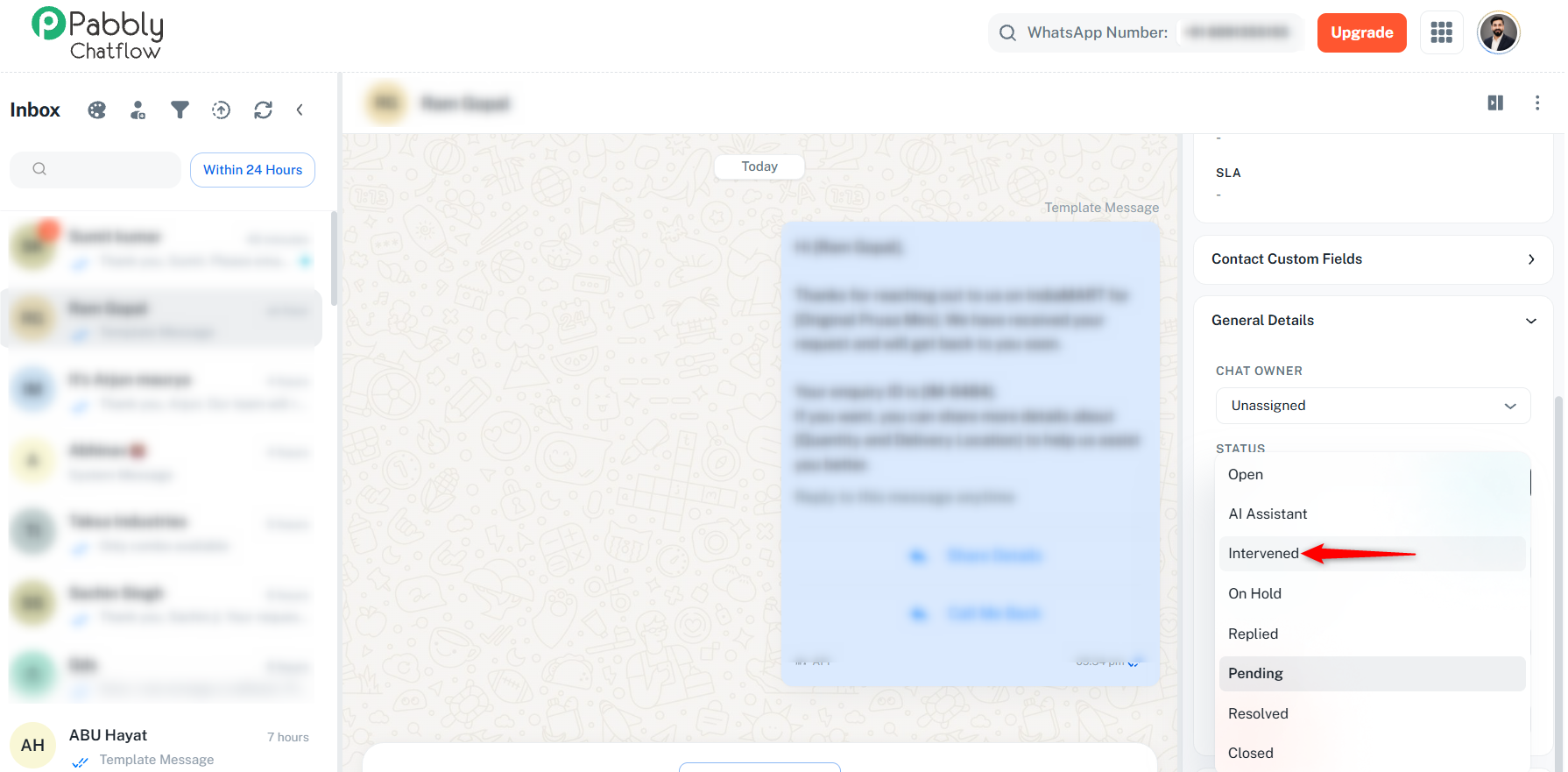
Storing AI-derived data into Custom Fields / Tags:
The AI Assistant cannot extract information from a conversation and write it into Custom Fields or apply Tags on its own. The AI Assistant is designed to answer user queries based on the knowledge base you upload — it does not parse messages for data capture, and it does not use previously collected data to personalize its replies.
To capture lead information (product interested in, budget, quantity, timeline, qualification status, etc.), you need to build a Flow that explicitly asks for and stores each value into Custom Fields. You can combine both approaches in one conversation:
1. Use the Flow Builder first to ask the qualifying questions and save answers into Custom Fields.
2. Then use the "Assign AI Assistant" block to hand the conversation over to the AI for free-form questions based on the knowledge base.
Note that data collected in the flow is available for your follow-up but is not passed into the AI Assistant to customize its answers.
Advanced agentic capabilities:
The more advanced behaviors you're describing — programmatic pause/resume per chat, AI-initiated tagging/field writes, structured escalation, and a full assistant API — are not standard features today. The correct channel to request these is the official roadmap, which routes directly to the product team for feasibility review: https://roadmap.pabbly.com/pabbly-chatflow