

Altering Phone Number to E.164 Format (Ex. +15161234567)

Status
Not open for further replies.
I saw a post a while ago with someone showing how to use a formula to add the +1 before a number. Right now, I need to remove a dash that's coming in from my data source because it's causing issues with other parts of the automation.

Right now, the phone numbers are coming over looking like this --> +1-3015018428
But I need them to look like this --> +1-3015018428 (without the dash)

Is there a formula I can use to remove the dash?

Thanks in advance,
William
 
P

Pabblymember11

Guest
Hey @billymingione

You need to add "Number Formatter by Pabbly" in your Workflow. After adding the action step, you can select the Format Phone Number as an action event and then you have to map the contact number and select the "E164 (+15555555555)" Format in "Format Field" in order to remove the dash from your phone Number.


1676626925110.png
 
Hey @billymingione

You need to add "Number Formatter by Pabbly" in your Workflow. After adding the action step, you can select the Format Phone Number as an action event and then you have to map the contact number and select the "E164 (+15555555555)" Format in "Format Field" in order to remove the dash from your phone Number.


View attachment 21962

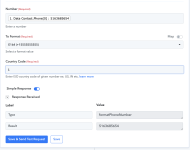
I have now done that, but it doesn't seem like Pabbly is actually changing the format. As you can see in my settings, the response is not being updated.
 

Attachments

  • Screenshot 2023-02-17 at 9.35.53 PM.png
    Screenshot 2023-02-17 at 9.35.53 PM.png
    169.7 KB · Views: 126
P

Pabblymember11

Guest
Please pass the country code as mentioned and then try again.

1676877287233.png
 
Status
Not open for further replies.
Top