

Aweber - new update

saransh1

Member
Hi

After the new update, the only action item I can select to add a new subscriber is add or update subscriber.

But this has a required field of tag.

However I am not collecting tag field in my opt-in page.

So, what should I put in the tag required field.

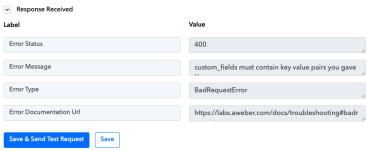
I am attaching a screenshot of what I am seeing.

What should I do here?
 

Attachments

  • Screenshot 2023-05-12 at 5.35.37 PM.png
    Screenshot 2023-05-12 at 5.35.37 PM.png
    46.9 KB · Views: 118
P

Pabblymember11

Guest
Hey @saransh1

Seems like you haven't passed the Tag in the action step which is required, so please pass some value to it and then try again.
1683893641130.png

Also, if you do not have any custom fields from your Aweber account then please create one and then try the action step after reconnecting it.

1683893659076.png
 

saransh1

Member
Hey @saransh1

Seems like you haven't passed the Tag in the action step which is required, so please pass some value to it and then try again.
View attachment 25912
Also, if you do not have any custom fields from your Aweber account then please create one and then try the action step after reconnecting it.

View attachment 25913
How do I pass a tag if I am not collecting it on my opt-in page? A visitor comes to my opt-in page, submits the name, email & that's it. Also, what do u mean by this: if you do not have any custom fields from your Aweber account then please create one
 
P

Pabblymember11

Guest
Hey @saransh1

You may ignore passing the data in the Tag field, please reconnect the action step and then try again.
 
Top