Workflow Name: https://connect.pabbly.com/workflow/mapping/IjQ1Nzc1MSI_3D
Workflow History: https://connect.pabbly.com/task/history?filter_status=applied&filter_by_workflow_id=IjQ1Nzc1MSI_3D
Only One Execution Till Date
But it shows Error
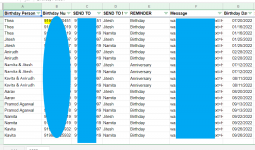
This is a Birthday Reminder
Task History ID: IjE5ODk3MTIxNCI_3D
The Error is confusing because, Most of the Triggers are executing properly but failing beyond a certain point.
You should know, There are no birthdays in the sheet for Today!
Workflow History: https://connect.pabbly.com/task/history?filter_status=applied&filter_by_workflow_id=IjQ1Nzc1MSI_3D
Only One Execution Till Date
But it shows Error
This is a Birthday Reminder
Task History ID: IjE5ODk3MTIxNCI_3D
The Error is confusing because, Most of the Triggers are executing properly but failing beyond a certain point.
You should know, There are no birthdays in the sheet for Today!