check Workflow url
Status: Closed · Asked by Maryam Salem on · 0 views
Hello Maryam,
We have checked your webhook URL by turning on the workflow and testing it from our end. The webhook URL is working and active.
Regarding your concern about receiving information on rejected or bounced emails, could you please elaborate on what exactly you are trying to achieve? Please explain what information you expect to receive through the webhook and how it is currently being handled on your company website.
Additionally, we noticed the following authentication error in your workflow:
Error 401 – UNAUTHENTICATED / OAuthException: invalid_grant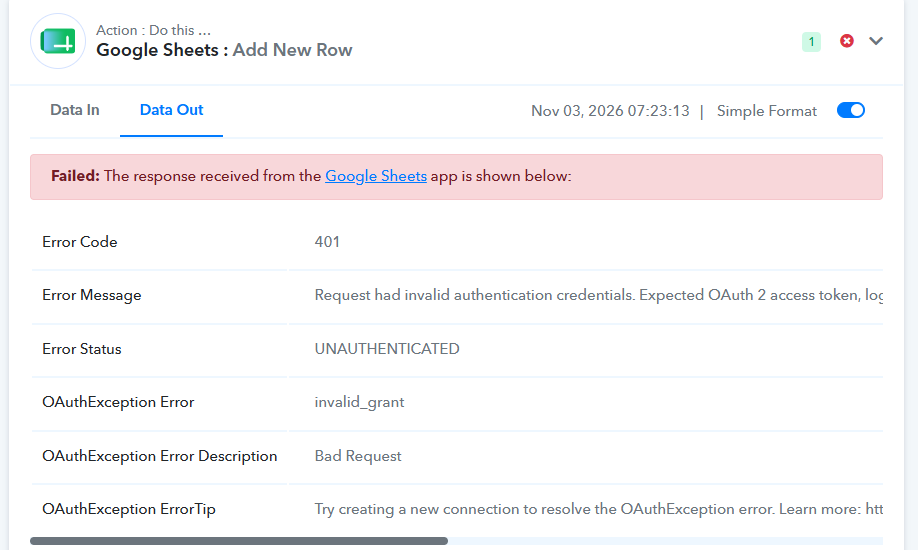
This indicates that the existing Google Sheets connection has an authentication issue.
To resolve this and allow data to be sent to Google Sheets, please follow these steps:
Open your workflow in Pabbly Connect.
Go to the Google Sheets action step.
Click on the existing Google Sheets connection.
Create a new connection and sign in with your Google account.
Grant all the required permissions.
Save the step and test it again.
Once the new connection is established successfully, please check whether the data is being added to your Google Sheet.
Aditya Chourey
Customer Support Associate
🌐 Pabbly.com
👉 Rate your support
Black Friday Early Access

Hello,
Thank you for the details and the screenshot of the Google Sheets error.
Unfortunately, we can’t follow these steps. We don’t have access to this Pabbly Connect account. It was set up by a third party, and nobody in our company knows the login. We are Massaed, the owner of massaed.com, which sends our customers’ enquiries to this webhook.
The Google Sheets step is important to us, because the connected Google Sheet probably contains our customers’ past enquiries. We’d like to recover them.
Could you please help with the following:
Google account and Sheet: Which Google account (email address) is connected to the Google Sheets step, and what is the name of the Google Sheet? If you can’t share this, could you please contact the account owner on our behalf and ask them to get in touch with us?
Connection failure date: When did the Google Sheets step start failing with the 401 / invalid_grant error? This tells us from which date enquiries stopped being saved.
Other workflow steps: Does the workflow have any steps other than Google Sheets, such as email, WhatsApp or SMS? If so, where do they send the data?
Account ownership: What is the process for transferring this workflow, or the account, to a Massaed company account? We can provide proof of ownership of the website and domain.
Task history: Can you provide an export of the task history (including the “Data In” for each task), going back as far as it’s available?
Pause the workflow: Until ownership is confirmed, please keep the workflow turned off. We’re also disabling the webhook on our website, and we’ll send enquiries directly to our company email.
Thank you for your support.
Best regards,
Hello Maryam,
Thank you for your response.
We understand that you do not have direct access to the Pabbly Connect account because it was originally set up by a third party. Since this community forum is publicly accessible, we cannot disclose account-specific information here, in accordance with our privacy policy.
Please find our responses to your queries below:
Google Account and Sheet Details: We cannot provide logs identifying the exact Google account or Google Sheet connected to the workflow. Once a connection is established, the workflow settings do not expose the connected account credentials or specific Sheet details.
Authentication Error: The
401 – UNAUTHENTICATEDerror occurred today when our team tested the workflow as part of our investigation.Other Configured Actions: We checked the workflow named "Google Ads Leads to Google Sheet" and confirmed that, apart from the Contact Form 7 trigger and Google Sheets action, no email, WhatsApp, or SMS actions are configured.
Account Ownership and Transfer: As stated in our Terms and Conditions, transferring account ownership or changing the registered email address of an account or sub-account is not permitted.


Task History Export: Currently, Pabbly Connect does not support exporting past Task History records or their associated Data In payloads.
Current Workflow Status: The workflow is currently paused (inactive) and will remain so until it is manually re-enabled.
Recommended Next Steps:
Since the account was created by a third party, we recommend contacting the original account owner or administrator and requesting an invitation as a Team Member. Once invited, you can access and manage the workflow based on the permissions granted to you. This will also allow you to update or re-authenticate the Google Sheets connection if required.
We hope this clarifies your concerns. Please feel free to reach out if you need any further assistance.
Thanks & Regards,
Shekh Dilshekh
Customer Support Specialist
🎉Black Friday Early Access
Hello Maryam,
We are following up on our previous response regarding your Pabbly Connect workflow.
Could you please confirm whether you have been able to contact the original account owner and obtain access to the workflow as a Team Member?
Please let us know if you need any further clarification or assistance from our end.
Hello, thank you for your support, but we didn't contact the original account owner, can you provide me your support team email please, I need to send an email.
Best regards.
Hello Maryam,
You can contact our support team at support@pabbly.com for any further assistance.
However, to gain access to the existing Pabbly Connect account and workflow, we recommend contacting the original account owner or administrator directly and requesting them to invite you as a Team Member or you can take account access.
Please feel free to reach out to us if you need any further assistance.
Hello,
Just following up on our previous email to check if you need any further assistance from our end.
Please feel free to let us know if you have any questions or concerns. We’ll be happy to assist you.
Hi,
We’re following up on our previous email regarding your query. As we haven’t received a response, this will be our last follow-up, and the ticket will be closed automatically.
If you still need assistance, you can email us again at support@pabbly.com to raise your concern.