Data is not going through
Status: Answered · Asked by Mido Said on · 0 views
Hi Mido,
Thank you for sharing the screenshots and workflow execution details.
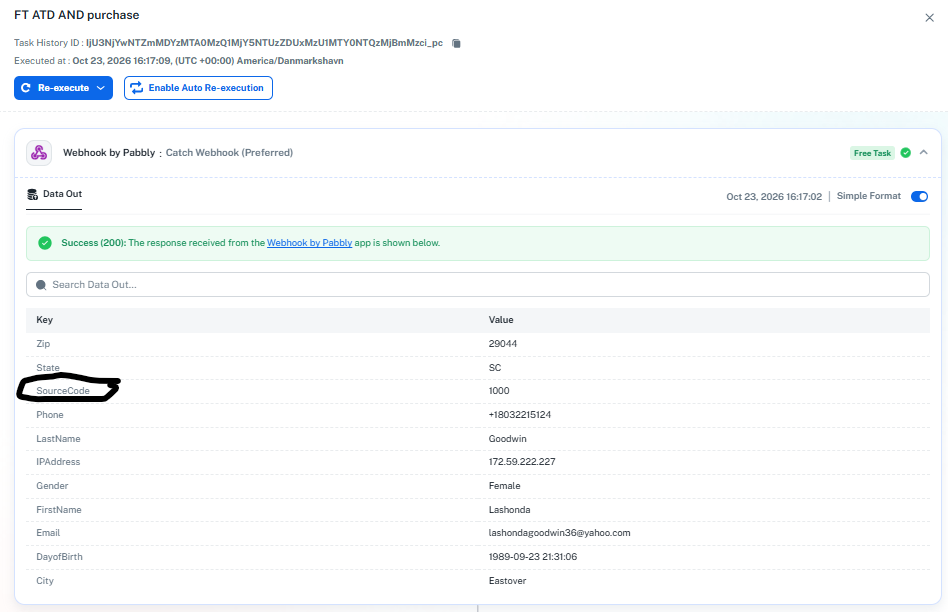
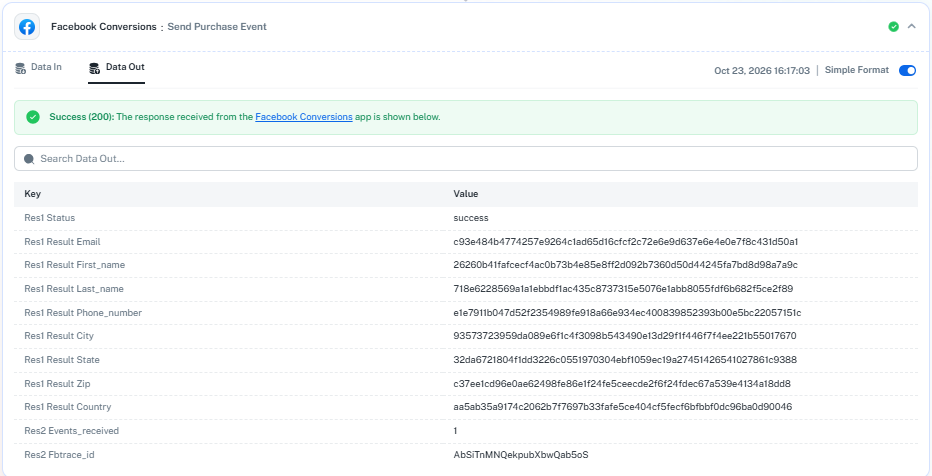
We have checked the Workflow history and can see that both the Webhook by Pabbly and Facebook Conversions steps are showing a successful response. The Facebook Conversions response also shows Events_received: 1.
To help us understand the issue better, could you please clarify whether the Purchase event is not appearing in Meta Events Manager, or whether it is appearing there but not reflecting in your Facebook Ads Manager reports?
If possible, please also share a screenshot of the Test Events tab in Meta Events Manager so we can investigate further.
Aditya Chourey
Customer Support Associate
🌐 Pabbly.com
👉 Rate your support
Black Friday Early Access

The Purchase event is appearing but the "value" is not showing
Hi Mido,
Thank you for your patience while we investigated this issue further.
We reviewed your “FT ATD AND purchase” workflow and its Task History logs. Our findings indicate that the Purchase event is being received by Meta (Events_received: 1). However, the conversion value is not being passed correctly.
In Step 3, Facebook Conversions (Send Purchase Event), the Value field is currently mapped to SourceCode instead of the parameter containing the actual purchase amount. Additionally, in recent webhook executions, the value parameter was empty or omitted. Consequently, Meta is receiving the Purchase event without the expected conversion value.
To resolve this, please follow these steps:
Open your “FT ATD AND purchase” workflow in Pabbly Connect and navigate to Step 3: Facebook Conversions (Send Purchase Event).
Locate the Value field below the Currency field.
Remove/update the existing
SourceCodemapping.
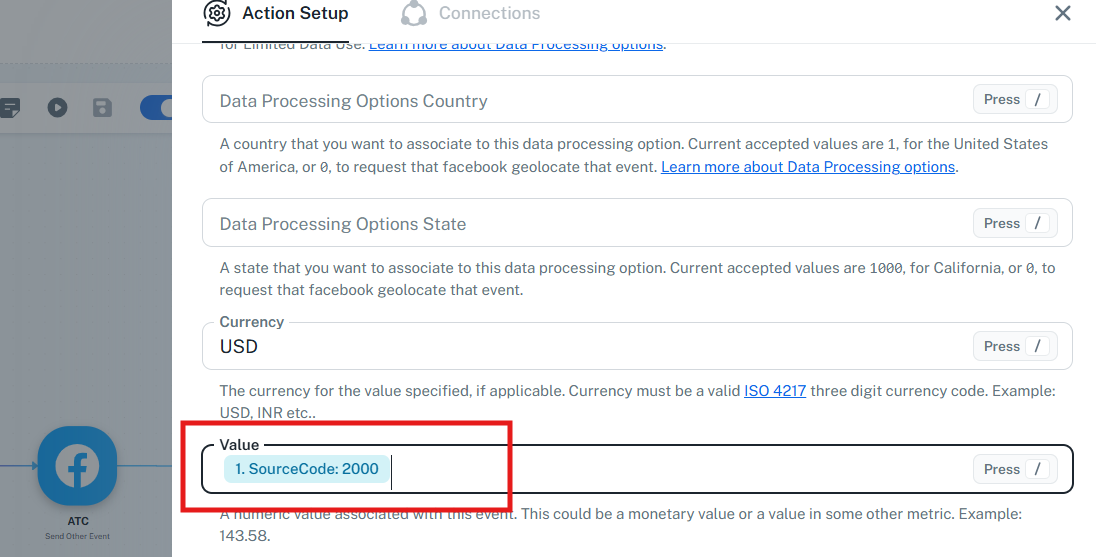
From the Webhook by Pabbly: Catch Webhook (Preferred) response, select the field that contains the actual purchase amount, such as
Price,Amount, orTotal, depending on your incoming payload.Ensure the mapped value is a valid numeric amount without currency symbols, thousands separators, or additional text. For example,
2000and2000.00are both valid numeric representations.Click Save & Send Test Request to test the updated configuration.
After updating the mapping, verify the event in Meta Events Manager → Test Events to confirm that the Purchase event is received with the correct value and currency parameters. Please also ensure that the incoming webhook payload contains the expected purchase amount before mapping it.
If the issue persists, kindly share a screenshot of the Purchase event details in Meta dashboard, including the received parameters and the missing or incorrect value. This will help us investigate further.
Thanks & Regards,
Shekh Dilshekh
Customer Support Specialist
🎉Black Friday Early Access
Thank you.
The "soruce code" is the value, for some reason my CRM name it "source code"
Hello,
Thank you for reaching out.
To better understand your issue and your specific use case, we would like to schedule a call with you. You can pick a convenient time slot using the following link:
👉 Schedule a Support Call: https://www.draftmeet.com/book/lnk_7bccc69e881e8bf495e6b96c0dafcfbe
Once scheduled, we’ll discuss your workflow in detail and provide guidance to resolve the issue efficiently.
Looking forward to speaking with you.
Aditya Chourey
Customer Support Associate
🌐 Pabbly.com
👉 Rate your support
Black Friday Early Access
Hello,
We are currently waiting in the meeting lobby for our scheduled meeting.
Kindly join the meeting at your earliest convenience so we can discuss your concerns and assist you further.
We look forward to connecting with you.
Aditya Chourey
Customer Support Associate
🌐 Pabbly.com
👉 Rate your support
Black Friday Early Access
Hi Mido,
As per our scheduled meeting, we waited for you in the meeting lobby however, since you were unable to join, we have had to move on to our next appointment.
Please let us know if you still need a support meet, and we will be happy to provide you with a new booking link so we can discuss this further.
Looking forward to connecting with you.
Aditya Chourey
Customer Support Associate
🌐 Pabbly.com
👉 Rate your support
Black Friday Early Access
Hello,
Thank you for reaching out.
To better understand your issue and your specific use case, we would like to schedule a call with you. You can pick a convenient time slot using the following link:
👉 Schedule a Support Call: https://www.draftmeet.com/book/lnk_7bccc69e881e8bf495e6b96c0dafcfbe
Once scheduled, we’ll discuss your workflow in detail and provide guidance to resolve the issue efficiently.
Looking forward to speaking with you.Thanks & Regards,
Aditya Chourey
Customer Support Associate
🌐 Pabbly.com
👉 Rate your support
Black Friday Early Access
Yes please, let's do it again
I do apologize
Hi Mido,
No problem at all! You can book a new meeting slot that works best for you using this link:
👉 https://www.draftmeet.com/book/lnk_3d27abf453b23f6c45845bafa627062d
Please select a time when you are available to join, and we'll look forward to connecting with you to get your workflow sorted out.
Aditya Chourey
Customer Support Associate
🌐 Pabbly.com
👉 Rate your support
Black Friday Early Access
Most available times are in the AM, do you have anything availablein PM EST?
Hi Mido,
We have forwarded your meeting request to our team. Someone from our team will connect with you regarding the meeting availability.
Aditya Chourey
Customer Support Associate
🌐 Pabbly.com
👉 Rate your support
Black Friday Early Access
Hello Mido,
You can schedule a meeting with me as per your availability, we hope the available time slots will match your timezone. You can schedule the meeting with this link: https://calendly.com/d/d2ts-r6s-zwc
I'm waiting!, will you call?
It say's "i'm alone on the call"
Hello Mido,
We waited for you to join the call at the scheduled time, you can book another meeting at the next available time slot at this link - https://calendly.com/d/dwc3-kc4-s7p
Thanks & Regards,
Adeel Akhtar
🌐 Pabbly.com