
With Pabbly Subscription Billing you can provide a FREE trial or a PAID trial to your customers before they purchase your product/plan. To achieve this you need to create plans with a free trial period or Paid trial period.
FREE TRIAL PLAN:
Setup:
In order to set up a free trial period plan, you need to go to Products >> Plans >> Add plan >> Add trial period.
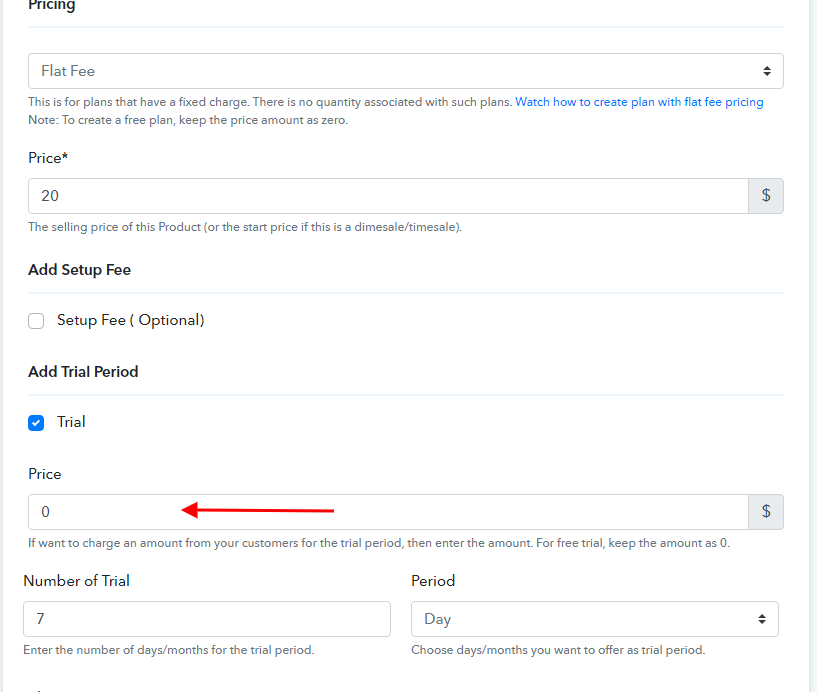
For a free trial, keep the amount as 0, in the price field. You can also set the number of days/months for the trial period.
Working:
Suppose you have created a $20 plan with a 7-days free trial period. The customer buys the plan on 1st April. Then the customer will be given 7-day free trial of the product and will be charged $20 on the 8th day from the day of purchasing, i.e. 8th April.
PAID TRIAL PLAN:
Setup:
Go to Products >> Plans >> Add plan >> Add trial period.
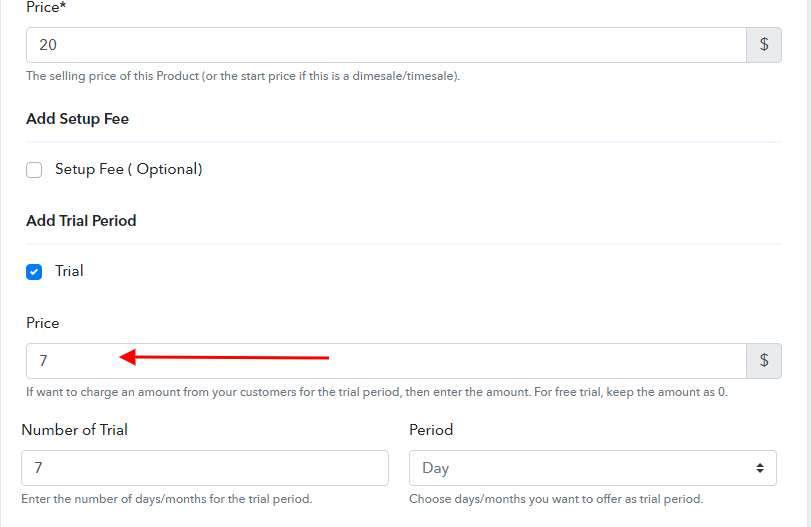
You can set the amount as per your business need for the trial period, in the price field and set the number of days/months for the trial period.
Working:
Suppose you have created a $20 plan with a 7-days paid trial period for $7. The customer buys the plan on 1st April. Then the customer will be charged $7 upfront for a 7-days trial and will be charged $20 on the 8th day from the day of purchasing, i.e. 8th April.
FREE TRIAL PLAN:
Setup:
In order to set up a free trial period plan, you need to go to Products >> Plans >> Add plan >> Add trial period.
For a free trial, keep the amount as 0, in the price field. You can also set the number of days/months for the trial period.
Working:
Suppose you have created a $20 plan with a 7-days free trial period. The customer buys the plan on 1st April. Then the customer will be given 7-day free trial of the product and will be charged $20 on the 8th day from the day of purchasing, i.e. 8th April.
PAID TRIAL PLAN:
Setup:
Go to Products >> Plans >> Add plan >> Add trial period.
You can set the amount as per your business need for the trial period, in the price field and set the number of days/months for the trial period.
Working:
Suppose you have created a $20 plan with a 7-days paid trial period for $7. The customer buys the plan on 1st April. Then the customer will be charged $7 upfront for a 7-days trial and will be charged $20 on the 8th day from the day of purchasing, i.e. 8th April.
