Creating a Channel in Slack with alphanumeric characters

Status
Not open for further replies.

gjpab

Member
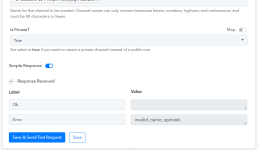
I'm trying to create a slack channel using Pabbly by mapping a value from one of the previous steps in a workflow. It contains alphanumeric values and I've been getting an error as in the attached screenshot. However, it works fine when I use the same value to create a channel manually in Slack.

Is there a reason why?
 

Attachments

  • pabbly-error.png
    pabbly-error.png
    20.7 KB · Views: 146
P

Pabblymember11

Guest
Hey @gjpab

In the "Slack : Create Channel" action step you need to pass the channel name which only contains lowercase letters, numbers, hyphens, and underscores, and must be 80 characters or fewer.

Whereas previously you were passing uppercase letters as well. Though we have made such changes in your workflow which can change the letters to lowercase and then pass the name accordingly.

Kindly try this at your end and let us know if that works for you.


1664799948979.png
 
Status
Not open for further replies.
Top