Credit Card Fields

Tvx1

Member
Hello,
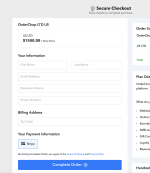
Not sure what I might be doing wrong, but the credit card fields seem to be missing in my checkout page. Any pointers and suggestions are greatly appreciated. Thanks
 

Attachments

  • Screenshot 2024-03-04 at 12.51.19 PM.png
    Screenshot 2024-03-04 at 12.51.19 PM.png
    236.1 KB · Views: 182
D

Deleted member 9923

Guest
Hello @Tvx1 ,
Once you select the payment gateway, such as Stripe in the checkout page for making the payment, after that the card details fields will be displayed on the page.
 

Tvx1

Member
Interesting, I tried click on the Stripe icon and nothing happened. Do the fields not show up automatically like in regular checkout pages?
I tried clicking on the complete order and I got an email saying the payment had failed, but the CC fields never showed up.
 
D

Deleted member 9923

Guest
Hello @Tvx1 ,

Upon reviewing your account associated with the email address - [email protected], we've identified the issue you're encountering with Stripe. The problem of the card details section not appearing is likely because the Stripe payment gateway has not been configured correctly in your account. We kindly request you to configure and connect the Stripe payment gateway correctly in your Pabbly Subscription Billing account to resolve this issue.

Please refer to the screenshot below for more details.

1709707147817.png


Additionally, please consult the following help document which provides guidance on how to connect the Stripe payment gateway with Pabbly Subscription Billing.
https://forum.pabbly.com/threads/stripe-integration-guide.17362/
 
Top