• Instructions to Ask a Question

    For any assistance, please click the "Ask a Question" button and select the Pabbly product for which you require support.

    We offer seven comprehensive applications designed to help you efficiently manage and grow your business:

    Our support team endeavors to respond within 24 business hours (Monday to Friday, 10:00 AM to 6:00 PM IST). We appreciate your understanding and patience.

  • Due to Holi celebrations, our team will have limited availability. While we’ll continue to monitor threads, responses may be slightly delayed. Normal operations will resume on Thursday, 5th March 2026.

elementor to google contact

Status
Not open for further replies.
Good morning, I have a question for you, a request for help on two aspects.
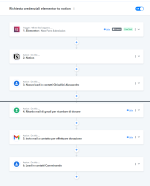
The workflow I created aims to collect data from an Elementor form and then create a contact in Google Contacts.
I wonder if it's possible:
1) Once the contact has been created in Google Contacts, it can be marked with a label (the contacts that come from the Elementor form will all have the same label).
2) the "date of birth" field coming from the form is in this format: dd/mm/yyyy. How can I format it so that this field can also be inserted into Google Contacts?
Thanks if you want to help me
 

Attachments

  • crfop.png
    crfop.png
    107 KB · Views: 154
A

Arshita

Guest
Hey @Perugio1972

1) Once the contact has been created in Google Contacts, it can be marked with a label (the contacts that come from the Elementor form will all have the same label).
To address your concern, you can utilize the filter step. This way, whenever you receive a response from the Elementor form, you can label it accordingly.

2) the "date of birth" field coming from the form is in this format: dd/mm/yyyy. How can I format it so that this field can also be inserted into Google Contacts?
To format the date, I request you to please use the Date/Time Formatter module in Pabbly Connect
 
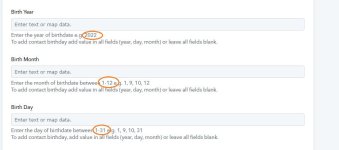
I apologize, I'll try to explain myself better. The first problem to solve is to ensure that the birthday date coming from the Elementor form in this dd/mm/yyyy format is divided by day, month and year as requested in the image to be inserted into Google Contacts.

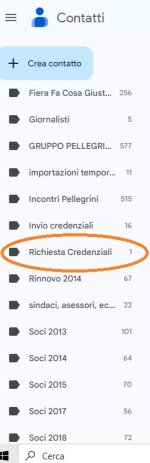
The second problem is to understand if a contact that is created in Google Form can automatically be given a label. For example "Request credential". image 2 Thank you
 

Attachments

  • birthday.JPG
    birthday.JPG
    58.8 KB · Views: 154
  • richiesta credenziale.JPG
    richiesta credenziale.JPG
    39.9 KB · Views: 126
A

Arshita

Guest
I have checked your workflow and noticed that the date of birth is received from the Elementor form in a specific format.

To pass this date of birth into the "Google Contacts: Create Contact" action step, you need to split the text. I have included a step of "Text Formatter: Split Text" in your workflow. Kindly review your workflow, and ensure that the details are correctly mapped in the "Google Contacts: Create Contact" action step.

1705042710641.png
1705042716720.png


The second problem is to understand if a contact that is created in Google Form can automatically be given a label. For example "Request credential". image 2 Thank you
If you wish to label the contact in the Google Contacts, we have included an action step for that purpose. I request you to review the Google Contacts action step related to labeling and add the step according to your requirements.

1705042845652.png
 
Status
Not open for further replies.
Top