

- Your Workflow URL
- https://connect.pabbly.com/workflow/sendwebhookdata/IjU3NjUwNTZkMDYzNDA0MzE1MjY1NTUzNDUxMzci_pc
- Your Task History ID
- IjU3NjAwNTZiMDYzNjA0M2Q1MjY1NTUzNDUxM2E1MTY3NTQzNyI_3D_pc
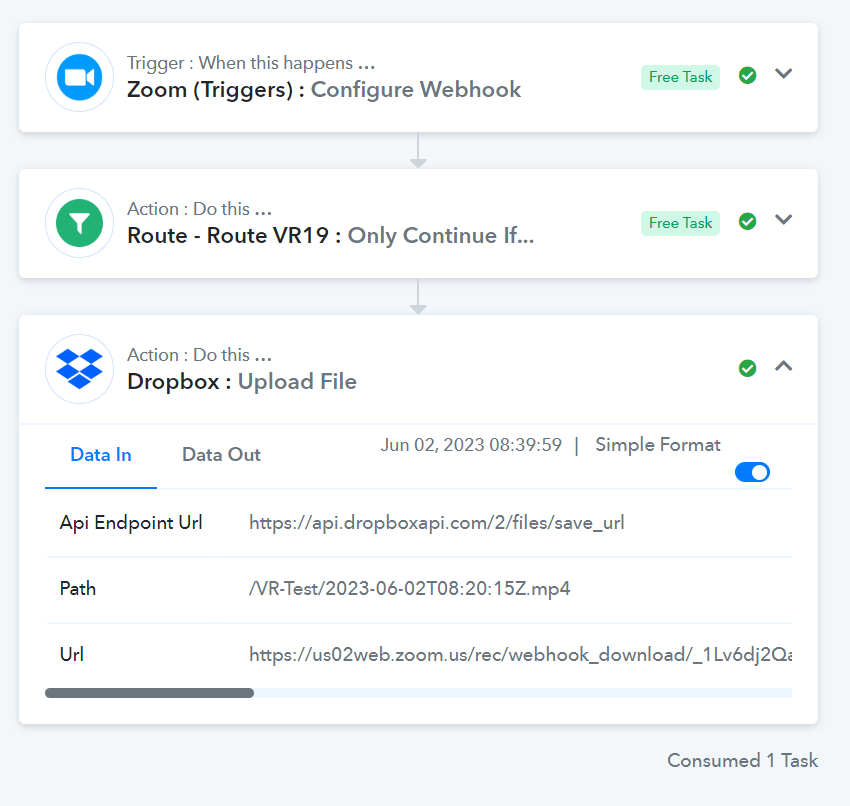
I have a Workflow configured to send the Zoom recordings to Dropbox and save them in a folder called VR-Test, as you can see in the image, it appears that it was successful and that it was created in the directory that I indicated, but when I enter I don't get the video on dropbox.
But if I change the directory and instead of uploading to VR-Test and upload it to VR3-New and run the WorkFlow again, it runs again successfully and if it can be displayed.
So why in some directories it uploads it but in some it doesn't?
But if I change the directory and instead of uploading to VR-Test and upload it to VR3-New and run the WorkFlow again, it runs again successfully and if it can be displayed.
So why in some directories it uploads it but in some it doesn't?


