Facing an issue with payment method addition on meta.
Status: Open · Asked by Riddhi Deorah on · 0 views
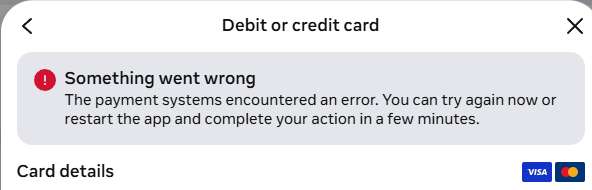
Getting an option to add funds. So if I add the prepaid funds, will it work for the Whatsapp account?

Hello Riddhi,
Thank you for reaching out and sharing the screenshot.
The error you're seeing ("The payment systems encountered an error...") is generated directly by Meta's payment system while adding a payment method on the WhatsApp Business Platform. This is not something Pabbly can control or resolve from our end, as the payment flow happens entirely on Meta's platform. It often occurs due to a temporary issue on Meta's side, even when the card itself is valid.
Please try the following steps:
1. Wait a few hours and try adding the payment method again.
2. Try a different browser, or clear your browser cache and cookies before retrying.
3. Verify that your card details (number, expiry, CVV, and billing address) match exactly what your bank has on file.
4. If the issue persists, please contact Meta/WhatsApp support directly through the WhatsApp Business Help Center, since your BSP cannot intervene in payment method addition.
Please give these a try and let us know how it goes. We're happy to assist further if needed.