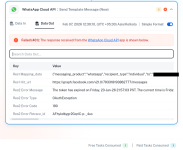
Getting error as token expired in whatsapp cloud api

Swetha

Member
Your Workflow URL
https://connect.pabbly.com/workflow/mapping/IjU3NjYwNTY0MDYzZTA0MzY1MjZhNTUzNTUxMzMi_pc
Consent to Access & Modify
I authorize Pabbly Support to log in to my account and make changes to the specified workflow for troubleshooting.
I have generated permanent token but it getting message as token expired.. so i generated new token but for that also it getting same error.
I have attached screenshot verify it
 

Attachments

  • image (1).png
    image (1).png
    108.8 KB · Views: 2

Preeti Paryani

Well-known member
Staff member
Hey @Swetha,

Thank you for sharing the workflow URL.

Could you please confirm whether you have set up a new connection using a permanent access token? If yes, kindly share a screen recording of the entire process, including the Meta account where the token is generated and the steps followed to set up the connection.

This will help us review the setup in detail, as per the screenshot it appears that the connection used to execute the action may have been created using a temporary access token.

Looking forward to your update.
 
Top