Gives me 204 status quote, why?

flowyze

Member
Your Workflow URL
https://connect.pabbly.com/workflow/mapping/IjU3NjYwNTZmMDYzMjA0M2Q1MjZmNTUzMTUxMzUi_pc
Consent to Access & Modify
I authorize Pabbly Support to log in to my account and make changes to the specified workflow for troubleshooting.
Hi team,

I get a 204 status message as soon as I try to execute something in Brevo.

The lead comes into FB, and the data should be transferred to Brevo.

I have two other automations with the same workflow, but a different lead form in FB and a different target list in Brevo, and they work perfectly. It's only this process that I can't get to work.

Who can help me?
 

Preeti Paryani

Well-known member
Staff member
Hey @flowyze,

Thanks for reaching out.

Upon checking your workflow, it looks like the field mapping in the Brevo action step has been affected, which may be causing the issue.

1769080493192.png


We recommend re-mapping the correct fields in that action step and then running a test execution to check if it works properly.

Let us know how it goes.
 

Preeti Paryani

Well-known member
Staff member
Hey @flowyze,

Thanks for getting back to us.

Upon checking the latest task history execution, it looks like the action is working fine. Also, please note that you are using the Create/Update action in Brevo.

So, in cases where a new contact is created, the API generally returns details like an ID in the response. However, when the contact already exists and it performs an update, Brevo may return a 204 (No Content) status, which still indicates a successful request.

Since 200/201/204 are all considered successful status codes depending on the action result, it appears to be working correctly.

We recommend monitoring the upcoming executions in Task History and verifying if the contacts are being created/updated in Brevo as expected.
 

flowyze

Member
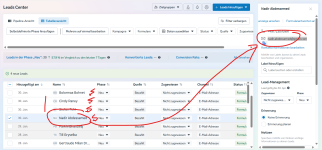
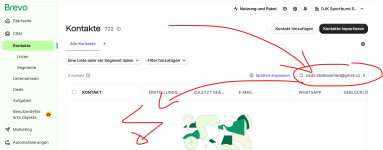
I dont know why but the automation is not taking all facebook leads into brevo, why?
Sometimes its working sometimes not.
I need to check daily and do it manually if not.
 

Attachments

  • 1.facebook leads missing in brevo.png
    1.facebook leads missing in brevo.png
    341.6 KB · Views: 6
  • 2. missing contact in brevo.png
    2. missing contact in brevo.png
    160.4 KB · Views: 6

flowyze

Member
The the 1st of february I didnt get sent any Lead to my brevo newsletter tool, impossible because there are new leads during sonday in facebook as well. Whats going wrong here?
 

Preeti Paryani

Well-known member
Staff member
Hey @flowyze,

It appears that your Facebook Lead Ads connection has expired, which is why you’re unable to proceed. Please set up a new connection, and this should resolve the issue.

Let us know if you need any assistance while reconnecting.
 

Preeti Paryani

Well-known member
Staff member
Hey @flowyze,

Could you please share the workflow URL under which you received this lead? This will help us check why the trigger is behaving inconsistently and advise whether a trigger change is required or not.
 

Preeti Paryani

Well-known member
Staff member
Hey @flowyze,

No, I’m asking for the Pabbly workflow URL, not the Brevo workflow.

Also, please note that you’ll need to set up a new Facebook Lead Ads connection first. After that, use the Facebook Lead Ads: New Lead (Instant) trigger, as it will fetch the latest leads directly from Facebook.

Once this is done, please monitor the workflow and share the Pabbly workflow URL with us so we can review it further.
 

flowyze

Member
Ok I think I did it now.

I couldn't send a test lead on Facebook because the Facebook form doesn't restart, but only shows the “sent” page of the form.
 
Top