Google Drive Upload File Not Working Well With Pabbly API Calls to Other Site
Status: Open Β· Asked by IChild Company on Β· 0 views

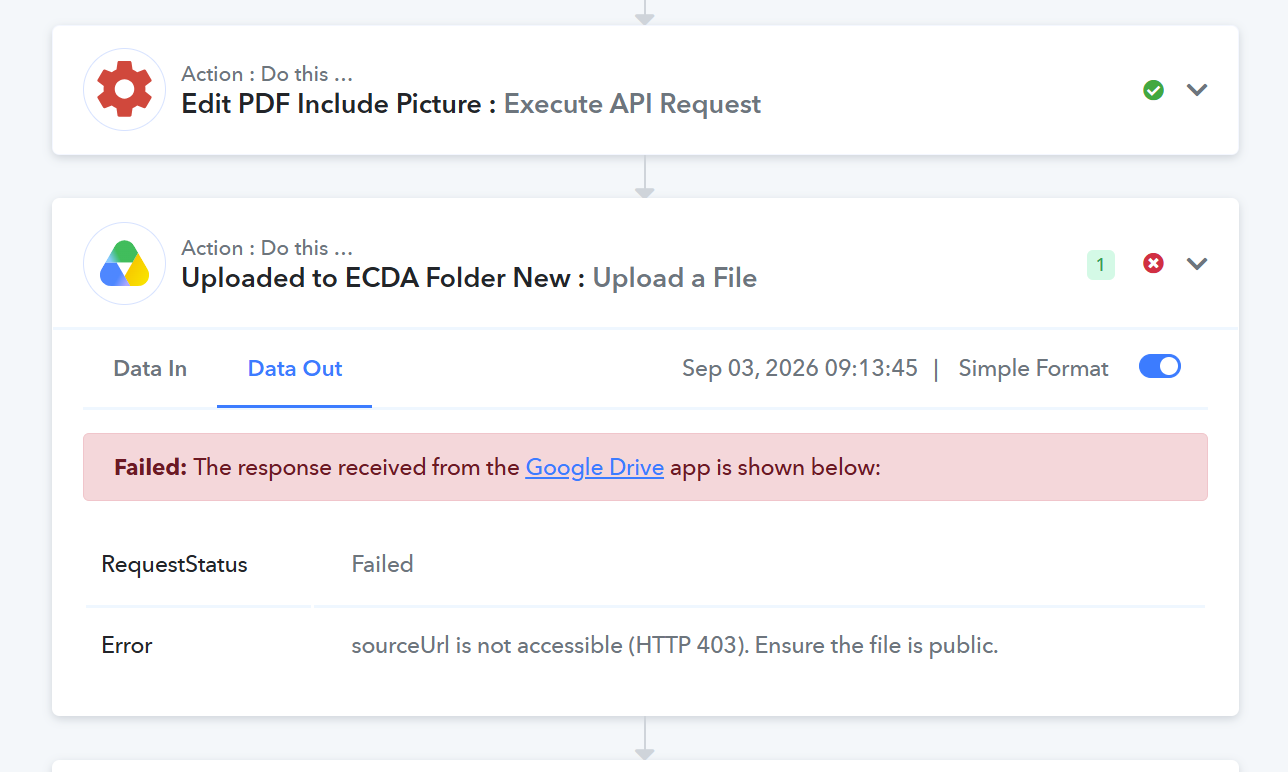
I have attached the screenshot of the public link generated by the previous step here.

Hello,
Thank you for your patience while we investigated this issue.
Reason for the Error
The HTTP 403 / sourceUrl is not accessible error occurred because the original file link passed to the Google Drive step was an S3 temporary link that lacked an explicit .pdf extension at the end. Without the file extension in the URL, Google Driveβs API cannot automatically identify the file's MIME type (application/pdf) and rejects the request as invalid or unauthorized.
What We Have Done to Resolve It
To fix this, we added Step 8: File Uploader by Pabbly directly before your Google Drive step. File Uploader processes the source document and generates a clean, direct, and publicly accessible file URL with the correct .pdf format.
Next Steps for You
To complete the setup, please run a quick test and map the new URL:
Open Step 8: File Uploader (Pabbly) and click Save & Send Test Request to generate the updated URL.
Open Step 9: Uploaded to ECDA Folder New (Google Drive) and clear the current File URL field.
Map the newly generated File URL output from Step 8 (File Uploader by Pabbly) into Step 9.
Click Save & Send Test Request on Step 9 to verify that the file uploads successfully to Google Drive.
Please let us know if you run into any issues after re-mapping!
Thanks & Regards,
Hrishabh
Customer Support Associate
π Pabbly.com
π Rate your support
Task ID: IjU3NjYwNTZmMDYzNzA0MzU1MjY5NTUzYzUxMzA1MTYwNTQzMTBmMzki_pc
Please assist to see why this task has the error when the file uploaded is a pdf.

Hello,
Thank you for reaching out to support.
We checked your task history for the Upload Document to Lecturer Folder New step, and the error sourceUrl returned a web page instead of a file occurs because the mapped file URL coming from your trigger/webhook is a Google Drive preview/view page link rather than a direct file download link.
Google Drive's API cannot download files from preview links (like [https://drive.google.com/file/d/FILE_ID/view](https://drive.google.com/file/d/FILE_ID/view)). It requires a direct download link or raw binary file stream.
How to Fix This:
Check the Mapped Field: Open your workflow and navigate to the Upload Document to Lecturer Folder New step. Ensure the URL mapped into the File URL field points directly to a raw file download link (e.g., from Pabbly File Uploader or a direct file URL).
Convert Google Drive Links: If the incoming link is a Google Drive link, convert the preview URL structure from:
[https://drive.google.com/file/d/YOUR_FILE_ID/view](https://drive.google.com/file/d/YOUR_FILE_ID/view)To a direct download URL format:
[https://drive.google.com/uc?export=download&id=YOUR_FILE_ID](https://drive.google.com/uc?export=download&id=YOUR_FILE_ID)Re-test the Step: Map the direct download link into the File URL parameter and click Save & Send Test Request.
Please give this a try and let us know if you need any further assistance!
Thanks & Regards,
Hrishabh
Customer Support Associate
π Pabbly.com
π Rate your support
Pabbly Support:
Hello,Thank you for your patience while we investigated this issue.Reason for the ErrorThe HTTP 403 / sourceUrl is not accessible error occurred because the original file link passed to the Google Drive step was an S3 temporary link that lacked an explicit .pdf extension at the end. Without the file
Ok, I've had this problem other times and never sure why. Including the File Uploader (by Pabbly) seems to solve it during testing the setup step by step, but then when running the workflow normally, the upload file to GDrive step fails and I can't figure out why. Sometimes it will succeed in execution, but never on first attempt.
Example:
First attempt failed: Task History ID - IjU3NjYwNTZmMDYzNzA0MzU1MjY0NTUzMzUxMzc1MTYxNTQzNzBmMzIi_pc
Second attempt success: Task History ID - IjU3NjYwNTZmMDYzNzA0MzU1MjY0NTUzMjUxMzc1MTYzNTQzMDBmMzgi_pc
I think there's something wrong with the file upload step. I've just come across this issue in a flow I was resetting up, but I've just realised it's been failing in other flows I've had running for ages, so now I have to go back and fix everything. Why would something that had been working find suddenly stop working? Could you please look into this issue?
Hello Craig,
Thank you for providing the Task History IDs.
We checked both executions in your account history, and both ended in a Success state:
Task ID (
...16354300f38i_pc): Executed smoothly and completed all steps on the first attempt.Task ID (
...16154370f32i_pc): Encountered a temporary delay on the initial attempt, but our Auto Re-execution system automatically retried it and successfully uploaded the file to Google Drive.
Temporary failures during live runs usually occur if the source file URL generated by the upstream service takes a few seconds to become fully accessible over the network. When Google Drive attempts to fetch the file immediately before it finishes processing on the source server, it can result in a momentary 403 or timeout error, which is then automatically resolved when Pabbly Connect retries the execution.
If you encounter any specific task that fails permanently without succeeding on re-execution, please share the exact Task History ID with us so we can investigate the error log!
Thanks & Regards,
Hrishabh
Customer Support Associate
π Pabbly.com
π Rate your support
Pabbly Support:
Hello Craig,Thank you for providing the Task History IDs.We checked both executions in your account history, and both ended in a Success state:Task ID (...16354300f38i_pc): Executed smoothly and completed all steps on the first attempt.Task ID (...16154370f32i_pc): Encountered a temporary delay on t
Thanks for your response. Would it help if I added a delay step?
Pabbly Support:
Hello Craig,Thank you for providing the Task History IDs.We checked both executions in your account history, and both ended in a Success state:Task ID (...16354300f38i_pc): Executed smoothly and completed all steps on the first attempt.Task ID (...16154370f32i_pc): Encountered a temporary delay on t
Also, it's not normal that it fails every time on the first run.
You say "Temporary failures during live runs usually occur if the source file URL generated by the upstream service takes a few seconds to become fully accessible over the network.". But I've added a 10s delay and it's still failing on the first run. I don't think this is normal.
Hello Craig,
To help us investigate the exact cause of this initial failure, could you please temporarily turn off Auto Re-execution in your account for a few hours?
When Auto Re-execution is enabled, Pabbly automatically retries and resolves the step before the detailed error log can be captured in a failed state for analysis.
By disabling it temporarily:
The workflow will not automatically retry when the error occurs.
The task will remain in a failed state in your Task History.
We will be able to inspect the exact error response and status code returned by the initial attempt to identify the root cause.
Once disabled, please let a run execute, and share the Task History ID of the failed task with us. You can turn Auto Re-execution back on right after!
Thank you for your cooperation and patience while we look into this.
Thanks & Regards,
Hrishabh
Customer Support Associate
π Pabbly.com
π Rate your support
Following up on my replies above... I dug into this further (with the help of Claude, which I used to pull apart the failed task logs) and can give you exact details rather than just "it's failing intermittently."
The issue: On the Google Drive "Upload a File" step, the request goes to your own pc-integrations.pabbly.com service, which then tries to fetch the file from assets-connect.pabbly.com (the URL produced by the File Uploader by Pabbly step I already have in place before the Drive step, plus a Delay step, so this isn't a case of the source file not being ready yet). The Drive step fails with:
Error: fetch failedExample from my account: Task History ID IjU3NjYwNTZmMDYzNzA0MzU1MjY1NTUzMTUxMzI1MTZhNTQzMjBmMzki_pc, step "Google Drive: Upload a File", SourceType publicUrl, SourceUrl pointing at assets-connect.pabbly.com/file-uploader/.... First attempt failed, and it's inconsistent on retry, sometimes a re-execution succeeds, sometimes it fails again, which matches what I described earlier (10-second delay makes no difference).
Since the SourceUrl is on your own infrastructure (not a third-party host), this looks like it's the handoff between pc-integrations.pabbly.com and assets-connect.pabbly.com that's flaky, not anything about my file, my URL, or Google rejecting the request. That matches what the original poster in this thread described about your own connectors "not working well" since the Upload File feature update.
Separate but maybe related issue (flagging in case it's useful context, though it looks like a different bug): another one of my workflows that still uses the older "Upload a File (Legacy)" Google Drive action is failing 100% of the time, every single upload step, with:
Error Code: 400
Script ID MQKgJ4TFmMDMOkOoNa5muLmmy7uZSrO0E could not be opened. Please check that the script exists, and that you have access to it.
Error Status: INVALID_ARGUMENTThat one looks like the Apps Script your Legacy upload action depends on internally has become inaccessible. It's been consistently failing since at least Sep 1, whereas earlier in August only individual (optional/empty) fields failed with the expected "Required field URL missing" error. Happy to open that as a separate thread if it's unrelated, just noting it since it's another Google Drive upload path breaking around the same time.
Given both are on your backend rather than my workflow configuration, could someone take a look at the pc-integrations.pabbly.com to assets-connect.pabbly.com fetch reliability, and separately check whether script MQKgJ4TFmMDMOkOoNa5muLmmy7uZSrO0E still exists and is accessible to the Legacy upload action?
Pabbly Support:
Hello Craig,To help us investigate the exact cause of this initial failure, could you please temporarily turn off Auto Re-execution in your account for a few hours?When Auto Re-execution is enabled, Pabbly automatically retries and resolves the step before the detailed error log can be captured in a
Done. Here's the Task History ID - IjU3NjYwNTZmMDYzNzA0MzY1MjZkNTUzNzUxMzU1MTY2NTQzMzBmMzki_pc
Hello Craig,
Thank you for providing those additional details and analyzing the logs.
Just to confirm: did you add the 10-second Delay step directly between the File Uploader by Pabbly step and the Google Drive: Upload a File step?
If you have already placed the delay step between those two specific actions and the fetch failed error persists on the Google Drive step, please let us know so we can pass these findings to our development team to inspect the internal handoff between pc-integrations.pabbly.com and assets-connect.pabbly.com.
Thanks & Regards,
Hrishabh
Customer Support Associate
π Pabbly.com
π Rate your support
Pabbly Support:
Hello Craig,Thank you for providing those additional details and analyzing the logs.Just to confirm: did you add the 10-second Delay step directly between the File Uploader by Pabbly step and the Google Drive: Upload a File step?If you have already placed the delay step between those two specific ac
Yes, I have. Already mentioned it in one of my comments and it's clear in the task history I shared in my last comment.

Hello Craig,
Thank you for confirming and for sharing the additional Task History ID and detailed findings.
We have escalated this issue to our technical/development team for further investigation. We have shared the affected Task History IDs, the fetch failed error details, and the fact that the 10-second delay does not resolve the issue, even though the File Uploader URL is publicly accessible.
The team will specifically check the internal file-fetch process between pc-integrations.pabbly.com and assets-connect.pabbly.com to identify why the initial request intermittently fails while a subsequent re-execution may succeed.
Weβll update you as soon as we receive further findings from the technical team.
Thanks & Regards,
Hrishabh
Customer Support Associate
π Pabbly.com
π Rate your support