• Instructions to Ask a Question

    For any assistance, please click the "Ask a Question" button and select the Pabbly product for which you require support.

    We offer seven comprehensive applications designed to help you efficiently manage and grow your business:

    Our support team endeavors to respond within 24 business hours (Monday to Friday, 10:00 AM to 6:00 PM IST). We appreciate your understanding and patience.

  • Due to Holi celebrations, our team will have limited availability. While we’ll continue to monitor threads, responses may be slightly delayed. Normal operations will resume on Thursday, 5th March 2026.

How to get multiple numbers from Google Sheet using Iterator ?

Status
Not open for further replies.

Carlos Melo

Member
Hello guys,

So my issue is exactly that, how to get multiple numbers from Google Sheet using Iterator ?
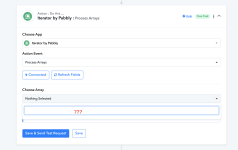
I am building a flow in which I am trying to do that. However, Iterator doesn't recognize Google Sheet in a previous step, as you can check in the flow:


Thank you,
Carlos M.
 

Attachments

  • Screenshot at Dec 06 08-23-14.png
    Screenshot at Dec 06 08-23-14.png
    272.2 KB · Views: 168
P

Pabblymember11

Guest
Hey @Carlos Melo

In terms of using the Iterator action step, you need to first capture the API response of the action step in the advanced format by toggling the "Simple Response" button then you will be able to get the JSON array in the Iterator action step.

2023-12-06_17h07_43.png


For a better understanding, you can also refer to the following video lesson on Iterator.


Carlos Melo

Member
Thank you Supreme.
Yes, I have done what you said but Iterator doesn't get JSON array. The field remains empty.

If you check the workflow you can see that.
 
Status
Not open for further replies.
Top