How to handle Data Values missed?

overnatural

Member
Hi, I integrated Google My Business to respond to reviews, and the Data Value "Comment" sometimes comes and sometimes does not. How can I handle this error when the data is not coming? Is it possible to indicate that if the data value doesn't exist, just write a default value?
 

ArshilAhmad

Well-known member
Staff member
Hi @overnatural,

You can try adding Text Formatter: Default Value action step to your workflow to achieve this use case.
1705181560532.png


overnatural

Member
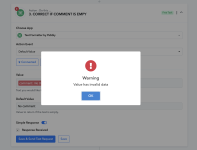
I cannot save the "Text Formatter" module if the Data Value does not exist, resulting in an error. If the Value does not exist and triggers an error, will the "Text Formatter" module interpret the error as an empty variable and use the "Default Value" I set?
 

Attachments

  • Screenshot 2024-01-13 at 6.24.09 PM.png
    Screenshot 2024-01-13 at 6.24.09 PM.png
    213.9 KB · Views: 127

ArshilAhmad

Well-known member
Staff member
During the setup of your workflow, you need to map a data value (comment) that exists. Meanwhile, in automation, if the comment doesn't come from the trigger step, it will automatically return the default value you set.

f the Value does not exist and triggers an error, will the "Text Formatter" module interpret the error as an empty variable and use the "Default Value" I set?
Yes, that is exactly what would happen.
 
Top