

What is Human in Loop?
Human in Loop (HITL) is an action step in Pabbly Connect that allows you to pause your workflow and request approval via email before continuing.
This is useful when you want a human to review or approve a step before the automation proceeds.
How Human in Loop Works
1. Add the Human in Loop action step anywhere in your workflow
2. When the workflow runs:
- It executes all steps normally
- When it reaches the HITL step, the workflow pauses
- An email is sent to the specified recipient for approval
Approval Process
The recipient receives an email containing:
- If Approved:
Workflow resumes
Continues to the next steps
- If Rejected:
Workflow stops at that step
No further steps are executed
Fields in HITL Step
The Human in Loop step has 2 fields:
Based on user action, the following messages are shown:
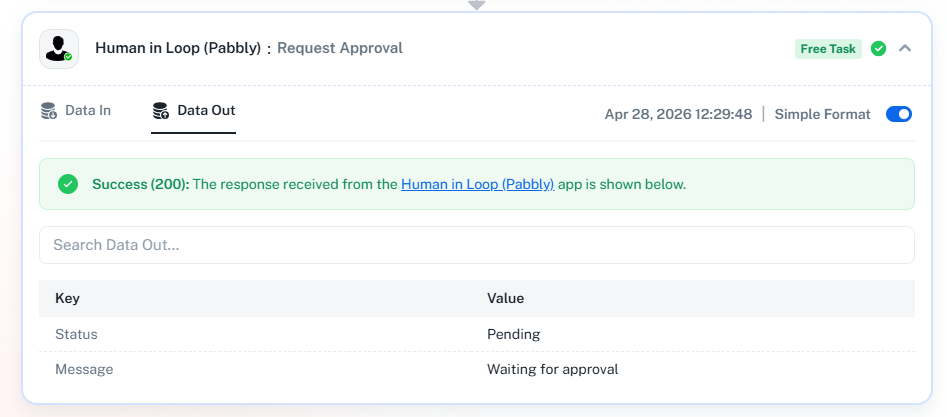
 Pending (No action taken)
Pending
Waiting for approval
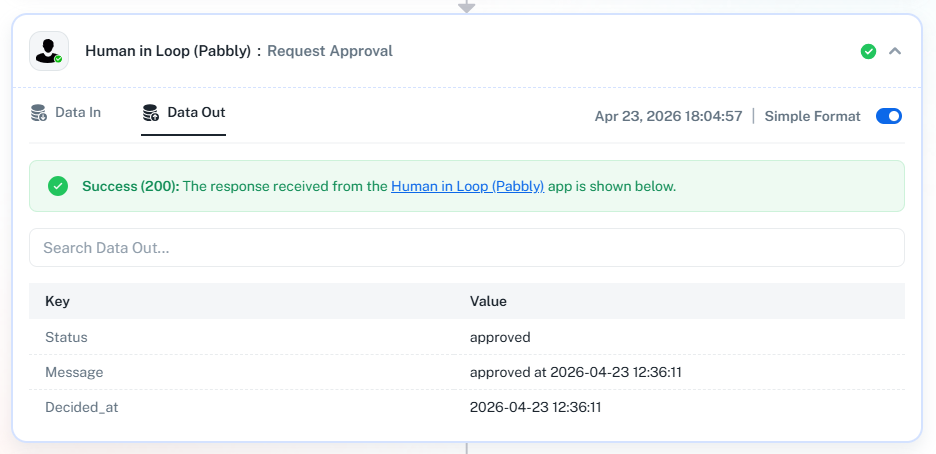
 Approved
Approved
Approved at {{time}}
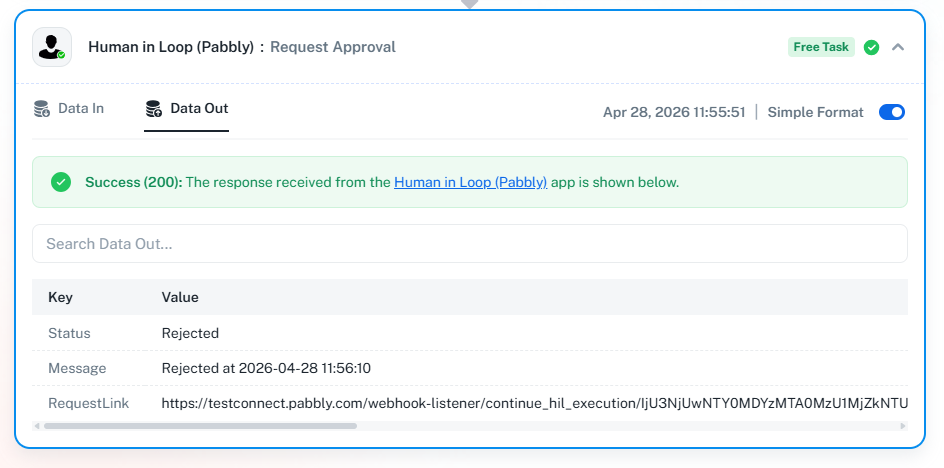
 Rejected
Rejected
Rejected at {{time}}
Example Use Case
Workflow:
Important Notes
HITL step pauses the workflow until action is taken
If no action is taken, the workflow remains in Pending state
Approval is done via email link
Limitations & Rules
- HITL step is not allowed inside loop branches or iterators
- It can only be used in the main branch
- HITL step can be used inside a router
- Only one approver is supported currently
- The approval link expires after 14 days
- Works only in the new workflow builder
- HITL step cannot be copied and pasted inside loop branches
Summary
Add HITL step to pause workflow
Sends email for approval
Approve → workflow continues
Reject → workflow stops
Simple and effective way to add human control to automation
Human in Loop (HITL) is an action step in Pabbly Connect that allows you to pause your workflow and request approval via email before continuing.
This is useful when you want a human to review or approve a step before the automation proceeds.
How Human in Loop Works
1. Add the Human in Loop action step anywhere in your workflow
2. When the workflow runs:
- It executes all steps normally
- When it reaches the HITL step, the workflow pauses
- An email is sent to the specified recipient for approval
Approval Process
The recipient receives an email containing:
- Your custom message
- Two options:
Approve
Reject
- If Approved:
Workflow resumes
Continues to the next steps
- If Rejected:
Workflow stops at that step
No further steps are executed
Fields in HITL Step
The Human in Loop step has 2 fields:
- Recipient Email
Enter the email address of the approver
Approval request will be sent to this email - Approval Message
Enter the message you want to show in the email
This message will be visible to the approver
Based on user action, the following messages are shown:
Pending (No action taken)Pending
Waiting for approval
ApprovedApproved
Approved at {{time}}
RejectedRejected
Rejected at {{time}}
Manual Stop from Task History
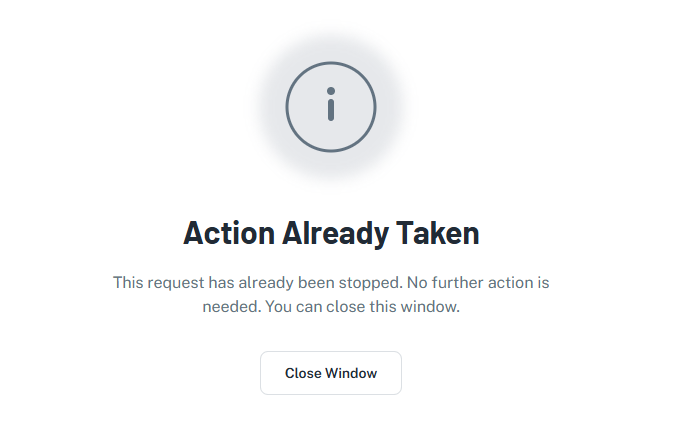
The workflow owner can manually stop the workflow from Task History using the “Stop Execution” button.What Happens If Workflow is Stopped?
If the workflow is stopped by the owner before approval:- When the approver clicks the email link, they will see:
Example Use Case
Workflow:
- Create Invoice
- Human in Loop (Send approval email)
- Send Email to Customer
- Workflow pauses at Step 2
- Email is sent to manager
- Manager reviews and:
Approves → Email is sent to customer
Rejects → Workflow stops
Important Notes
HITL step pauses the workflow until action is taken
If no action is taken, the workflow remains in Pending state
Approval is done via email link
Limitations & Rules
- HITL step is not allowed inside loop branches or iterators
- It can only be used in the main branch
- HITL step can be used inside a router
- Only one approver is supported currently
- The approval link expires after 14 days
- Works only in the new workflow builder
- HITL step cannot be copied and pasted inside loop branches
Summary
Add HITL step to pause workflow
Sends email for approval
Approve → workflow continues
Reject → workflow stops
Simple and effective way to add human control to automation
Last edited:


