Kolachi
Member
- Consent to Access & Modify
- I authorize Pabbly Support to log in to my account and make changes to the specified workflow for troubleshooting.
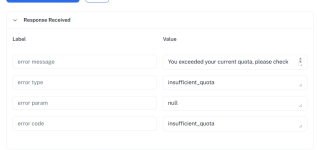
I am getting an error message as following: You exceeded your current quota, please check your plan and billing details. For more information on this error, read the docs: https://platform.openai.com/docs/guides/error-codes/api-errors.
I am using a free account to test and I have 96 free tasks remaining so I am not sure if it is API problem with OpenAI (software I am using) or Pabbly Connect.
(I have attached a ss of error message)
I am using a free account to test and I have 96 free tasks remaining so I am not sure if it is API problem with OpenAI (software I am using) or Pabbly Connect.
(I have attached a ss of error message)