Hold Issue with Contact Count in Campaign and Footer Customization

Private Comment
This field is visible only to staff members and is for their reference only.
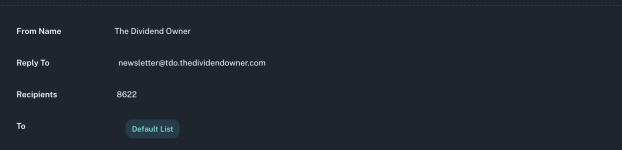
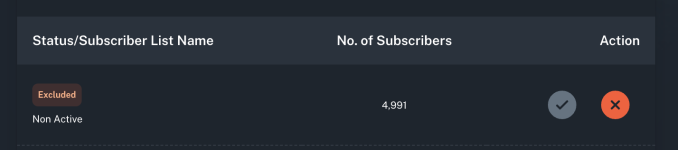
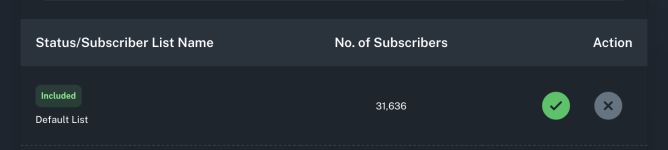
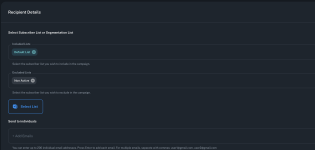
  1. Incorrect contact count calculation: When I select a list with 31,636 contacts and exclude 4,991 contacts from a campaign, the system calculates the final send to only 8,622 contacts. This doesn't match the expected calculation (31,636 - 4,991 = 26,645). Could you please explain why this discrepancy occurs and how to resolve it for accurate campaign sizing?
  2. Custom footer removal: Is it possible to completely remove the custom footer and the "Send by Pabbly" icon from the email footer? If so, could you provide instructions on how to do this?
 

Attachments

  • pabbly4.png
    pabbly4.png
    41 KB · Views: 19
  • pabbly3.png
    pabbly3.png
    39.2 KB · Views: 21
  • pabbly2.png
    pabbly2.png
    39.9 KB · Views: 22
  • pabbly1.png
    pabbly1.png
    120.3 KB · Views: 20

Preeti Paryani

Well-known member
Staff member
Hi @thedividendowner,

Thank you for sharing the details.

For the contact count discrepancy, it would be helpful if you could share a short screencast demonstrating how you are selecting the list and applying exclusions. This will allow us to better understand what’s happening and identify the exact cause of the mismatch.

Regarding the footer customization, the “Send by Pabbly” branding can be removed; however, this cannot be done from your end. We will need to disable it from our side. Once removed, any new templates you create will no longer include that footer.

Please let us know if you would like us to proceed with removing it.
 
Thank you for your response.

Regarding the contact count discrepancy, I have attached a screencast demonstrating how the list is selected and how exclusions are applied. Please review it and let me know what might be causing the mismatch.


Regarding the footer, yes, please proceed with removing the “Send by Pabbly” branding from my account.

Thank you for your assistance.
 

Preeti Paryani

Well-known member
Staff member
Hi @thedividendowner,

Thank you for sharing the screencast.

It seems the link is not accessible from our end. Could you please check the permissions or share an updated link so we can review it?
 
The video is set to public access. If it's not loading on your end, please try refreshing the page a few times or opening the link in an incognito/private browsing window.

Please let me know if you’re still unable to access it.
 
also

I would like to request an increase in my subscriber quota from 50,000 to 200,000.

Please let me know if you need any additional information to proceed with this request.
 

ArshilAhmad

Well-known member
Staff member
Thank you for your response.

Regarding the contact count discrepancy, I have attached a screencast demonstrating how the list is selected and how exclusions are applied. Please review it and let me know what might be causing the mismatch.

The video appears to be region-restricted, and we are unable to access it without a VPN.

That said, please note that the total unsubscribed list is automatically excluded at the time of sending. This explains the discrepancy you mentioned.
1777054816237.png


Regarding the footer, yes, please proceed with removing the “Send by Pabbly” branding from my account.
We have disabled the “Send by Pabbly” footer. It will not appear in any new templates you create.

also

I would like to request an increase in my subscriber quota from 50,000 to 200,000.

Please let me know if you need any additional information to proceed with this request.
We cannot increase the subscriber quota directly to 200,000; however, we have increased it to 100,000 for now. You can use this, and after reviewing your campaign statistics with the new limit, we can gradually increase it to the requested 200,000.

Thanks & Regards,
Arshil Ahmad
Customer Support Associate
🌐 Pabbly.com
 
Hi

I am experiencing two issues with segments in your platform:

  1. When I try to send emails to a segment, the number of recipients is calculated incorrectly (the count doesn't match the actual segment size).
  2. When I attempt to copy contacts from a segment into a list/campaign, I receive a "segment update error".
Additionally, I would like to request an increase of the contact limit on my account.

I also have two feature requests that would be very helpful:

  • Could you please add the ability to segment and filter by bounce (e.g., hard bounce, soft bounce, number of bounces)? This would be extremely useful for list hygiene.
  • In the campaign/open rate filters, you allow operators such as "more than or equal to" and "equals", but in the segment builder, only "greater than" or "equals" are available (no "greater than or equal to"). It would be great to have consistent operators across filters and segments.
Thank you in advance for looking into these issues and considering the requests. Please let me know if you need any additional details or screenshots from my side.
 

ArshilAhmad

Well-known member
Staff member
Hi

I am experiencing two issues with segments in your platform:

When I try to send emails to a segment, the number of recipients is calculated incorrectly (the count doesn't match the actual segment size).
If you have excluded a list during the sending process, any emails that overlap with the segment will not receive the email and will be deducted from the segment count. Additionally, bounced emails are also excluded. Therefore, the final count may differ from the total number of contacts in your segment.

When I attempt to copy contacts from a segment into a list/campaign, I receive a "segment update error".
We were unable to replicate the issue you encountered. Could you please share a short screen recording showing this error? Also, specify the name of the segment you are copying from and the list to which you are copying the subscribers.

Additionally, I would like to request an increase of the contact limit on my account.
Please send us an email at [email protected] so our team can look into your request after reviewing your campaign statistics.

I also have two feature requests that would be very helpful:

  • Could you please add the ability to segment and filter by bounce (e.g., hard bounce, soft bounce, number of bounces)? This would be extremely useful for list hygiene.
  • In the campaign/open rate filters, you allow operators such as "more than or equal to" and "equals", but in the segment builder, only "greater than" or "equals" are available (no "greater than or equal to"). It would be great to have consistent operators across filters and segments.
If you would like these features to be added to Pabbly Email Marketing, you can submit a request on our dedicated platform. Our development team will review your request and, if feasible, add the desired features to Pabbly Email Marketing.


Thanks & Regards,
Arshil Ahmad
Customer Support Associate
🌐 Pabbly.com
 

ArshilAhmad

Well-known member
Staff member


here is example of error
The issue appears to be related to moving the segment while creating a new list at the same time. We have escalated this concern to our technical team.

In the meantime, we suggest that you first create a new list, and then move the segment to that existing list. This should help you move the segment to the list.

Thanks & Regards,
Arshil Ahmad
Customer Support Associate
🌐 Pabbly.com
 
Top